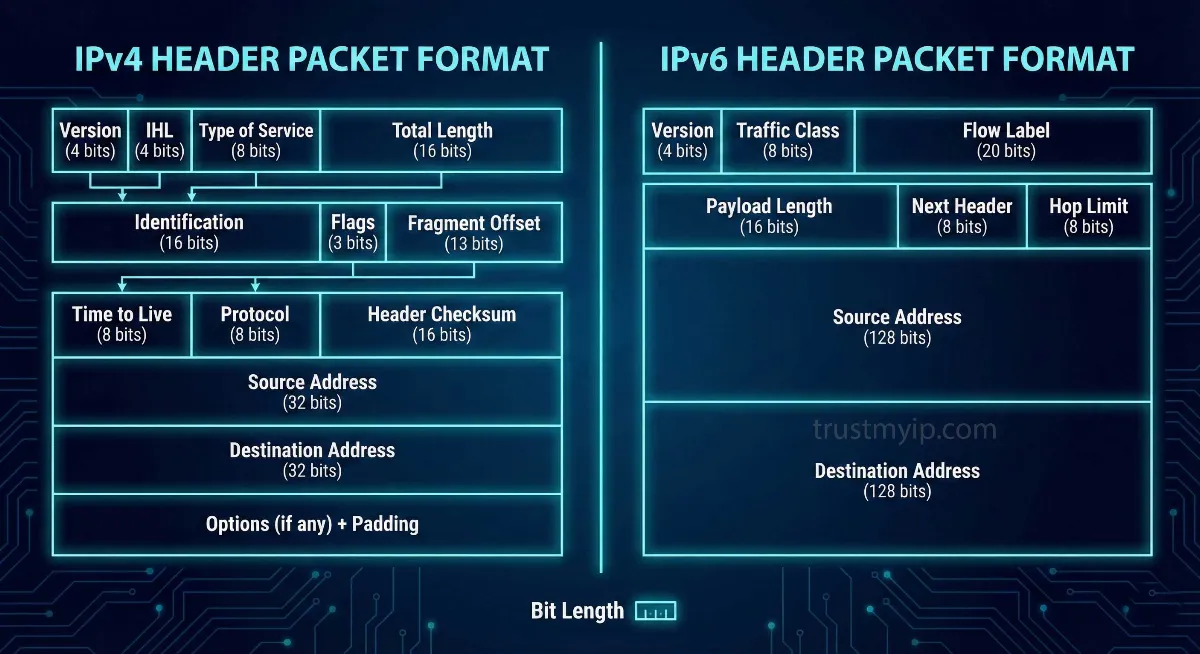
Every piece of data traveling across the internet is packaged into a "packet." That packet carries a header—essentially a shipping label containing routing instructions, source and destination addresses, and technical metadata routers use to forward data correctly. The difference between IPv4 and IPv6 headers isn't cosmetic. It's a fundamental architectural overhaul that determines how fast, how efficiently, and how securely data moves across modern networks.
IPv4's header was designed in 1981 for a network with hundreds of connected devices. IPv6's header was engineered for a world of billions. The gap between them explains why network engineers call the IPv6 transition the most important infrastructure upgrade in internet history — not just because of address space, but because of raw packet-processing efficiency.
This 2026 technical guide breaks down every field in both headers, explains exactly what was removed and why, reveals the performance implications of each design decision, and shows how these differences affect real-world internet performance — from streaming video to VPN encryption to network troubleshooting.

"I've analyzed packet captures across hundreds of enterprise networks, and the difference between IPv4 and IPv6 processing is immediately visible in router CPU graphs. The moment traffic shifts to IPv6-native paths, CPU utilization drops measurably — because ASICs process fixed-size headers at wire speed without any software intervention. The checksum removal alone eliminates a calculation that happened at every single router hop. Whether you're diagnosing latency issues, configuring VPN tunnels, or building infrastructure that scales into 2026 and beyond, understanding these headers is as fundamental as understanding the engine under the hood."
Quick Answer: IPv4 vs IPv6 Header
The IPv4 header is 20–60 bytes (variable), contains 12 fields including a checksum recalculated at every router hop, and allows routers to fragment packets. The IPv6 header is a fixed 40 bytes, contains only 8 fields, removes the checksum entirely, and forbids router-level fragmentation. IPv6 is processed faster in hardware because its fixed size enables ASIC-level forwarding without CPU involvement.
1. Why the IPv6 Header Matters in 2026
Back in 1981, when IPv4 was standardized under RFC 791, the internet connected a few hundred experimental nodes. The designers built a flexible, feature-rich header for a small research network. That same flexibility became a serious liability as the internet scaled to billions of devices and backbone routers began forwarding tens of millions of packets per second.
If you're new to how IP addresses work before diving into their header structure, our complete IP address guide covers the foundations clearly. When you visit TrustMyIP.com today, you might see a long hexadecimal string if your ISP supports IPv6 — that 128-bit address is supported by a streamlined header specifically designed for hardware-level processing.
Fixed vs Variable: The Core Performance Difference
Variable size: 20–60 bytes. Every router must read the IHL field to calculate where the header ends. That calculation happens in software — consuming CPU cycles at millions of packets per second, creating real bottlenecks at backbone scale.
Fixed size: always exactly 40 bytes. ASICs (Application-Specific Integrated Circuits) process packets at wire speed without complex software calculations. The payload always starts at byte 41 — no calculation required.
2. Deep Dive: The IPv4 Header Fields
To appreciate IPv6, you must first understand the overhead baked into IPv4 (RFC 791). The IPv4 header contains 12 mandatory fields plus a variable Options section — and several of them create significant processing burden at scale. Understanding how these fields connect to the actual IP address format you see is covered in our guide to reading IP address format.
| Field | Size | Purpose | IPv6 Status |
|---|---|---|---|
| Version | 4 bits | IP version identifier (4) | Kept (as 6) |
| IHL | 4 bits | Header length — only exists because size varies | ❌ Removed |
| Type of Service | 8 bits | QoS / traffic priority hints | → Traffic Class |
| Total Length | 16 bits | Combined header + data length | → Payload Length |
| Identification | 16 bits | Groups fragments from same packet | ❌ Removed |
| Flags | 3 bits | Fragmentation control bits | ❌ Removed |
| Fragment Offset | 13 bits | Fragment position in original packet | ❌ Removed |
| TTL | 8 bits | Max hops before packet discarded | → Hop Limit |
| Protocol | 8 bits | Upper-layer protocol (TCP, UDP) | → Next Header |
| Header Checksum | 16 bits | Integrity — recalculated at EVERY hop | ❌ Removed |
| Source Address | 32 bits | Sender's IP address | Kept (128-bit) |
| Destination Address | 32 bits | Recipient's IP address | Kept (128-bit) |
| Options | 0–40 bytes | Optional routing features — causes variable length | → Extension Headers |
3. The IPv6 Header: 8 Fields, Maximum Efficiency
IPv6's designers took a "less is more" approach. They removed 6 redundant fields from the main header and added only what actually enhances performance — resulting in a header that is both simpler to process and more capable for modern traffic patterns.
Traffic Class
Replaces IPv4's Type of Service with a cleaner implementation. Prioritizes critical traffic like real-time video calls over background file downloads, with better-defined DSCP markings that modern routers honor consistently.
Flow Label
The biggest new field — no IPv4 equivalent exists. A 20-bit value tags all packets from the same session. Routers that recognize a Flow Label apply the same forwarding decision without re-inspecting every packet, enabling consistent low-latency QoS.
Next Header
Replaces the Protocol field and enables the Extension Header chain. Points to either the upper-layer protocol (TCP/UDP) or to the first Extension Header. Keeps the main header clean while allowing unlimited future extensibility.
Payload Length
Replaces "Total Length" — reports only the data length after the fixed header, not including the header itself. Simpler math for receiving devices since the header is always exactly 40 bytes.
4. Packet Fragmentation: IPv6 is "Hands-Off"
In IPv4, any router along a packet's path can fragment that packet if it's too large for the next link's MTU. Three header fields exist to support this — Identification, Flags, and Fragment Offset. Routers must maintain state for in-progress reassembly, fragments arrive out of order, and security devices must inspect all fragments to detect attacks.
In IPv6, routers are completely forbidden from fragmenting packets. If a packet is too large, the router drops it and sends an ICMPv6 "Packet Too Big" message back to the source. The source device then performs Path MTU Discovery to find the correct size and retransmits — keeping the entire routing infrastructure stateless and fast.
This architectural choice also eliminates an entire class of fragmentation-based denial-of-service attacks that regularly affect IPv4 networks. How traffic associated with your IP address behaves under attack conditions shapes its long-term standing — understanding what an IP reputation score is explains how networks and services judge IP addresses based on historical traffic patterns.
5. Hop Limit vs TTL: Same Job, Honest Name
IPv4's Time to Live (TTL) was originally intended to track actual seconds. In practice, every router decremented it by 1 per hop — making the name misleading. IPv6 corrected this with Hop Limit — a field that accurately describes exactly what it does. Both serve identical purposes: each router decrements by 1, and at zero the packet is discarded to prevent infinite routing loops. You can analyze these hop counts in real time using our DNS lookup tool alongside traceroute to map the full path packets take to a destination.
6. Extension Headers: Flexibility Without Overhead
IPv4's Options field made the main header variable in length, forcing every router to parse optional additions even when irrelevant. IPv6 replaces this with Extension Headers — separate optional headers chained after the fixed main header via the Next Header field.
The critical design principle: intermediate routers only process Extension Headers relevant to routing. Security Extension Headers (Authentication Header and ESP for IPsec) are processed only by tunnel endpoints. Destination Options are processed only by the recipient. The result: most packets flow through routers that examine only the fixed 40-byte IPv6 header and forward immediately. Extensions exist for the minority of traffic that needs them, without slowing the majority that doesn't.
7. QoS and Security: Where IPv6 Truly Shines
In modern networking, not all data is equal. A video call requires consistent low latency, while a file download can tolerate variation. IPv6's Flow Label creates a virtual circuit feel — ISPs and enterprise routers can handle all packets from one session identically without per-packet header inspection, which IPv4's Type of Service field alone could never cleanly accomplish.
On security: IPv4 was created before network security was a priority. IPsec was retrofitted as an awkward bolt-on. IPv6 was designed with IPsec as an integral component — the Authentication Header (AH) and Encapsulating Security Payload (ESP) are first-class Extension Headers, not afterthoughts. This makes deploying end-to-end IP-layer encryption significantly cleaner in IPv6 environments. For practical IP security guidance beyond header architecture, our guide on how to protect your IP address from hackers covers the defenses that matter most in 2026.
8. Complete IPv4 vs IPv6 Comparison Table
| Feature | IPv4 (RFC 791) | IPv6 (RFC 8200) | Winner |
|---|---|---|---|
| Address Size | 32-bit (~4.3B addresses) | 128-bit (340 undecillion) | IPv6 ✓ |
| Header Size | Variable (20–60 bytes) | Fixed (40 bytes always) | IPv6 ✓ |
| Header Checksum | Yes — every hop recalculated | Removed — delegated to L2/L4 | IPv6 ✓ |
| Router Fragmentation | Allowed at any router | Forbidden — source only | IPv6 ✓ |
| QoS / Traffic | Type of Service only | Traffic Class + Flow Label | IPv6 ✓ |
| IPsec Support | Optional bolt-on | Built-in Extension Header | IPv6 ✓ |
| Router Processing | Software — CPU intensive | ASIC hardware — wire speed | IPv6 ✓ |
| Global Adoption | Universal (legacy) | ~45% and growing (2026) | IPv4 (still) |
The Highway Analogy
IPv4 — Toll Booth Every 5 Miles
Every router stops each packet, recalculates the checksum, checks if fragmentation is needed, parses the variable-length header. Constant micro-delays that compound across millions of packets per second.
IPv6 — Electronic Toll at 100 mph
ASIC reads fixed 40-byte header, makes one forwarding decision, moves on instantly. No checksum. No fragmentation state. No variable-length parsing. Pure wire-speed performance at every single hop.
Conclusion: The Future is Header-Light
While we will live in a dual-stack world for many years still, the technical superiority of the IPv6 header is undeniable and measurable. The removal of the checksum, the prohibition on router fragmentation, the fixed 40-byte size, and the Flow Label collectively transform packet forwarding from a software-intensive process into a hardware-native operation that scales to any traffic volume.
Understanding the difference between IPv4 and IPv6 packet format isn't just for networking exams — it's fundamental knowledge for anyone diagnosing latency, configuring VPN tunnels, building servers, or simply wanting to understand how the internet actually works. The old IPv4 address class system that made a 128-bit replacement necessary is explained in full in our guide to IPv4 address classes A through E.
Ready to see which protocol your connection uses right now? Check your IP version, geolocation, and connection metadata instantly with our TrustMyIP IP checker.
Final Key Takeaways
- Fixed 40-byte header is IPv6's single biggest routing performance advantage — enables ASIC wire-speed forwarding without software overhead.
- Removal of checksum eliminates a calculation that happened at every router hop — delegated to Layer 2 and Layer 4 where it already existed.
- No router fragmentation eliminates state tracking overhead and an entire class of denial-of-service attacks that exploit IPv4 fragmentation behavior.
- Flow Label enables per-session QoS without inspecting transport-layer headers — a capability IPv4's Type of Service field alone could never provide.
- Extension Headers allow unlimited future extensibility without touching the core header that routers process at wire speed for every single packet.
Audit Your Network Now
Header efficiency is just the start. See your current IP version, verify geolocation accuracy, and analyze DNS performance with our professional tools.