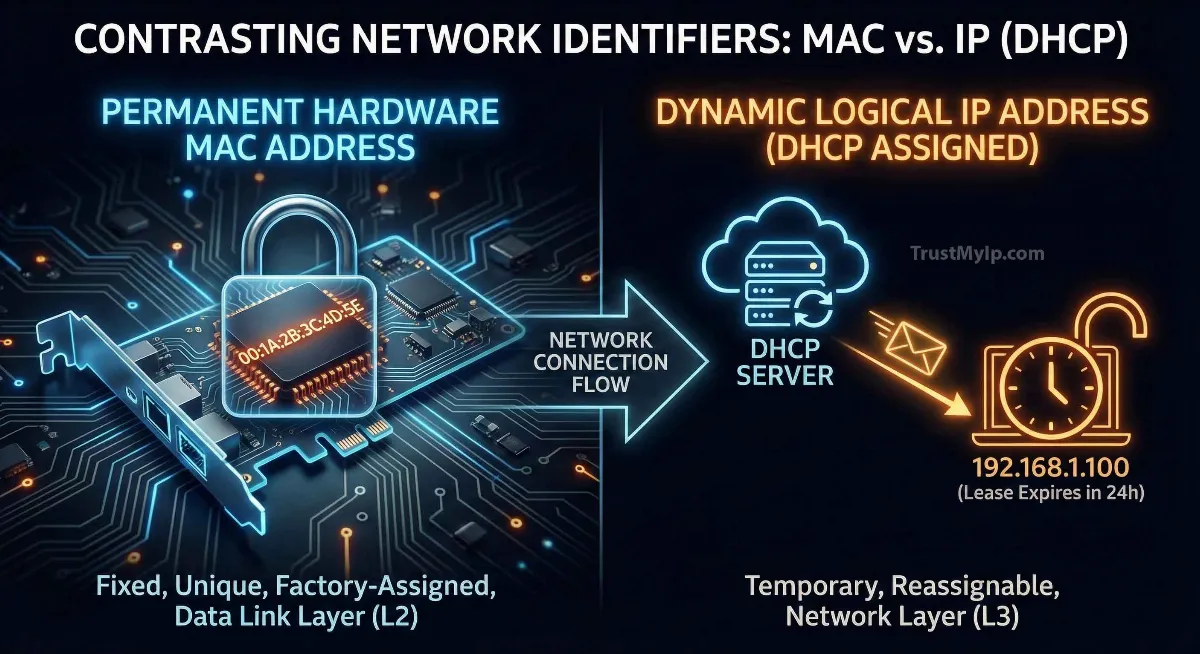
Think of your digital identity as a professional athlete. Your Social Security Number never changes—it defines who you are regardless of where you play. That is your MAC Address. However, your Home Address changes every time you move to a new city for a new contract. That is your IP Address. To win at the game of global networking, you need both: a permanent identity and a reachable location.
"In my 20 years of auditing silicon-level data flows, I've seen countless admins get confused by Layer 2 vs Layer 3. A MAC address is your device's soul—it's written in stone (silicon). An IP address is just a lease. If you don't understand the relationship between mac address and ip address in arp, you can't truly secure a network."
1. Physical vs. Logical: Defining the Core Difference
The fundamental difference between mac address and ip address with analogy lies in their nature: one is a hardware address, and the other is a software address.
The MAC (Hardware)
Known as the Burnt-in address, this 48-bit identifier is assigned at the manufacturing level. It is unique to your NIC (Network Interface Card) and practically permanent.
The IP (Logical)
Assigned via DHCP allocation or static assignment, this address defines your location on a network. It is temporary and changes based on which Wi-Fi or ISP you connect to.
Pro Tip: Want to see who manufactured your device's network chip? Use our MAC Vendor ID Tool to decode the OUI (Organizationally Unique Identifier) instantly.
2. OSI Model Layers: Layer 2 Data Link vs. Layer 3 Network
To understand how mac address works in a local network vs internet, we must look at the OSI Model Layers. Think of these as the rules of the road for data packets.
Layer 2: Data Link (MAC)
At this layer, data is organized into frames. MAC addresses are used for hop-to-hop delivery within the same local network (LAN). Your switch only cares about MACs.
Layer 3: Network (IP)
At this layer, data is organized into packets. IP addresses are used for end-to-end delivery across the global internet (WAN). Your router only cares about IPs.
3. Why do we need both MAC Address and IP Address?
This is the million-dollar question. If an IP address identifies me, why do I need a MAC? And vice-versa?
-
01
The Routing Dilemma
If we only used MAC addresses, every router in the world would need to store the hardware ID of every phone and laptop on earth. The internet would crash under the weight of that database. IP addresses allow us to group devices by network, making routing efficient.
-
02
The Local Delivery Issue
Within a Local Area Network (LAN), multiple devices might share the same dynamic IP over time. The MAC address ensures the packet reaches the physical silicon of *your* device and not your neighbor’s laptop.
4. ARP: The Secret Glue Between MAC and IP
How does your computer know which MAC address belongs to which IP? It uses a Resolution Protocol called ARP (Address Resolution Protocol).
When your computer wants to send data to 192.168.1.5, it shouts to the whole room: "Who has IP 192.168.1.5? Tell me your MAC!" The device with that IP replies with its hardware address. Your computer then saves this in its "ARP Cache" to avoid asking again. This is the relationship between mac address and ip address in arp that makes local communication possible.
5. Forensic Comparison: MAC vs. IP At a Glance
Use this table to understand is a mac address permanent and an ip address temporary across different networking scenarios.
| Feature | MAC Address | IP Address |
|---|---|---|
| Address Type | Physical (Hardware) | Logical (Software) |
| Format | 48-bit Hexadecimal (e.g., 00-1A-2B) | 32-bit (IPv4) or 128-bit (IPv6) |
| Assignor | Manufacturer (Intel, Apple) | ISP or Network Admin (DHCP) |
| Data Unit | Frames | Packets |
6. Can a device have multiple MAC and IP addresses?
In modern USA-based professional setups, the answer is a resounding YES.
- Multiple MACs: Every physical connection has its own MAC. If your laptop has Wi-Fi and an Ethernet port, you have two MAC addresses. If you use a VPN, a "virtual" NIC is created with its own unique identifier.
- Multiple IPs: A single device can have an IPv4 address and an IPv6 address simultaneously (Dual-Stack). Furthermore, you have a Private IP for your home network and a Public IP for the internet.
7. How to find MAC address and IP address on Windows 10/11
Whether you're troubleshooting for a remote job or setting up a home server, here is how you audit your IDs:
Option 1: The Command Line (Pro Choice)
Press Win + R, type cmd, and enter this command:
ipconfig /all
Look for "Physical Address" (MAC) and "IPv4 Address" (IP).
Option 2: GUI Settings
Go to Settings > Network & Internet > Ethernet/Wi-Fi > Properties. Scroll to the bottom to see both addresses listed clearly.
Forensic FAQ
Can I hide my MAC address from websites?
Websites on the internet cannot see your MAC address. It only stays within your local network. However, local apps (like browsers or game launchers) can sometimes read it for hardware ID tracking.
What is MAC Spoofing?
It is a software trick that makes your network card report a fake MAC address. This is used by privacy experts to prevent tracking in public Wi-Fi spots like airports or cafes.
Why does my IP change but my MAC stays the same?
Because your IP is a logical software address managed by a router's DHCP lease. When the lease expires or you move locations, you get a new IP. Your MAC is physically built into your hardware card.
Conclusion: The Dual Pillars of Networking
Understanding MAC Address vs IP Address is the first step toward mastering network security. While your MAC provides the permanent hardware address that identifies your physical device, your IP provides the dynamic software address that allows data to travel the globe. In 2026, as DHCP allocation and hardware privacy become even more critical, knowing how to audit both will keep you one step ahead of trackers and hackers alike.
Trace Your Network ID
Is your hardware leaking its identity? Use our forensic MAC and IP toolset to identify manufacturers, detect proxy leaks, and audit your digital footprint in one click.