You’ve seen the commercials: "Gigabit Speeds!" or "Ultra-Low Lag!" But when you actually play a game or download a massive file, the reality often feels slower. Why? Because internet speed isn't just one number. It is a complex dance between Speed, Capacity, and Efficiency. To truly master your network, you must understand the critical relationship between bandwidth, latency, and throughput.
"In my 15 years of optimizing fiber backbones for USA tech giants, the biggest mistake I see is people confusing Speed vs. Capacity. You can have a massive 10Gbps pipe, but if your Round Trip Time (RTT) is high, your user experience will still feel like dial-up. Throughput is the only metric that truly tells you the 'truth' of your connection."
1. The Pipe Analogy: Visualizing the Big Three
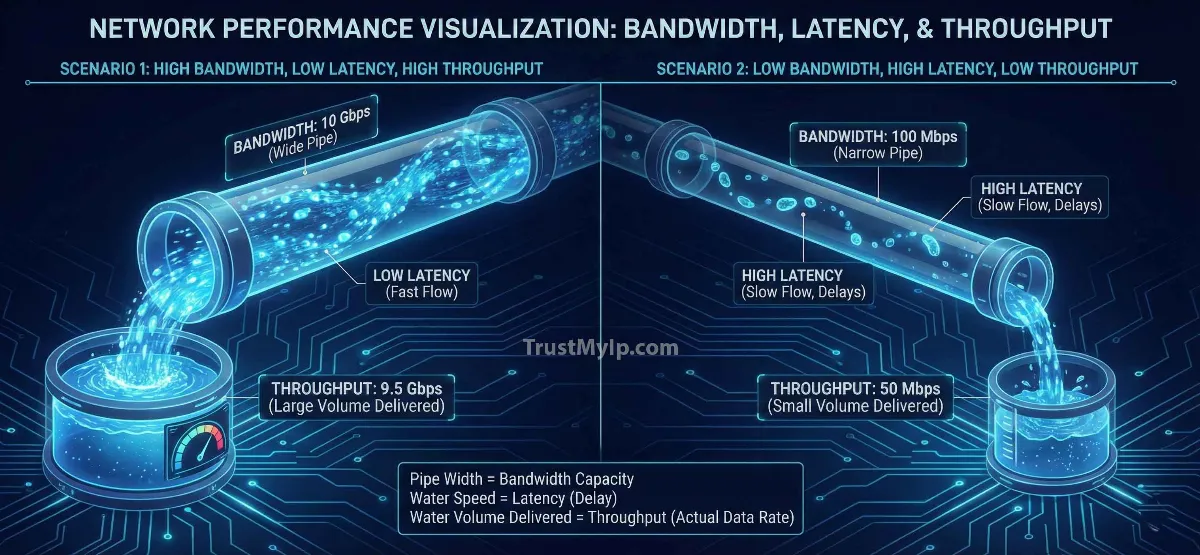
The easiest way to explain the difference between bandwidth and throughput with examples is to imagine a water pipe system delivering water to your house.
Bandwidth
The Diameter of the pipe. It defines the maximum capacity of how much data *could* flow at once.
Latency
The Speed of water flow. It defines the delay between the moment you turn the tap and the first drop hitting the bucket.
Throughput
The Actual Water delivered. It represents the successful data transfer rate over a specific period.
Pro Tip: Before you optimize your hardware, verify your baseline. Use our Internet Speed Test to see your current data transfer rate in real-time.
2. Network Latency: The Hidden Speed Killer
Latency is measured as Round Trip Time (RTT)—the time it takes for a packet to go to a server and come back. In the USA, if you're on fiber optics, you're looking at 5-15ms, but on satellite, it can jump to 600ms.
Performance Metrics
- • Jitter: The variation in latency over time. High jitter causes "lag spikes" in VoIP and gaming.
- • Packet Loss: When data never arrives, forcing a re-send and killing your throughput.
Impact Factors
The physical distance between you and the server is the primary impact factor. Light can only travel so fast through a fiber cable.
3. How Latency Affects Network Throughput
This is where the math gets interesting. Even if you have 1,000 Mbps of bandwidth, high latency can throttle your actual connection speed.
The TCP Window Logic
Most internet traffic uses the TCP protocol. TCP requires an "ACK" (acknowledgment) for every batch of data sent. If your latency is high, the sender spends most of its time waiting for the acknowledgment before sending the next batch. This effectively lowers your throughput, regardless of how much bandwidth you have.
Check your routing efficiency now using our Ping Test Tool.
4. Why is my Throughput Lower than my Bandwidth?
If you pay for 100 Mbps, why do you only see 85 Mbps on a file download? It comes down to technical constraints.
-
01
Protocol Overhead
Every packet of data needs a header (like an envelope with an address). This "extra" data eats up about 3-5% of your bandwidth.
-
02
Network Congestion
When too many users hit the same ISP performance hub, the "pipe" gets crowded, causing delays and lowering your actual water delivered.
5. Performance Comparison: The Big Three At a Glance
Understanding how to measure network latency vs bandwidth starts with this technical breakdown:
| Metric | Unit | Focus | Goal |
|---|---|---|---|
| Bandwidth | Mbps / Gbps | Max theoretical capacity | Highest possible |
| Latency | Milliseconds (ms) | Response time (RTT) | Lowest possible |
| Throughput | Mbps / Gbps | Actual data delivery rate | Closest to Bandwidth |
6. What is a good latency for gaming and streaming?
In the USA and global markets, the user experience depends on different thresholds:
For Pro Gaming
Goal: < 30ms Latency. Competitive games like Valorant or Warzone require instant RTT. Anything over 100ms results in "rubber-banding."
For 4K Streaming
Goal: > 25Mbps Bandwidth. Latency is less important here because the video "buffers" (pre-loads). Throughput must be consistent to avoid lower quality.
7. Technical Constraints: Hardware & Distance
Your network performance is only as strong as its weakest link. Common hardware limitations in USA households include:
- Old Wi-Fi Standards: If you are on an old Wi-Fi 4 router, your bandwidth is capped, no matter what fiber speed you pay for.
- MTU Settings: Incorrect MTU sizes can cause packet fragmentation, increasing latency. Test your packets with our MTU Test Pro.
- ISP Throttling: Some ISPs might limit your throughput for specific tasks like torrenting or streaming during peak hours.
Performance FAQ
Why does fiber have lower latency than cable?
Fiber uses light to transmit data, which travels significantly faster and experiences less electrical interference compared to the copper wires used in traditional cable internet.
Does a high Ping always mean bad throughput?
Not necessarily. You can have high ping but still download a massive file at full speed once the "pipeline" is full. However, it makes real-time interactions feel sluggish.
What is "Bufferbloat"?
This happens when your router stores too many packets in its buffer during a large upload, which causes your latency to skyrocket for everyone else on the network.
Conclusion: The Perfect Network Balance
The relationship between bandwidth latency and throughput is what defines your digital life in 2026. For a seamless experience, you don't just need the widest pipe; you need the fastest flow and the most efficient delivery. By understanding these network performance metrics and auditing your hardware limitations, you can ensure your connection is optimized for both professional productivity and elite-level entertainment.
Is Your Speed Real?
Don't trust your ISP's marketing. Use our forensic speed and latency toolkit to analyze Jitter, RTT, and actual Throughput in one click.