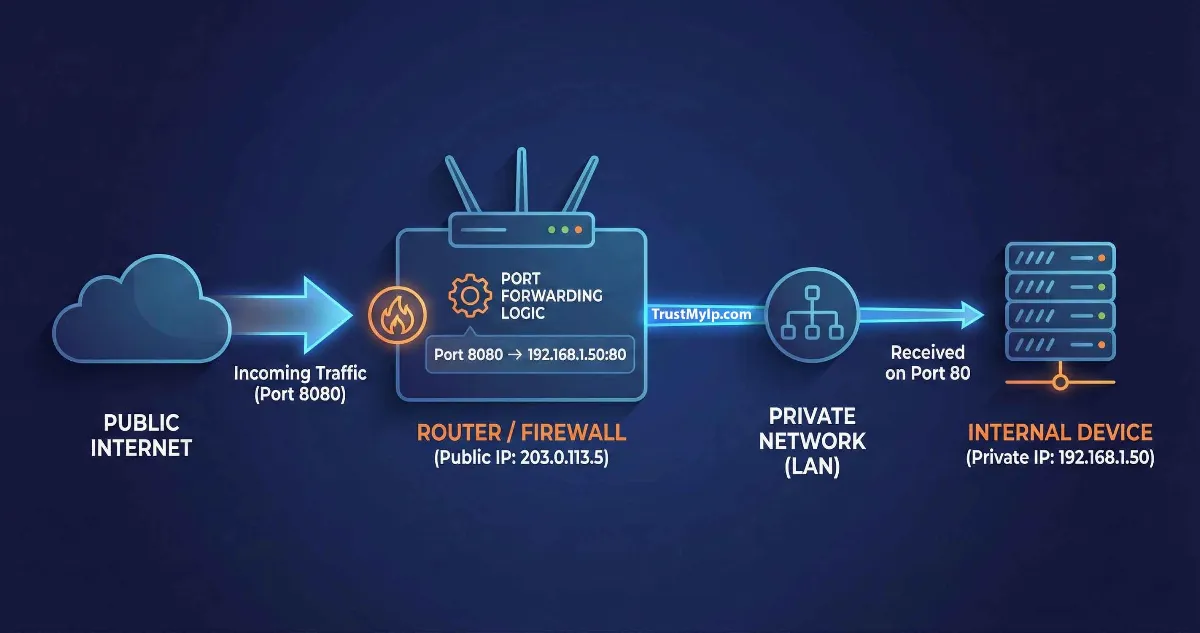
Imagine you are hosting a high-stakes gaming tournament or trying to access your home security cameras from a coffee shop in New York. You have a perfect fiber connection, yet your friends can't join your lobby, and your CCTV app shows a "Connection Timed Out" error. The wall you’ve hit is the router’s firewall. To break through, you need to master Port Forwarding.
"In modern networking, your router is a gatekeeper. While it protects your internal network through NAT (Network Address Translation), it often blocks legitimate incoming traffic. Understanding how a router handles port forwarding requests is the difference between a secure, reachable network and a digital island."
1. What is Port Forwarding? (The Apartment Building Analogy)
To understand how port forwarding works, think of your home network as a massive apartment building. The building has one main street address—this is your Public IP Address. However, inside the building, there are 50 different apartments, each with its own internal number—these are your Internal IP Addresses (like 192.168.1.15).
When a mail carrier (external request) arrives at the building with a package for "Apartment 402," the building manager (your router) needs to know exactly which door to deliver it to. Without a rule in place, the manager just leaves the package at the front desk where it sits forever. Port forwarding is the rule that tells the manager: "Any package marked with Port 80 should go straight to Apartment 10 (the Web Server)."
2. NAT Traversal: Private to Public IP Mapping
The core reason we need port forwarding is NAT (Network Address Translation). Because the world officially ran out of IPv4 addresses years ago, your ISP assigns one public IP to your entire house.
The NAT Traversal Process
How Traffic Navigates the Firewall
Your cell phone asks for a website. The router notes the request and allows the "return mail" back in because it started from the inside.
A friend tries to connect to your Minecraft server. Since your router didn't ask for this, it kills the connection for security unless port forwarding is enabled.
Before you start mapping, use our Public IP Checker to verify your current external identity and ensure your ISP isn't using CGNAT, which can block traditional port forwarding.
3. Port Types: Understanding TCP vs. UDP Ports
When setting up your router configuration, you will be asked to choose a protocol. Picking the wrong one is the #1 reason why port forwarding fails.
| Protocol Type | Mechanism | Best For |
|---|---|---|
| TCP Ports | Requires a "handshake." It ensures every packet arrives perfectly. | Web Servers, Email, SSH |
| UDP Ports | Sends data without checking. Faster but can lose some "frames." | Gaming, VoIP, Live Streaming |
4. Step-by-Step Guide to Setting Up Port Forwarding
Configuring your router doesn't require a computer science degree. Follow this universal blueprint:
Static IP Assignment
Assign a static internal IP to the device you want to reach (e.g., your CCTV DVR). If your device uses a Private IP that changes every time it reboots, your port rule will break.
Access Router Gateway
Type your router's gateway IP (usually 192.168.1.1) into your browser and log in using your admin credentials.
Enter Port Details
Locate the "Port Forwarding" or "Virtual Server" tab. Enter the External Port (what the internet sees) and the Internal Port (what the device uses), then save.
5. Is Port Forwarding Safe for Gaming?
This is the most common question in the US gaming community. The short answer is: Yes, but with caution. Opening a port is like opening a small window in your house. It’s safe as long as the device on the other side of that window has a strong lock (password).
The Security Risk Check
When you open a port for a game server, hackers can scan that port and try to exploit vulnerabilities in the game software. Never use port forwarding for old, unpatched software. If you're hosting a server, run it on a guest network if possible.
Pro-Tip: Always run your public IP through our Port Scanner Tool after configuration to see exactly what a hacker sees.
6. Port Forwarding vs. Port Triggering vs. DMZ
Users often confuse these three network security features. Here is the definitive breakdown for 2026 standards:
Port Forwarding
Always Open. Traffic is permanently routed to one specific internal IP address. Best for 24/7 services like CCTV.
Port Triggering
Dynamic. The port only opens when an internal device starts a request. More secure, but doesn't work for hosting servers.
DMZ (Demilitarized Zone)
Full Exposure. Opens all ports to one device. Extremely dangerous and should only be used for testing purposes.
7. Why is my Port Forwarding Not Working?
If you’ve followed every step but the port still shows as "Closed," check these common USA ISP roadblocks:
- Carrier-Grade NAT (CGNAT): Many 5G/LTE and fiber ISPs (like T-Mobile Home Internet) use CGNAT. This means your "Public IP" is actually shared with 1,000 people, making individual port forwarding impossible without a VPN or tunnel.
- Windows Firewall: Even if the router is open, your PC might block the incoming traffic. Ensure the port is allowed in your OS-level firewall rules.
- Double NAT: If you have two routers (e.g., a modem/router combo from Comcast connected to your own Netgear router), you must port forward on both units.
Technical FAQ
How do I find my router's default gateway?
Open Command Prompt on Windows and type ipconfig. Look for the "Default Gateway" line—it’s usually 192.168.1.1 or 192.168.0.1.
Does Port Forwarding affect my internet speed?
No. It doesn't increase your bandwidth, but it significantly reduces latency for gaming and peer-to-peer applications by providing a direct path for data.
Can I use port forwarding with a dynamic IP?
Yes, but if your ISP changes your public IP, the person trying to connect won't know the new address. We recommend using a Dynamic DNS (DDNS) service to solve this.
Conclusion: Securing Your Digital Gateway
Port forwarding is the bridge between a private home network and the global internet. While it offers incredible convenience for CCTV remote access, web hosting, and low-latency gaming, it must be handled with an expert mindset. By understanding the difference between port forwarding and port triggering and keeping your internal software updated, you can enjoy a fully reachable network without compromising your digital safety.
Is Your Port Really Open?
Don't leave your network to chance. Use our Forensic Port Scanner to verify your configuration and detect potential vulnerabilities in seconds.