Have you ever wondered how your computer knows exactly which server to call when you type a website name? Behind every single click is a lightning-fast global directory working in the shadows to translate your human words into the numerical language of the web. The secret? It's the Domain Name System (DNS)—the fundamental foundation of every online connection.
"Think about the last time you ordered a pizza online or checked your email. You didn’t type a string of complex numbers like 192.0.2.1 into your browser. You typed a name—a brand you trust. DNS is the invisible engine that makes this possible, serving as the GPS of the modern digital city."
Introduction: The Invisible Engine of the Internet
The reality of the internet is quite different from what we see. While we navigate through beautiful interfaces, the internet doesn’t actually "speak" English, Spanish, or any other human language. It speaks in numbers. This is where the Domain Name System (DNS) comes in.
If the internet were a massive, global city, DNS would be the GPS, the directory, and the local guide all rolled into one. Specifically, it is often called the phonebook of the internet. Just as you look up "John Doe" to find his phone number, your browser looks up trustmyip.com to find its numerical IP address.
In this guide, we aren't just going to skim the surface. We are going to dive deep into how DNS resolves domain names to IPs, exploring the hidden handshakes and lightning-fast queries that happen every time you click "Go."
Why is DNS Called the Phonebook of the Internet?
To understand the "why," we have to look at how humans and machines differ. Humans are great at remembering names and labels. We remember "Amazon," "Facebook," or "TrustMyIP." Machines, however, are built for efficiency and routing based on numerical addresses.
Logic Comparison
Human Memory vs. Machine Routing
We use mnemonics and branding (e.g., Apple.com). It is intuitive but impossible for routers to process at a global scale.
Routers use Binary and Hexadecimal IP addresses. Every server has a unique identifier called an IP Address.
Originally, we used IPv4 (like 192.168.1.1), but as the world ran out of those, we moved toward IPv6. If you want to see the technical differences in how these addresses are structured at a deep level, you should check out our IPv4 vs IPv6 header comparison technical guide.
Without DNS, you would have to carry around a literal notebook of IP addresses just to visit your favorite sites. DNS bridges the gap between human memory and machine logic.
The Cast of Characters: The DNS Hierarchy Explained
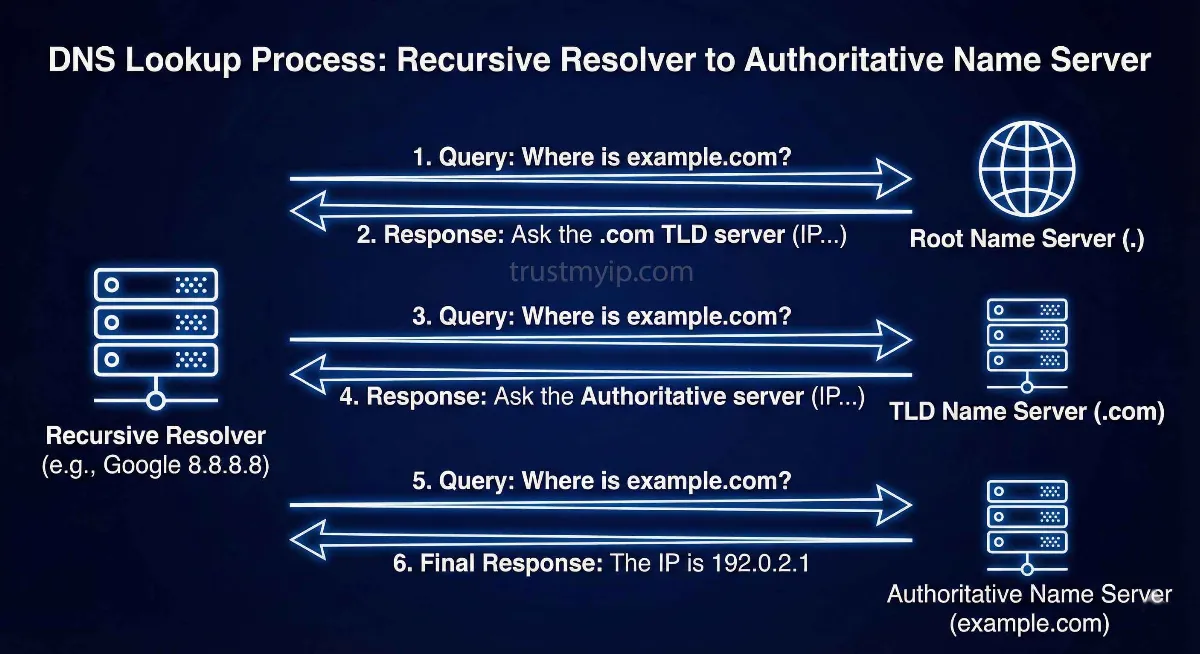
The process of how DNS finds the IP address of a website isn't handled by one single "super-computer." Instead, it is a distributed, hierarchical system designed for speed and redundancy. Let’s meet the four main players:
01 Recursive Resolver
Think of the Recursive Resolver as a librarian. When you type a URL, your computer asks the resolver, "Hey, where is this site?" It does all the hard work of talking to other servers for you.
02 Root Name Servers
If the answer isn't in its DNS Cache, it goes to the Root Name Servers. There are 13 logical clusters globally (operated by ICANN/NASA) that point you to specific extensions like .com or .org.
03 TLD Name Servers
TLD stands for Top-Level Domain. These are the keepers of specific extensions. If looking for a .com site, the Root points you to the .com TLD server, which knows about every domain registered there.
04 Authoritative Servers
This is the final destination. The Authoritative Name Server holds the specific IP Address mapping. It has the final "A Record" or "AAAA Record" that tells your browser exactly where to go.
Step-by-Step DNS Resolution Process
This entire "odyssey" usually takes less than 100 milliseconds. Here is exactly what happens during a DNS lookup:
trustmyip.com into your browser.Recursive vs. Iterative DNS Queries
One of the most common questions from networking students is the difference between recursive and iterative DNS queries. It's a matter of responsibility.
- Recursive Query: The client tells the resolver, "Find the whole answer for me." The resolver is obligated to return the result or an error.
- Iterative Query: The DNS server says, "I don't know the answer, but try this other server." The resolver then moves on manually.
Understanding the DNA of DNS: Records and Port 53
| Record Type | Full Form | Purpose |
|---|---|---|
| A Record | Address Record | Maps domain to IPv4. |
| AAAA Record | IPv6 Address | Maps domain to IPv6. |
| CNAME | Canonical Name | Alias of one name to another. |
| MX Record | Mail Exchange | Routes email to the correct mail server. |
All of this data typically travels over Port 53. While most traffic uses UDP for speed, it switches to TCP for larger transfers like "Zone Transfers."
The Concept of DNS Cache and TTL
Every step of the process saves a copy of previous lookups in the DNS Cache. Speed is largely due to this local storage.
"Website IP change ke waqt Time to Live (TTL) ka khayal rakhain. Agar aapki propagation slow hai, toh iska matlab purana cache abhi expire nahi hua. Check our fix DNS propagation delay guide to speed things up."
Security in DNS: Beyond Default Settings
DNS wasn't designed with security in mind. This led to DNS Hijacking and DNS Cache Poisoning. Today, we use DNSSEC to add digital signatures, ensuring your resolver gets an authentic, tamper-proof answer.
Troubleshooting Like a Pro
Sometimes, the "phonebook" gets a smudge on the page. As an expert, I always recommend using a dedicated tool like our DNS Lookup tool. It allows you to see if your records are pointing to the right places globally, bypassing stuck browser caches.
Frequently Asked Questions (FAQs)
1. How long does DNS propagation usually take?
Typically between 24 to 48 hours, although modern Anycast networks can often update in under an hour.
2. What is the difference between a Public and Private DNS?
Public DNS (like Google 8.8.8.8) is available to everyone on the web. Private DNS is used within internal corporate networks to resolve local server names.
3. Why do browsers have their own DNS cache?
To reduce latency. By saving the IP locally, the browser doesn't have to ask the OS or the network for the IP every time you click a link on the same site.
4. Can I use DNS to block certain websites?
Yes. DNS filtering allows organizations to block malicious or distracting domains by returning a "sinkhole" IP instead of the real one.
5. Is Port 53 always open for DNS?
Standard DNS uses Port 53. However, modern encrypted versions like DNS-over-HTTPS (DoH) use Port 443 to hide DNS queries inside HTTPS traffic.
Conclusion: The Backbone of Your Digital Life
Understanding how DNS resolves domain names to IPs isn't just for engineers; it’s for anyone who wants to understand how the modern world works. Billions of queries happen every single day, ensuring that when you type a name, you find your destination.
Audit Your Network Now
DNS is just one part of your network health. Ensure your current infrastructure is secure and optimized with our diagnostic tools.