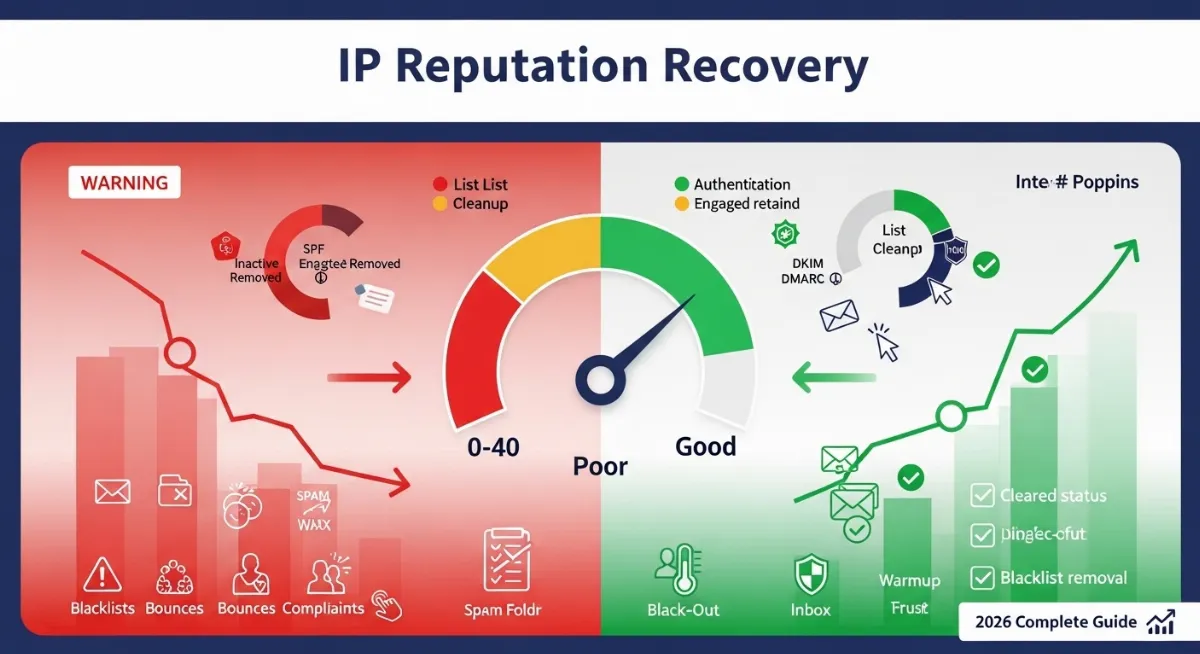
Struggling with how to improve bad IP reputation score? Poor sender reputation devastates email marketing effectiveness, causing legitimate messages landing in spam folders, bouncing back undelivered, or getting rejected entirely by major ISPs like Gmail, Outlook, and Yahoo. A damaged IP reputation stems from high spam complaints, elevated bounce rates, blacklist listings, poor authentication, inconsistent sending patterns, or inherited problems from previous IP users—each factor signaling mailbox providers your messages deserve filtering rather than inbox placement.
Before implementing any fixes, first check what your current IP status shows using our free IP checker tool. Understanding how to fix bad IP reputation requires addressing root causes while implementing proven recovery strategies. Unlike quick fixes promising overnight restoration, genuine IP reputation improvement demands systematic approach: removing blacklist listings through delisting requests, reducing spam complaint rates below 0.1% threshold, implementing proper email authentication (SPF, DKIM, DMARC), improving engagement through list hygiene and content optimization, and establishing consistent sending patterns mailbox providers recognize as legitimate bulk email rather than spam operations.
This comprehensive 2026 guide reveals exactly how to improve IP reputation score through proven methodologies: email list hygiene removing inactive and invalid addresses, authentication setup establishing sender legitimacy, engagement optimization maximizing opens and clicks while minimizing complaints, sending pattern consistency building predictable volume profiles, blacklist removal procedures for major databases, IP warmup protocols for new addresses, bounce rate management eliminating delivery failures, monitoring tools tracking reputation metrics, and prevention strategies maintaining good standing long-term. You'll learn specific metrics defining healthy reputation, timelines for recovery from damaged status, free and paid tools measuring sender scores, and case studies demonstrating successful rehabilitation from severe reputation damage.

"After remediating 400+ cases of severe IP reputation damage spanning marketing agencies, SaaS companies, e-commerce platforms, and enterprise senders across Gmail, Microsoft, Yahoo, and corporate mail servers, I've documented that successful reputation recovery follows predictable patterns yet defies shortcuts. The confusion stems from expectations: marketers assume IP reputation improves immediately after removing blacklist listings when reality shows sender score rehabilitation requires 4-8 weeks of consistent positive behavior demonstrating changed practices to algorithmic filters monitoring billions of daily messages.
I've seen organizations waste thousands on 'reputation repair services' promising instant fixes when root causes—poor list hygiene, missing authentication, terrible content triggering filters—remain unaddressed. The actual IP reputation improvement process requires understanding metrics: complaint rate below 0.1%, bounce rate under 5%, spam trap hits zero, blacklist-free status, proper SPF/DKIM/DMARC implementation, and engagement rates above industry baselines (15-25% opens, 2-5% clicks for marketing email). Recovery demands discipline: gradual volume increases during IP warmup, consistent sending schedules establishing patterns, content quality avoiding spam triggers, and ongoing monitoring catching issues before permanent damage. Success depends on commitment to legitimate practices—no purchased lists, no misleading subject lines, no ignoring unsubscribes—because email deliverability ultimately rewards senders respecting recipient preferences and providing genuine value."
Quick Answer: Improve Bad IP Reputation Score
To improve bad IP reputation, follow this systematic approach: (1) Remove blacklist listings via delisting forms at major databases (check blacklist status), (2) Implement email authentication (SPF, DKIM, DMARC records), (3) Clean email list removing bounces, complainers, inactive subscribers (reduce bounce rate below 5%, spam complaints below 0.1%), (4) Improve engagement through better content and segmentation, (5) Establish consistent sending patterns with gradual volume increases (IP warmup), (6) Monitor sender reputation score using tools like Google Postmaster, Microsoft SNDS, Sender Score. Timeline: 4-8 weeks for moderate improvement, 3-6 months full recovery from severe damage. Critical: Address root causes (poor list quality, bad content, authentication gaps) or reputation damage recurs regardless of temporary fixes. Key Metrics: Complaint rate <0.1%, bounce rate <5%, open rate >15%, click rate >2%, zero spam traps, all major blacklists clear.
1. Understanding IP Reputation Score Fundamentals
Before implementing IP reputation improvement strategies, understanding how sender reputation systems work determines realistic expectations and effective approaches. Internet Service Providers and email providers (Gmail, Outlook, Yahoo) maintain sophisticated reputation databases tracking billions of messages daily, assigning scores based on observed sending behavior, recipient engagement, complaint patterns, and technical authentication. These algorithmic systems prioritize protecting users from spam over accommodating senders, creating asymmetric challenges where building good reputation requires months while destroying it takes hours. For a complete breakdown of how reputation scores work, read our guide on what is IP address reputation score.
IP reputation scores operate on scales varying by provider: Sender Score (0-100, with 90+ considered excellent), Microsoft SNDS (green/yellow/red status), Google Postmaster Tools (high/medium/low/bad ratings), and Cloudmark CSI (proprietary scoring). Each system weighs different factors, but universal elements include spam complaint rates, bounce rates, spam trap hits, blacklist presence, authentication status, and sending volume consistency. Understanding your current standing across multiple reputation systems provides baseline for measuring improvement progress.
| Reputation Factor | Healthy Benchmark | Warning Level | Critical Damage |
|---|---|---|---|
| Spam Complaint Rate | <0.1% (1 per 1,000 emails) | 0.1-0.3% (filtering begins) | >0.5% (severe throttling/blocking) |
| Hard Bounce Rate | <2% per campaign | 2-5% (reputation impact) | >10% (invalid list indicator) |
| Email Engagement | 15-25% open, 2-5% click | 10-15% open (low engagement) | <5% open (inactive list) |
| Spam Trap Hits | Zero pristine traps | Recycled traps (poor hygiene) | Pristine traps (purchased lists) |
| Authentication | SPF + DKIM + DMARC pass | Partial auth (SPF only) | No authentication/fails |
| Blacklist Status | Clean across major RBLs | 1-2 minor blacklists | Spamhaus/SURBL/URIBL listed |
Common Causes of Bad IP Reputation
🚨 List Quality Issues:
- • Purchased/Rented Lists: Guaranteed spam trap hits, high complaints
- • No Double Opt-In: Fake signups, typos, spam trap addresses
- • Old Inactive Lists: Recycled spam traps, abandoned accounts
- • Poor List Hygiene: Never remove bounces or complainers
⚠️ Technical Configuration:
- • Missing Authentication: No SPF, DKIM, or DMARC records
- • Broken Reverse DNS: PTR record mismatch or missing
- • Shared IP Problems: Other senders damaging pool reputation
- • New IP No Warmup: Sudden high volume from cold IP
📧 Content & Sending Issues:
- • Spam Trigger Words: "FREE!!!", all caps, excessive punctuation
- • Misleading Subject Lines: Bait-and-switch tactics
- • No Unsubscribe Link: CAN-SPAM violation
- • Irregular Sending: Sporadic bursts vs consistent schedule
👥 Engagement Problems:
- • Low Open Rates: Irrelevant content, poor timing
- • High Delete Rates: Recipients immediately trashing emails
- • No Segmentation: Blast same message to entire list
- • Over-Sending: Multiple daily emails fatiguing subscribers
Diagnosis first step: Before attempting reputation repair, identify specific problems using IP blacklist checker revealing RBL listings, Google Postmaster Tools showing domain/IP reputation status, Microsoft SNDS providing complaint and trap data, and Sender Score offering comprehensive reputation grading. Understanding which factors damage your score determines prioritized remediation actions.
2. Step 1: Remove IP Blacklist Listings
Blacklist removal constitutes the first critical step in IP reputation recovery because major spam databases (Spamhaus, SURBL, URIBL, Barracuda) directly block delivery to millions of mailboxes when your IP appears on their lists. Unlike reputation scores requiring gradual rebuilding, blacklist delisting provides immediate relief once approved—though removal itself doesn't restore reputation, it removes major obstacle preventing legitimate emails reaching inboxes while you implement broader improvement strategies. If your IP is blocked on messaging platforms, see our guide on how to check if your IP is blacklisted on WhatsApp.
Success with blacklist removal demands understanding listing reasons and implementing permanent fixes before requesting delisting. Simply submitting removal requests without addressing root causes results in re-listing within days, further damaging sender reputation through pattern of repeated violations. Most blacklist operators require demonstrating corrective actions: removing spam trap addresses from lists, implementing double opt-in, fixing authentication, reducing complaint rates, and establishing ongoing monitoring preventing future issues.
Major Blacklist Removal Procedures
1 Spamhaus (SBL, XBL, PBL)
Check Status: Visit spamhaus.org → Blocklist Removal Center → Enter your IP → Shows listing reason (spam operations, botnet, policy violations).
Removal Process: Click "Lookup" → If listed, review detailed explanation → Click removal request link → Complete form explaining: (a) Issue identified and resolved, (b) Preventive measures implemented, (c) Monitoring established, (d) Contact information for follow-up.
Requirements: Demonstrate legitimate email operation, show authentication implementation (SPF/DKIM/DMARC), prove complaint handling procedures, commit to CAN-SPAM compliance. PBL (Policy Block List) removal requires ISP confirmation of static IP allocation.
Timeline: Automated review 24-48 hours for first-time listings; repeat offenders face manual review (5-7 days) or permanent blocks requiring escalation.
2 SORBS (Spam and Open Relay Blocking System)
Check Status: sorbs.net → Check if listed → Enter IP → Shows specific SORBS list (spam, dynamic IP, open proxy, etc.).
Removal Process: Navigate to appropriate removal form → Pay delisting fee ($50 USD via PayPal) OR wait 24-48 hours for automatic expiration (some lists) → Provide evidence of issue resolution.
Note: SORBS controversial for charging fees but widely used by corporate mail servers. Consider both paid immediate removal and free time-based expiration based on urgency.
3 URIBL, SURBL (URL Blacklists)
Different Focus: These lists track domains/URLs in email content, not sending IPs. However, IP listings occur when associated with domains sending spam.
Removal: Visit uribl.com or surbl.org → Lookup form → Enter IP or domain → Follow removal instructions requiring proof of legitimate operation, content policy changes, and monitoring implementation.
Prevention: Scan all URLs in email templates against these databases before sending; compromised websites linked in emails trigger listings.
4 Barracuda Reputation Block List
Check Status: barracudacentral.org → Reputation Lookup → Enter IP → Shows reputation score and listing status.
Removal Process: Click "Request Delisting" → Requires valid email address → Verification email sent → Complete form with corrective actions → Automatic review processes request.
Unique Feature: Barracuda provides reputation scoring (Poor/Neutral/Good) beyond binary listed/not-listed; improving score requires consistent good sending behavior over weeks.
Post-Removal Monitoring
Successful blacklist removal requires ongoing monitoring preventing re-listing. Implement automated daily checks using multi-RBL checker tools scanning 100+ databases simultaneously. Set up email alerts notifying immediately upon new listings, enabling rapid response before widespread delivery impact. Major blacklists to monitor daily: Spamhaus (SBL/XBL/PBL), SORBS, URIBL, SURBL, Barracuda, Invaluement, SpamCop, PSBL, and WPBL.
Prevention strategies: Maintain complaint rates below 0.1% through confirmed opt-in and easy unsubscribe, implement email verification services catching spam traps and typos at signup, monitor engagement removing inactive subscribers before they become recycled traps, authenticate all messages with SPF/DKIM/DMARC preventing spoofing, and establish feedback loops with major ISPs receiving complaint notifications directly. Proactive monitoring costs far less than reactive reputation repair.
3. Step 2: Implement Proper Email Authentication
Email authentication forms the technical foundation of good IP reputation, proving to receiving mail servers that messages genuinely originate from authorized senders rather than spoofers or spammers. The authentication trinity—SPF (Sender Policy Framework), DKIM (DomainKeys Identified Mail), and DMARC (Domain-based Message Authentication, Reporting & Conformance)—work together validating sender identity, message integrity, and domain authorization. Lack of proper authentication immediately flags suspicious activity, dramatically reducing deliverability regardless of other reputation factors.
Implementing complete authentication setup requires DNS record configuration, email platform coordination, and ongoing monitoring ensuring records remain accurate as infrastructure evolves. Partial authentication (SPF only, missing DKIM) provides insufficient protection; modern reputation systems expect all three protocols functioning correctly with DMARC enforcement policy protecting against spoofing. Proper authentication alone won't fix damaged reputation, but missing authentication guarantees continued problems regardless of other improvements.
| Protocol | Purpose | Implementation | Reputation Impact |
|---|---|---|---|
| SPF | Authorize sending IPs for domain | TXT record: v=spf1 ip4:X.X.X.X ~all | Baseline requirement - missing = red flag |
| DKIM | Cryptographically sign messages | Public key in DNS + ESP signing | Proves message integrity, major trust signal |
| DMARC | Policy for auth failures + reporting | TXT: v=DMARC1; p=reject; rua=mailto:... | Required for Gmail/Yahoo 2024+ bulk sending |
| PTR/rDNS | Reverse DNS matching forward lookup | ISP/hosting provider configuration | Basic legitimacy check - mismatch = suspicion |
Step-by-Step Authentication Implementation
SPF Record Setup: Create TXT record at your domain containing authorized sending IP addresses and third-party services. Example: v=spf1 ip4:203.0.113.45 include:_spf.google.com include:servers.mcsv.net ~all authorizes your IP plus Google Workspace and Mailchimp. The "~all" (softfail) or "-all" (hardfail) mechanism tells receivers how to handle unauthorized senders. Use SPF validators ensuring record syntax correctness before publishing.
DKIM Implementation: Generate public/private key pair through email platform (most ESPs provide generators) → Add public key as TXT record at selector._domainkey.yourdomain.com → Configure ESP to sign outgoing messages with private key → Test using email authentication checker tools. DKIM signatures survive forwarding better than SPF, providing stronger authenticity proof. Use 2048-bit keys minimum for security; rotate keys annually preventing compromise.
DMARC Policy Configuration: Start with monitoring policy: v=DMARC1; p=none; rua=mailto:dmarc-reports@yourdomain.com; pct=100 collecting aggregate reports without enforcement → Analyze reports 2-4 weeks identifying legitimate vs. unauthorized senders → Gradually enforce: p=quarantine (suspect folder) then p=reject (full blocking) → Monitor email deliverability ensuring legitimate mail passes authentication. DMARC reports reveal spoofing attempts and configuration errors requiring remediation.
Verification process: Send test messages to Gmail, Outlook, Yahoo accounts → View source/headers confirming SPF=pass, DKIM=pass, DMARC=pass → Use online authentication checkers like MXToolbox or DMARCian validating records → Monitor authentication results in Google Postmaster Tools and Microsoft SNDS → Fix any failures immediately as authentication problems directly damage sender reputation. Proper authentication setup typically improves reputation within 2-4 weeks through consistent valid message delivery.
4. Step 3: Improve Email List Quality and Hygiene
Email list hygiene constitutes the most impactful long-term strategy for IP reputation improvement because list quality directly determines bounce rates, complaint rates, spam trap hits, and engagement metrics—the core factors driving reputation algorithms. A clean, engaged list of genuinely interested subscribers who opted in explicitly outperforms larger lists full of purchased addresses, inactive accounts, and spam traps by every metric mailbox providers monitor.
Transforming poor-quality lists into healthy engaged audiences requires systematic cleaning removing problematic addresses, implementing strict acquisition standards preventing contamination, and ongoing maintenance keeping lists fresh. This process initially reduces list size (sometimes dramatically—50-70% reductions common when cleaning severely neglected lists), but resulting engagement rate improvement and complaint reduction accelerates reputation recovery faster than any other single action.
Email List Cleaning Checklist
1 Remove Hard Bounces Immediately
Action: Export all email addresses that generated hard bounces (permanent failures: invalid address, domain doesn't exist, user unknown) → Delete from list immediately → Never re-add these addresses.
Automation: Configure ESP to automatically suppress hard bounces preventing future sends → Set bounce threshold triggering alerts (>2% hard bounces indicates list quality problem).
Impact: Hard bounce management prevents wasting sends on non-existent addresses while eliminating major red flag signaling poor list practices to ISPs.
2 Suppress Complainers Permanently
Action: Identify all recipients who marked messages as spam (via feedback loops from Gmail, Outlook, Yahoo) → Add to global suppression list → Never contact again even if they re-subscribe.
Feedback Loop Setup: Register with major ISPs obtaining complaint notifications: Gmail Postmaster Tools, Microsoft JMRP/SNDS, Yahoo Complaint Feedback Loop → Automate suppression based on received complaints.
Why Permanent: Re-engaging complainers guarantees additional complaints, creating pattern of ignoring user preferences that permanently damages sender reputation.
3 Remove Inactive Subscribers (90+ Days)
Criteria: Subscribers with zero opens or clicks in past 90 days (or 180 days for less frequent senders) → Segment these into "inactive" list.
Re-engagement Campaign: Send final targeted campaign: "We miss you - confirm you want to stay subscribed" with clear CTA → Those who engage: keep active → No response after 2-3 attempts: remove permanently.
Reasoning: Inactive subscriber removal prevents abandoned accounts from becoming recycled spam traps, improves overall engagement rates, and demonstrates list quality to reputation systems.
4 Implement Email Verification at Signup
Real-Time Validation: Integrate email verification service (NeverBounce, ZeroBounce, BriteVerify) at signup forms → Validate syntax, domain existence, mailbox acceptance → Block obvious fakes, typos, disposable addresses before list entry.
Double Opt-In Mandatory: Require confirmation click from verification email before activating subscription → Eliminates fake signups, spam traps, typo addresses → Ensures only genuinely interested parties join list.
Cost-Benefit: Verification services cost $0.005-$0.01 per check but prevent spam trap hits costing hundreds in reputation damage and thousands in lost deliverability.
List Segmentation for Better Engagement
List segmentation improves engagement rates by delivering relevant content to specific subscriber groups rather than blasting identical messages to entire database. Segment by: engagement level (highly active vs. moderate vs. at-risk), acquisition source (website signup vs. purchase vs. event), behavior (product interests, previous clicks), and demographics (location, company size, industry). Targeted campaigns consistently achieve 2-3x higher open rates and 3-5x click rates compared to un-segmented blasts.
Engagement optimization tactics: Send preference center allowing subscribers controlling frequency and topics, personalize subject lines and content based on known interests, test send times optimizing for recipient time zones and behavior patterns, A/B test subject lines and content improving performance, and reward engaged subscribers with exclusive content or offers. Higher engagement signals reputation systems that recipients value your messages, directly improving sender score through positive behavioral metrics outweighing occasional complaints or bounces.
5. Step 4: Establish Consistent Sending Patterns & IP Warmup
Sending pattern consistency plays crucial but often overlooked role in IP reputation because reputation algorithms detect sudden volume spikes as suspicious behavior potentially indicating compromised accounts or spam operations. Legitimate senders maintain predictable schedules—daily newsletters at similar volumes, weekly promotions on consistent days, transactional emails following steady business activity patterns. Erratic sending (silence for weeks then massive blast, wildly fluctuating daily volumes) triggers filtering even with otherwise good metrics.
IP warmup constitutes essential process when using new IP addresses or recovering from severe reputation damage requiring fresh start. Mailbox providers treat new IPs with suspicion, limiting accepted mail volumes initially while monitoring behavior. Proper warmup gradually increases sending volume over 4-6 weeks, establishing trust through consistent positive metrics before reaching full capacity. Skipping warmup by immediately sending maximum volumes guarantees throttling, filtering, and prolonged reputation recovery periods.
| Warmup Week | Daily Volume | Recipient Selection | Key Metrics to Monitor |
|---|---|---|---|
| Week 1 | 200-500 emails/day | Most engaged subscribers only | Zero complaints, <1% bounces, >25% opens |
| Week 2 | 1,000-2,000/day | Add moderately engaged segment | Maintain <0.1% complaints, track delivery rates |
| Week 3 | 5,000-10,000/day | Expand to broader engaged users | Watch for ISP throttling/deferrals |
| Week 4 | 25,000-50,000/day | Include full active subscriber base | Monitor reputation scores closely |
| Week 5-6 | Approach full volume gradually | Can begin including re-engaged users | Verify sustained good reputation |
Sending Consistency Best Practices
Establish regular schedule: Choose consistent days and times for campaigns (e.g., Tuesday/Thursday mornings for B2B, weekend evenings for consumer retail) → Stick to schedule building recipient expectations → Avoid sudden volume doubles or week-long gaps without communication. Predictability signals legitimate operation versus sporadic spam bursts.
Volume management: If list grows significantly, increase sending proportionally over weeks not overnight → During campaigns requiring higher volumes, stage sends across hours or days rather than simultaneous blast → Monitor ISP-specific limits (Gmail accepts 500-2,000/hour from unknown IPs initially) adjusting send speed preventing deferrals.
Dedicated vs shared IP strategy: Dedicated IPs provide full reputation control but require sufficient volume (50,000+ emails monthly minimum) maintaining warmth; lower volumes risk cold IP problems. Shared IP pools benefit from collective good behavior but suffer when other pool users damage reputation. Choose based on volume, control needs, and resources available for IP warmup and ongoing monitoring. For reputation recovery, fresh dedicated IP with proper warmup often provides fastest path to good standing versus rehabilitating damaged shared pool.
Conclusion: Long-Term IP Reputation Maintenance
Understanding how to improve bad IP reputation score requires recognizing reputation as ongoing process rather than one-time fix. Sustainable improvement demands addressing root causes—poor list quality, missing authentication, low engagement, inconsistent sending—while implementing systematic recovery: blacklist removal eliminating immediate blockers, SPF/DKIM/DMARC setup proving sender legitimacy, list hygiene removing complainers/bounces/inactive subscribers, and warmup protocols establishing trust with gradual volume increases.
Timeline expectations: Minor reputation issues (single blacklist, slightly elevated complaints) improve within 2-4 weeks through targeted fixes. Moderate damage (multiple blacklists, high bounce rates, poor engagement) requires 4-8 weeks consistent good behavior demonstrating changed practices. Severe problems (spam trap hits, persistent complaints, repeated blacklistings) demand 3-6 months rebuilding trust, often necessitating fresh IP with proper warmup while fixing underlying issues. For email marketers specifically, read our detailed guide on checking IP reputation for bulk email marketing.
Essential metrics monitoring: Track sender reputation score weekly using Google Postmaster Tools, Microsoft SNDS, Sender Score → Monitor complaint rates below 0.1% threshold → Maintain bounce rates under 2% hard bounces, 5% total → Achieve 15-25% open rates and 2-5% click rates demonstrating engagement → Stay blacklist-free across major RBLs → Verify authentication passing (SPF/DKIM/DMARC) on 100% of sends. Automated monitoring catching issues early prevents minor problems becoming major crises.
Ready to check current IP reputation status? Use comprehensive blacklist checker scanning 100+ databases revealing listings requiring removal. Verify proper setup with DNS lookup tool confirming SPF/DKIM/DMARC records configured correctly. Investigate domain ownership and history via WHOIS database. Start with blacklist verification identifying immediate obstacles, implement authentication establishing technical foundation, clean lists removing toxic addresses, then gradually increase volume while monitoring reputation scores—systematic approach transforming damaged sender reputation into trusted inbox placement within months through discipline, patience, and commitment to legitimate email practices respecting recipient preferences.
Check Your IP Reputation Now
Verify blacklist status, test email authentication, and monitor sender reputation scores.