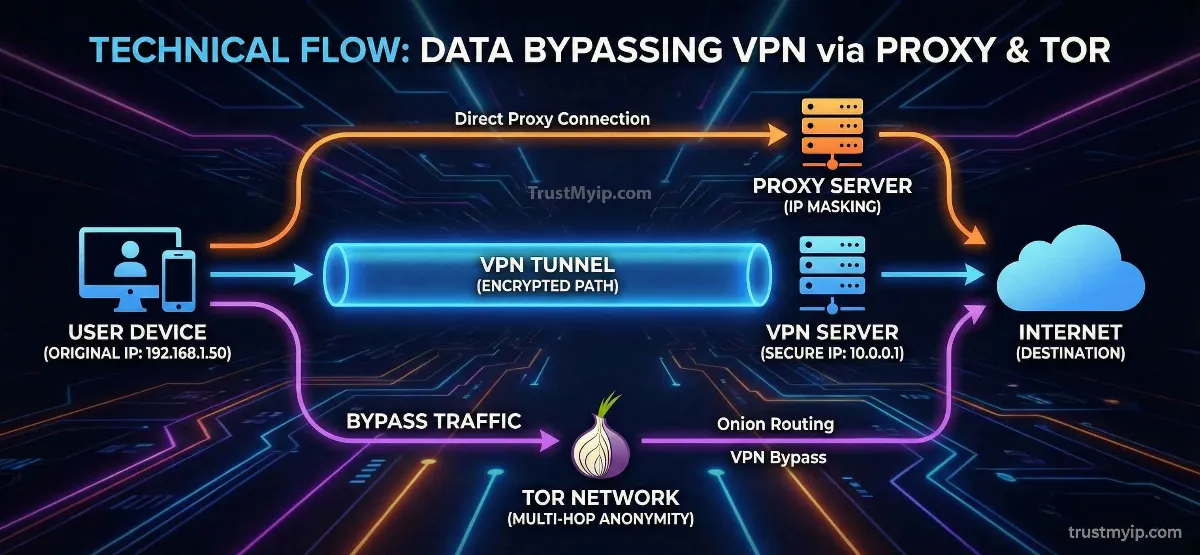
While VPNs are the "go-to" solution for privacy, they come with a heavy price: increased latency and reduced throughput. For gamers in the USA or remote developers who need raw speed without the encryption overhead, finding another way is vital. Knowing how to change your IP address without a VPN is about understanding the cracks in the DHCP allocation system and manipulating your hardware to force a new identity. This guide explores 7 expert methods to refresh your digital footprint while remaining undetectable to tracking systems.
"In my 8 years of securing global networks, I've seen that VPNs are often overkill. If you only need to bypass a geo-block or an IP ban, you can use MAC Cloning or SOCKS5 Proxies to achieve the same result with 0% speed loss. The trick is knowing how to talk to your ISP's DHCP server directly to request a fresh lease without using third-party software."
1. Why Change Your IP Without a VPN?
In the USA market, users often avoid VPNs because of "Strict NAT" issues in gaming or because certain authorized users’ portals block known VPN IP ranges. By learning how to change your IP address without a VPN, you maintain direct access to the web's backbone.
Zero Latency
VPN encryption adds "hops" to your network path. Removing the VPN keeps your Ping low for competitive play.
Cost Efficiency
High-quality VPNs are expensive. Modern router configuration hacks are 100% free and permanent.
Device Compatibility
Many smart TVs and game servers don't support VPN apps natively. Hardware-level IP shifts solve this.
Step 1: Check your current speed and IP. Use our High-Speed Test Tool to see if your current connection is being throttled by your ISP.
2. Method 1: The Proxy Server Strategy (SOCKS5 vs HTTP)
A proxy acts as a middleman. Unlike a VPN, it doesn't encrypt your entire device—it only masks the traffic of a specific app. For those needing an undetectable solution, using a residential proxy is the ultimate hack to mimic a real home user.
SOCKS5 Proxies
The most advanced type. It supports all traffic types (UDP/TCP) and is perfect for Hypixel or other gaming platforms where speed is king.
HTTP/S Proxies
Limited to web browsing. Excellent for bypassing school or office firewalls to access public data.
Worried about proxy safety? Run your connection through our Forensic Proxy Auditor to detect any leaks.
3. Method 2: MAC Address Cloning (The ISP Trick)
ISPs in the USA (like Comcast or Spectrum) often assign a Dynamic IP but "bind" it to your router's physical MAC address for weeks. To break this bind, you must "clone" a new address to force a DHCP reset.
The Technical Workflow:
1. Log into your router’s firmware settings (usually 192.168.1.1).
2. Navigate to WAN Settings and find "MAC Clone."
3. Change the last character of the MAC address. Save and Reboot.
4. The ISP sees a "new" device and instantly triggers a new DHCP allocation. You now have a fresh Public IP.
Learn more about hardware identities in our MAC vs IP Ultimate Guide.
4. Method 3: Using the Tor Network (Onion Routing)
If your goal is absolute anonymity rather than speed, Tor is the answer. It bounces your traffic through three different authorized users’ nodes across the globe.
The Multi-Layer Advantage
Tor changes your IP every few minutes automatically. While it is slow, it is the most difficult method for IT auditing systems to track. It effectively masks your public data without requiring a centralized VPN provider.
5. Method 4: Mobile Hotspots & Airplane Mode
Your Android or iPhone uses Carrier-Grade NAT (CGNAT). This means your phone shares an IP with hundreds of others. By toggling Airplane Mode, you force a refresh.
Connect your computer to your phone’s hotspot. Toggle Airplane Mode on your phone for 60 seconds. When you turn it off, the cell tower grants a new IP. Your computer now has a completely different Public IP without ever touching a VPN app. This is the fastest way to change your IP address without a VPN.
Check your mobile routing status with our Mobile IP Locator.
6. Method 5: Forcing a DHCP Lease Renewal
Sometimes your router is "stuck" on an old IP. You can manually force your ISP to give you a new one by releasing your current lease. This is a pro-level hack for how to change IP address without a VPN on Windows and Mac systems.
Windows Command Line
Type "ipconfig /release" then "ipconfig /renew" in CMD. This communicates directly with the gateway to refresh your network identity.
macOS Network Settings
Go to Network > Advanced > TCP/IP and click "Renew DHCP Lease." This is the cleanest way to fix an IP conflict without a reboot.
7. VPN vs. Proxy vs. Tor: The Performance Verdict
Use this technical breakdown to decide which method fits your network documentation and performance goals.
| Method | Encryption | Speed Loss | Best Use Case |
|---|---|---|---|
| VPN Tunnel | Military Grade | 15% - 40% | Maximum Privacy |
| SOCKS5 Proxy | None | 0% - 5% | High-Speed Gaming |
| Tor Network | Multi-Layer | 80% - 90% | Anonymity & Whistleblowing |
8. Troubleshooting: Why won't my IP change without a VPN?
If you've tried cloning and restarting but your Public IP remains the same, you might be facing these technical constraints:
- DNS Leaks: Even if your IP is different, your browser is still asking your ISP’s DNS Resolution servers for directions. Use our DNS Leak Test to verify your stealth.
- Cookie Tracking: Websites don't just use IPs; they use tracking cookies. Even with a new IP, if you don't clear your browser cache, the site will recognize you instantly.
- Static assignment: If you are on a business line, your ISP has locked your IP. In this case, you must learn why your IP is blocked and use a Proxy as a workaround.
Conclusion: Controlling Your Digital Footprint
Mastering how to change your IP address without a VPN gives you the flexibility to maintain high-speed connections while protecting your privacy. Whether you utilize MAC Cloning for a permanent ISP-level shift or a SOCKS5 Proxy for app-specific masking, you are taking control of your network identity. In 2026, as online tracking becomes more invasive, having these non-VPN tools in your arsenal is mandatory.
Audit Your Stealth Status
Changing your IP is just the beginning. Use our forensic toolkit to audit your Proxy status, check for DNS leaks, and analyze your Browser Fingerprint in one click.