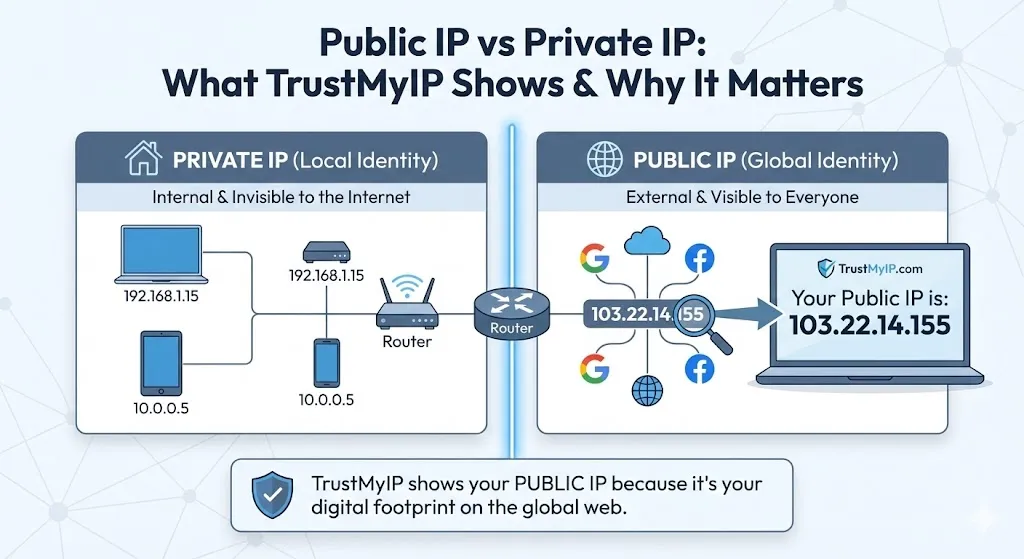
You open Windows Command Prompt, type ipconfig, and see 192.168.1.15. Then you visit TrustMyIP.com and it shows something completely different—perhaps 103.22.14.155. At first glance, it feels like someone is lying to you. Is your computer wrong? Is TrustMyIP broken?
Neither is wrong. You're simply seeing the two different layers of the modern internet: the Private IP address and the Public IP address. Every device on earth has both—and confusing them is one of the most common networking mistakes beginners make.
This complete 2026 guide explains exactly what is a public IP address, what is a private IP address, how they differ, why both exist, and what each one reveals about your identity online—with practical examples that make it immediately clear.

"After a decade analyzing network traffic and IP infrastructure, I still see this confusion daily. The public vs private IP distinction isn't just academic—it directly affects your privacy, your security posture, and your ability to troubleshoot connection problems. Once you understand why this two-layer system exists, networking suddenly makes complete sense. The key insight is simple: your ISP gives your router one public address, and your router creates a private neighborhood inside your home where every device gets its own room number."
Quick Answer: Public IP vs Private IP
A Private IP address (like 192.168.1.15) identifies your specific device inside your home or office network—assigned by your router, invisible to the internet. A Public IP address (like 103.22.14.155) identifies your entire network to the outside world—assigned by your ISP, visible to every website you visit. TrustMyIP always shows your Public IP. Your ipconfig command shows your Private IP.
1. What is a Private IP Address?
Think of your home network as an apartment building. Your Private IP address is your room number—it identifies your specific device (laptop, phone, smart TV) inside your local network.
Your router acts as the building manager. It assigns private addresses to every device that connects using a protocol called DHCP (Dynamic Host Configuration Protocol). These addresses come from three reserved ranges that are never used on the public internet:
- • 192.168.0.0 – 192.168.255.255 — Home routers (most common)
- • 172.16.0.0 – 172.31.255.255 — Corporate intranets
- • 10.0.0.0 – 10.255.255.255 — Large enterprise networks
Private IPs are invisible to the outside world. Google, Netflix, and TrustMyIP cannot see your internal 192.168.x.x address. It only exists inside your local network. If you're new to how IP addresses work generally, our complete IP address guide covers the full picture.
Millions of routers worldwide use the exact same private address ranges. Your neighbor might also have a device at 192.168.1.5 — that's perfectly fine because these addresses only mean something inside each separate network.
2. What is a Public IP Address?
If the Private IP is your room number, the Public IP address is the actual street address of the entire apartment building. This is the global identity your Internet Service Provider (ISP) assigns to your connection.
Every piece of data that leaves your house and enters the internet travels under this Public IP. Websites use it to send information back to you. Without a Public IP, you couldn't browse the web, stream videos, or check email.
Your Public IP address reveals your approximate location, your ISP, and your connection type to every server you contact. It also accumulates a reputation score based on how traffic from that address has behaved historically — understanding what is an IP reputation score explains exactly how this affects your online experience.
Why Your Public IP Matters — 3 Practical Reasons
VPN Validation: After connecting to a VPN, your Public IP should change to the VPN server's address. If TrustMyIP still shows your real ISP IP, your VPN is not working.
Geolocation Audit: Websites use your Public IP to determine your country and region. If you see the wrong city, read our geolocation accuracy guide to understand why.
Security Status: Your Public IP accumulates a reputation. If it's flagged on spam blacklists, your emails bounce and some websites block you. Check yours instantly with our IP checker tool.
3. Which One Does TrustMyIP Show?
TrustMyIP always shows your Public IP address.
When you visit our IP Checker, our server looks at the incoming request and reads the global address it came from. This is your Digital Footprint—the same information every website, advertiser, and potential attacker sees when you connect to them.
Your Private IP (192.168.x.x) never reaches our server. It gets replaced by your router before your traffic even leaves your home. This is why ipconfig and TrustMyIP show different numbers—they're both correct, just measuring different things.
4. How NAT Connects the Two Worlds
You might wonder: if my laptop has a Private IP, how does data ever reach the internet? The answer is NAT (Network Address Translation)—the technology that bridges your private network with the public internet.
When you click a link, your router does two things simultaneously:
• It strips away your Private IP (192.168.1.15) from outgoing traffic
• It replaces it with your Public IP (103.22.14.155) before sending it out
When the website responds, your router remembers which device made the original request and translates the incoming data back to your specific Private IP. This all happens in milliseconds, invisibly, for every single request.
NAT is also why an entire household can share a single Public IP address. Your router keeps a translation table mapping each private device to its outgoing connections—up to thousands of simultaneous connections handled by one Public IP.
5. Public IP vs Private IP: Complete Comparison
| Feature | Private IP | Public IP |
|---|---|---|
| Scope | Local Network (LAN) | Global Internet (WAN) |
| Assigned By | Your Router (DHCP) | Your ISP |
| Visibility | Invisible to external sites | Visible to everyone online |
| Uniqueness | Reused across millions of networks | Globally unique (usually) |
| Example Range | 192.168.0.0 – 192.168.255.255 | Any non-reserved address |
| Cost | Free | Included in ISP plan |
| Changes? | When you reconnect to router | Periodically (dynamic) or never (static) |
| How to Find | ipconfig (Windows) / ifconfig (Mac) | Visit TrustMyIP.com |
6. Static vs Dynamic: The Other Key Distinction
Both Public and Private IPs can be either static (permanently fixed) or dynamic (changes periodically). This distinction matters differently for each type.
Dynamic IP Addresses (Most Common)
Most homes have a dynamic Public IP. Your ISP assigns it from a pool and may change it when your router reconnects, or every few days. Most people never notice because websites they visit don't require a fixed address from visitors.
Private IPs assigned by your router are also dynamic by default. Your laptop might be 192.168.1.5 today and 192.168.1.8 tomorrow if you reconnect.
Static IP Addresses (Fixed Forever)
Businesses and power users pay extra for a static Public IP—an address that never changes. This is essential for hosting websites, game servers, remote desktop access, or security cameras accessible from outside.
Static Private IPs are used for printers, NAS devices, or smart home hubs that you always want at the same local address. You configure these manually in your router's settings.
7. CGNAT: When Your Public IP Isn't Really Yours
In 2026, a growing number of ISPs—especially mobile carriers and broadband providers in high-density areas—use CGNAT (Carrier Grade NAT). This adds a third layer to the picture.
With CGNAT, your ISP groups multiple customers behind a single shared Public IP address. You get a Private IP from your router, your router gets a Private IP from your ISP (in the 100.64.0.0/10 range), and the ISP's equipment shares one Public IP among dozens of households.
Why this matters:
• Port forwarding and remote access no longer work without extra configuration
• If another user on your shared IP does something malicious, your IP gets flagged too
• Some services (like certain game servers or P2P applications) may not function correctly
If you suspect CGNAT, check if TrustMyIP shows a different IP than what your router reports as its external IP. A mismatch confirms your ISP is using CGNAT.
8. Real-World Scenarios: When This Knowledge Saves You
Understanding the difference between Public and Private IPs isn't just theory. Here are four practical situations where this knowledge directly solves real problems.
Scenario 1: "My VPN Isn't Working"
You connect to a VPN and assume you're protected. But you're not sure. Visit TrustMyIP — if it still shows your real ISP's Public IP, your VPN has failed or leaked. If it shows the VPN server's IP, you're protected.
This is the fastest, most reliable VPN verification method. Takes 10 seconds and removes all doubt.
Scenario 2: "My Emails Keep Bouncing"
Email servers check your Public IP against spam blacklists before accepting messages. If your ISP's IP was previously used by a spammer, your legitimate emails get rejected before recipients even see them.
Check your Public IP with our blacklist checker. If it's flagged, contact your ISP for a new IP assignment or use a dedicated email sending service.
Scenario 3: "I Can't Access My Home Camera Remotely"
Remote access to home devices requires port forwarding using your Public IP. If your ISP uses CGNAT, you don't have a dedicated Public IP — you share one with neighbors. Port forwarding is impossible without requesting a static IP upgrade from your ISP.
Compare TrustMyIP's reading against your router's WAN IP. If they differ, CGNAT is confirmed.
Scenario 4: "Netflix Shows the Wrong Country's Content"
Streaming services use your Public IP to determine your geographic region and serve the correct content library. Your Private IP is completely irrelevant to them — they only ever see your Public IP.
If you're seeing the wrong country's content, your Public IP is being geolocated incorrectly by the streaming service's database. This is an ISP routing issue, not a device problem. For free options to mask or change your location, see our guide on how to hide your IP address for free.
Conclusion: Two Addresses, One Internet
Now you know the truth. TrustMyIP shows your Public IP—the address that defines your presence on the global web. Your ipconfig command shows your Private IP—the address that exists only inside your home network.
Both addresses are real, both are correct, and both serve essential purposes. Your Private IP lets your router organize multiple devices on a local network. Your Public IP lets the entire internet know where to send data back to you.
Understanding this distinction helps you troubleshoot connectivity problems, verify that your VPN is working correctly, configure remote access, and understand why security tools flag certain addresses. If you're using a VPN and want to verify it's truly protecting your Public IP without leaking, our guide on how to check for VPN IP leaks walks through every test step-by-step.
In 2026, knowing your IP addresses isn't optional—it's a fundamental part of managing your digital privacy and security.
Audit Your Digital Footprint Now
See your Public IP address, check your geolocation accuracy, verify your reputation status, and analyze your DNS configuration — all in one place.