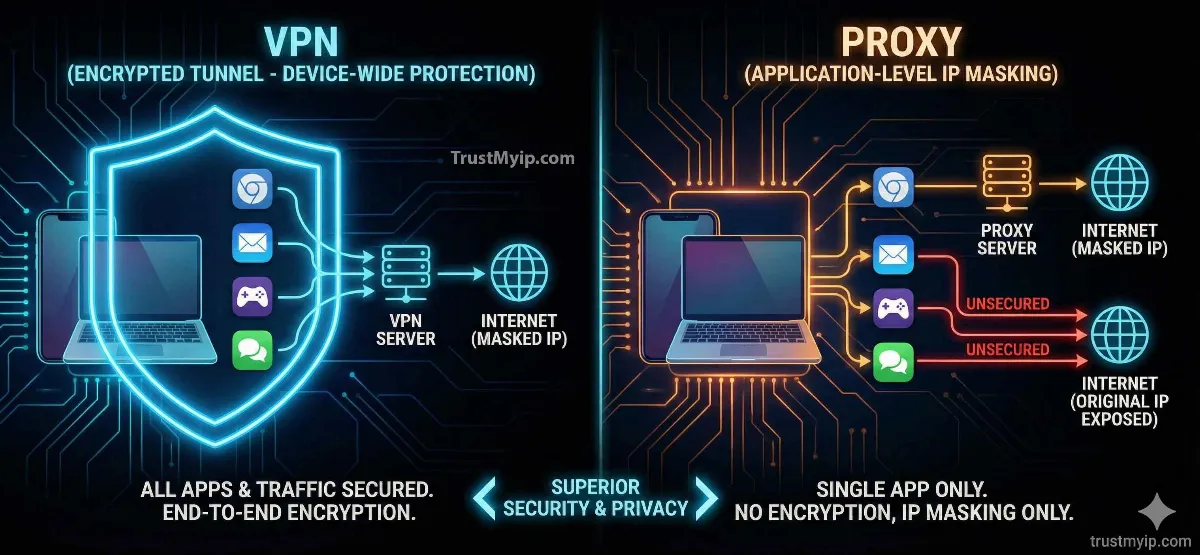
You want to hide your IP address. You search online and find two options staring back at you: VPN or proxy. Both promise to mask your location. Both claim to protect your privacy. But they are fundamentally different tools — and choosing the wrong one can leave your data completely exposed without you knowing it.
The VPN vs proxy debate is not about which one sounds better. It is about what each tool actually does at the network level, what it protects, and — critically — what it leaves unprotected. A proxy hides your IP from a single website. A VPN encrypts every byte of data leaving your device. That difference matters enormously depending on what you are trying to do.
In 2026, with AI-driven traffic analysis, browser fingerprinting, and WebRTC IP leaks becoming standard detection methods, the tool you choose for hiding your IP address has to match your actual threat level. This guide breaks down every difference — encryption, speed, use cases, risks, and cost — so you can make the right choice for your situation.
Quick Answer: VPN vs Proxy — Which Is Better for Hiding Your IP?
A VPN is better for hiding your IP address in almost every situation. A VPN encrypts all traffic from your entire device and routes it through a secure server, masking your real IP from every website, app, and your ISP. A proxy only hides your IP for one specific app or browser tab — with zero encryption — leaving your ISP, other apps, and network-level observers able to see everything.
Use a proxy when: you need fast, anonymous web scraping or simple geo-unblocking for one browser tab and security is not a concern. Use a VPN when: you need real privacy, encryption, protection on public Wi-Fi, or system-wide IP masking. Before choosing either, check your current IP address and reputation to see exactly what information is exposed right now.

"I have spent over a decade designing privacy architectures for financial institutions and enterprise networks. The single most dangerous misconception I see — from individual users and IT departments alike — is treating proxies as a privacy tool. They are not. A proxy is a routing tool. It changes which IP address a website sees. It does nothing to protect your data in transit. I have reviewed incident reports where users believed they were protected by a proxy while their login credentials, session tokens, and personal data were being captured in plaintext by their network provider. A VPN with proper encryption is a fundamentally different class of technology. If you are making a security decision based on the VPN vs proxy question, the answer is almost always VPN — unless your only goal is speed and you have zero security requirements for that specific task."
1. What Is a Proxy Server? How It Actually Works
A proxy server sits between your device and the website you want to visit. When you send a request, the proxy intercepts it, swaps your real IP address for its own, and forwards the request to the destination. The website sees the proxy's IP — not yours. The response comes back to the proxy, which forwards it to you.
That is the entire process. There is no encryption involved in most proxy configurations. Your ISP can still see every request you make. Other apps on your device are completely unaffected — they bypass the proxy entirely and connect using your real IP. The proxy only affects the specific browser, app, or connection configured to use it.
There are three main types of proxy servers, and they behave very differently. Understanding which type you are using matters, because the protection level varies significantly. Use our proxy checker tool to instantly detect whether your current connection is routing through a proxy server and what type it is.
| Proxy Type | How It Works | Encryption | Best For |
|---|---|---|---|
| HTTP Proxy | Routes browser HTTP traffic only | None | Basic geo-unblocking, web scraping |
| HTTPS Proxy | Routes HTTPS traffic with SSL passthrough | Site's SSL only (not proxy) | Streaming, shopping, light browsing |
| SOCKS5 Proxy | Routes any TCP/UDP traffic at protocol level | None (optional with SSH) | Torrents, gaming, high-speed tasks |
| Residential Proxy | Routes through real ISP-assigned residential IPs | None | Bypassing bot detection, ad verification |
2. What Is a VPN? How the Encrypted Tunnel Works
A VPN (Virtual Private Network) creates an encrypted tunnel between your device and a VPN server. Every byte of data leaving your device — from every app, every browser, every background process — gets encrypted before it ever reaches your router or ISP. The VPN server then forwards your traffic to the destination using its own IP address.
The destination website sees the VPN server's IP. Your ISP sees only encrypted data going to the VPN server — they cannot see what websites you visit, what data you send, or what apps you use. Every device process is protected simultaneously, not just one browser tab.
Modern VPN protocols — WireGuard, OpenVPN, and IKEv2 — use AES-256 encryption or ChaCha20 ciphers. These are the same encryption standards used by banks and government agencies. Breaking this encryption by brute force is computationally impossible with current technology. This is why a VPN is the superior tool for hiding your IP address whenever security matters.
How a VPN Tunnel Protects Every Layer of Your Connection
Step 1 — Encryption at Source: Your device encrypts all outgoing data before it leaves your network adapter. Your router and ISP see only encrypted packets — destination: VPN server.
Step 2 — Secure Tunnel Transit: The encrypted data travels through your ISP's infrastructure completely unreadable. Even if intercepted, the data is useless without the decryption key.
Step 3 — Exit at VPN Server: The VPN server decrypts your data and forwards the request to the destination website using the VPN's IP address. Your real IP never appears.
Step 4 — Return Path Encrypted: The response from the website comes back to the VPN server, gets encrypted again, and arrives at your device — fully protected end to end.
3. VPN vs Proxy: The 7 Critical Differences
These are the exact differences that determine which tool is right for your situation. Do not make this decision based on price or marketing claims — make it based on these technical realities.
| Feature | VPN | Proxy |
|---|---|---|
| Encryption | ✅ AES-256 / ChaCha20 — full encryption | ❌ None — plaintext by default |
| Coverage Scope | ✅ Entire device — all apps, all traffic | ❌ One app or browser only |
| ISP Visibility | ✅ ISP sees only encrypted VPN traffic | ❌ ISP sees all your requests clearly |
| DNS Leak Protection | ✅ Built-in DNS leak prevention (quality VPNs) | ❌ DNS requests often leak your real IP |
| WebRTC Protection | ✅ VPN clients block WebRTC leaks | ❌ Browser bypasses proxy via WebRTC |
| Speed Impact | ⚠️ 10-20% speed reduction (encryption overhead) | ✅ Minimal speed loss (no encryption) |
| Cost | ⚠️ $3-$12/month for quality service | ✅ Free options available (with risks) |
The table makes the tradeoff clear: proxies win on speed and cost, VPNs win on everything security-related. If you are unsure what your current connection looks like to the outside world — whether it appears as a VPN, proxy, or clean residential IP — run a check with our free IP address checker to see your IP type and reputation score instantly.
4. Speed Comparison: VPN vs Proxy Performance in 2026
Speed is the one area where proxies genuinely win over VPNs. Because a proxy does not encrypt your data, there is no encryption overhead. Your request goes out, the proxy swaps the IP, and forwards it — fast. A datacenter proxy in particular adds almost no latency at all.
VPNs add latency because every packet must be encrypted before it leaves your device and decrypted at the server. With modern protocols like WireGuard, this overhead has dropped significantly — typically 10-20% speed reduction on a quality VPN versus 5% or less on a good proxy.
However, speed comparisons depend heavily on the quality of the service. A cheap VPN with overcrowded servers will be far slower than a premium residential proxy. The baseline numbers below reflect quality services using current infrastructure.
| Metric | VPN (WireGuard) | Residential Proxy | Datacenter Proxy |
|---|---|---|---|
| Avg. Added Latency | +10ms – +20ms | +5ms – +15ms | <5ms |
| Speed Loss | 10–20% | 5–10% | Minimal |
| Detection by Sites | High (VPN IP ranges known) | Low (residential IPs trusted) | Very High (datacenter IPs flagged) |
| Best Use Case | Privacy, security, all-device protection | Web scraping, ad verification | Bulk data tasks, internal testing |
For gaming and latency-sensitive tasks specifically, the proxy often wins on raw numbers. But if your IP reputation score is damaged — which can happen regardless of using a VPN or proxy — the resulting blocks and CAPTCHAs will hurt your experience far more than a 15ms latency difference. Read our complete guide on what is IP reputation score to understand how your IP is judged by every site you visit.
5. Use Case Guide: When to Use VPN vs Proxy
The right choice depends entirely on what you are trying to accomplish. Neither tool is universally better — they are optimized for different tasks. Here is the definitive use case guide.
✅ Use a VPN When:
- → Public Wi-Fi — airport, hotel, coffee shop
- → You need full device protection across all apps
- → Streaming geo-blocked content (Netflix, BBC iPlayer)
- → Sending sensitive data — banking, work logins
- → Avoiding ISP throttling or surveillance
- → Remote work connecting to company servers
- → You want your ISP to see nothing about your activity
✅ Use a Proxy When:
- → Web scraping — rotating IPs at high volume
- → Ad verification — checking ads from different locations
- → Simple geo-unblocking for one website or tab
- → Speed is the top priority, security is not needed
- → SEO research — checking search results by region
- → Price comparison — checking regional pricing
- → Accessing one specific blocked site — low-stakes only
⚠️ Never Use a Proxy For:
Online banking, work email, cloud storage logins, social media with personal info, any transaction involving payment cards, or any task where your data being intercepted would cause real harm. Proxies do not encrypt your data. Anyone on your network — or your ISP — can read everything passing through in plaintext.
6. The Dangers of Free Proxies and Free VPNs
If you are searching for how to hide your IP for free, you need to understand what "free" actually costs you in 2026. Free proxy servers and free VPN services operate on a revenue model — and in most cases, that revenue comes from selling your data.
Free proxies are particularly dangerous. Many free proxy lists are operated by criminals who use the proxy position to capture credentials, inject ads, or redirect traffic to phishing sites. Because there is no encryption, everything you send through a free proxy is visible to the proxy operator in plaintext — including passwords, session cookies, and form data.
Free VPNs are slightly better because most do encrypt traffic, but many log your browsing activity and sell it to advertisers or data brokers. Some free VPNs have been caught injecting tracking cookies, selling unused bandwidth, or leaking DNS requests that reveal your real IP. If you must use a free option, use the Tor network — which is genuinely privacy-preserving by design — rather than a random free VPN or proxy. But even Tor has limitations for speed and certain use cases. For a vetted list of reliable paid options, see our guide on the top 5 VPNs for privacy in 2026.
3 Hidden Risks With Free Privacy Tools
Risk 1 — DNS Leaks: Even when using a proxy or VPN, your browser can make DNS requests that bypass the tool completely — revealing your real IP to your ISP and the DNS server. Check whether your current connection leaks your real identity with our DNS lookup tool.
Risk 2 — WebRTC Leaks: Your browser's WebRTC feature can expose your real local and public IP even when a proxy or VPN is active. This is especially common in Chrome and Firefox. Our WebRTC leak test reveals if your real IP is being exposed through your browser.
Risk 3 — IP Reputation Damage: Free proxy and VPN IP pools are heavily blacklisted. When you connect through a free service, you inherit the damaged reputation of every other user who shared that IP. Websites block you not because of what you did — but because of what others did from the same IP. This damages your access and your browsing experience across every website that checks IP reputation.
7. How Websites Detect VPNs and Proxies in 2026
In 2026, major websites use sophisticated detection systems that go far beyond simply checking IP addresses. If you are trying to use a VPN or proxy to hide your IP from streaming services, banks, or high-security platforms, you need to understand how they detect and block these tools.
IP reputation databases are the first layer. Companies like Spamhaus, MaxMind, and IPQualityScore maintain real-time databases of known VPN server IPs, proxy server ranges, and datacenter IP blocks. Most streaming services and financial platforms check incoming IPs against these databases. If your IP appears in a VPN or proxy range, access gets blocked before you even see a login screen.
Behavioral analysis is the second layer. Even if your IP passes the reputation check, AI systems analyze browsing behavior — connection timing, request patterns, browser fingerprint, and device characteristics — to detect automated or proxied traffic. A residential proxy passes IP reputation checks because it uses a real home IP, but it may still fail behavioral analysis if it behaves too mechanically.
-
→
ASN-Level Blocking: Websites block entire Autonomous System Numbers (ASNs) associated with known VPN and proxy providers — blocking all IPs in that range simultaneously regardless of individual IP reputation.
-
→
Browser Fingerprinting: Even if your IP is clean, your browser fingerprint — screen resolution, fonts, timezone, language settings — can betray your real location if it does not match your VPN's exit country.
-
→
WebRTC Real IP Exposure: Browsers can reveal your real IP through WebRTC even with a VPN or proxy active. This is the most common bypass method that websites use to confirm your actual location.
If you are being blocked despite using a VPN or proxy, the cause is usually one of these detection methods. Check what websites see when you connect using our IP checker tool — it shows your IP type, fraud score, and whether your connection registers as a VPN, proxy, or residential address. If websites are blocking your IP entirely — not just detecting your VPN — read our guide on why websites block IP addresses for the complete diagnosis and fix process.
8. Smart DNS: The Speed Alternative to VPN and Proxy
There is a third option worth knowing about for one specific use case: Smart DNS. It is not a VPN and not a proxy — it works by intercepting and rerouting only your DNS requests for geo-restricted content, while all your actual traffic travels directly from your device to the destination.
The result: zero speed loss because no encryption happens and no traffic is rerouted through an intermediary server. Your content loads at full ISP speed because only the DNS resolution is redirected — the website then responds to your real IP directly.
The massive tradeoff: Smart DNS provides zero privacy. Your ISP sees all your traffic. Your real IP is visible to the destination website after the redirect. There is no encryption of any kind. Smart DNS is purely a geo-unblocking tool for streaming — nothing more. It does not hide your IP address. It does not protect your data. Do not use it for anything beyond unlocking streaming content.
Conclusion: VPN Wins for Privacy, Proxy Wins for Speed
The VPN vs proxy decision comes down to one question: do you need security or speed? If you need to hide your IP address while actually protecting your data — from your ISP, from network attackers, from anyone who might intercept your connection — a VPN is the only real choice. A proxy does not encrypt anything and leaves your ISP with full visibility into everything you do.
If your only goal is rotating IPs at high speed for web scraping, ad verification, or accessing one website from a different region — and you have zero security requirements for that task — a residential proxy delivers better performance at lower cost.
Avoid free versions of both tools. Free proxies are often actively malicious. Free VPNs log and sell your data. If cost is a concern, the Tor network is the only genuinely free privacy tool worth using — though it comes with significant speed limitations.
Start by checking what your current connection looks like right now. Use our free IP address checker to see your IP type, location, fraud score, and whether your connection registers as a VPN or proxy. If your IP reputation is already damaged from a shared VPN or proxy pool, our guide on how to improve a bad IP reputation score shows you the exact steps to recover it and restore clean access to the sites you need.
Is Your IP Leaking Right Now?
Check your IP type, fraud score, DNS leaks, and WebRTC exposure in one click. Know exactly what websites see when you connect — VPN, proxy, or real residential IP.