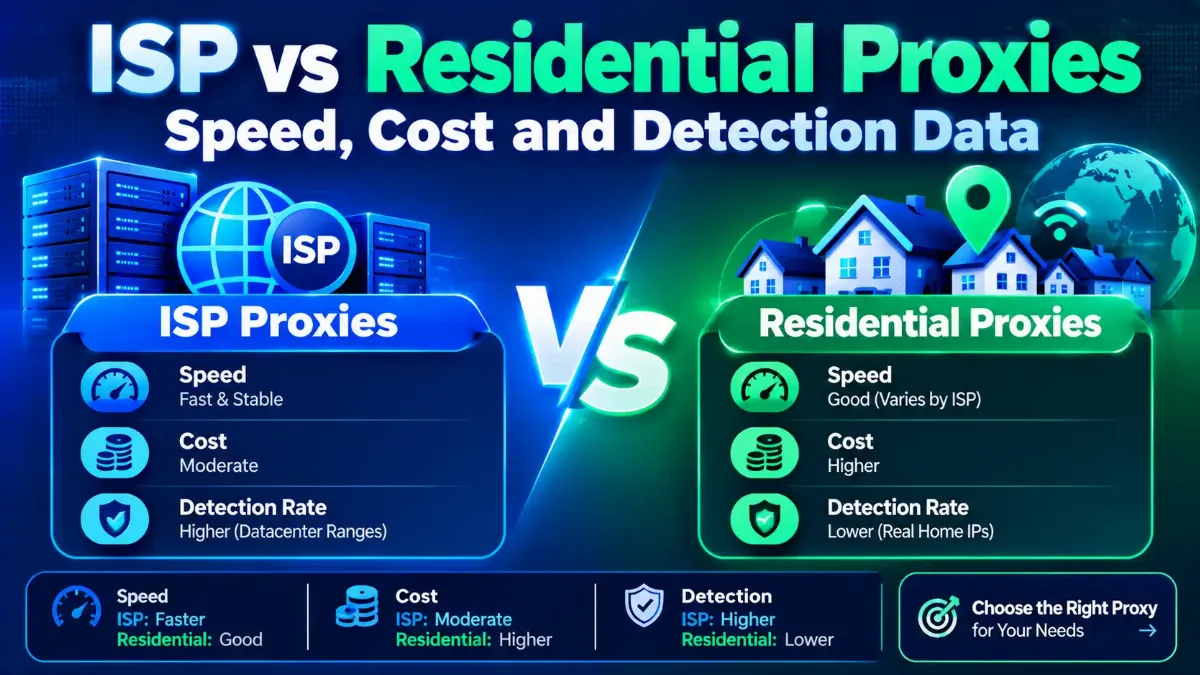

Choosing ISP vs residential proxies comes down to one trade: pick ISP when one fast address must hold for days, and residential when you need many addresses in many places. An ISP proxy, often marketed as a static residential proxy, runs on a data center server but uses an address from a consumer internet provider's range. A residential proxy sends your request out through a real household device, such as a home router, phone or smart TV, that has joined a proxy network.
Both types hide your own IP in the same basic way, as our primer on a proxy's place in your connection explains. They part ways on everything after that: speed, how long an address lasts, how you pay, how websites spot them and who stands behind each IP. This guide sets third-party test data against each of those points. It also works out the monthly traffic at which paying per IP beats paying per gigabyte.
This is a comparison of two proxy types, not a seller ranking, and our seller lists are linked at the end. Its figures come from Proxyway's 2026 ISP and residential studies, the IP-data firms IPinfo, Spur and IP2Location, an FBI alert and seller price pages. We did not buy either type or run our own tests, and none of the links here is paid or affiliated. Every price carries its date, and every claim a seller makes about itself is marked as the seller's own.

Quick Answer: ISP or Residential Proxy?
ISP Proxy vs Residential Proxy: What Sets Them Apart?
The difference is where the IP lives and whose name is on it. An ISP proxy's address sits in a range held by, or linked to, a consumer internet provider, yet the machine using it is a server. A residential proxy's address belongs to a real subscriber line, and your traffic leaves from a device inside someone's home. Here is the path a request takes with each:
- → ISP proxy: your app, then the seller's server, then the website. The site sees one fixed address, assigned to you for the billing month and usually registered to a home internet provider.
- → Residential proxy: your app, then the seller's gateway, then a household device (the exit), then the website. The site sees that device's address, which can change with every request or hold for a set session.
Sellers label these products loosely. "ISP proxy", "static residential proxy" and "static ISP" usually name the same thing, while "residential proxy" alone means a rotating pool. Some sellers also offer rotating ISP pools billed per GB, which blurs the residential vs ISP proxy line, so read the product page rather than the label.
Expect IPv4 addresses on the ISP side. Proxyway's October 2026 study found that "IPv6 ISP proxies remain effectively impossible to find." Residential IPs mostly come from people's devices that joined through apps, while ISP IPs come from address blocks a provider issues or leases. That sourcing split drives most of the differences that follow.
How we compared the two types
ISP vs Residential Proxies Side by Side
The main differences between ISP proxies and residential proxies show up in seven places. Each row holds for most sellers, though individual plans vary.
| Factor | ISP Proxy | Residential Proxy |
|---|---|---|
| Where the IP runs | A server in a data center | A home device on a subscriber line |
| How long an IP stays | The whole billing month, same address | Changes per request, or holds for a sticky session |
| Speed | Fast and steady in lab tests | Slower; depends on the home connection |
| Billing | Per IP each month, traffic within fair use | Per GB of traffic |
| How sites spot it | Owner records, location gaps, clustered blocks | Listings on known proxy-exit feeds |
| Location reach | Far fewer countries and city options | Most countries, often with city or ZIP filters |
| Best fit | Long sessions and steady repeat checks | Wide sampling and high-volume collection |
Rotation is a setting, not a separate product: a residential plan can switch IPs on every request or hold one for a set time through a sticky session. A /24 is a run of 256 neighboring addresses that a site can block with one rule. Detection and billing surprise buyers most, so each gets its own section further down.
ISP Proxies: Strengths and Limits
An ISP proxy behaves like a fast server that carries a home provider's name, which is both its appeal and its weak spot.
Where it wins
- The quicker responses of the two types in lab tests
- One address you keep, so logins and allowlists hold
- No per-GB meter below the fair-use line
- No home device in the path that can drop offline
Where it falls short
- Fewer countries, and weaker IP quality outside the US
- Labels depend on who holds the block; some miss a residential tag
- Some sellers' IPs sit in just a few /24 blocks
- "Unlimited" traffic can end in session cuts or usage reviews
- IPv4 only in practice
Residential Proxies: Strengths and Limits
A residential pool trades speed and control for sheer variety, and its weak spots sit with the devices it borrows.
Where it wins
- Millions of addresses across most countries
- City, ZIP or network (ASN) filters at many sellers
- Real subscriber lines that pass owner-based checks
- Billing follows the gigabytes you use
Where it falls short
- Slower and less predictable than server-hosted IPs
- An exit disappears when its device goes offline
- Many exits sit on activity-based proxy lists
- Consent behind each device is hard to verify
- Heavy pages and media raise the bill
Are ISP Proxies Really Residential IPs?
Not physically: an ISP proxy runs on a server, though databases that label by owner call it residential when a consumer provider holds its block. IP2Location's usage type is the field that tags an IP as fixed-line ISP, mobile, business or data center. Its June 2026 explainer says the field reflects "the primary role or function of the organization or business unit behind the IP." A server can therefore pass as a home line if the right company holds its range.
Who holds the block counts for more than whose network carries it. Proxyway's 2026 ISP study, writing about the IPXO leasing marketplace, says "IPs rented from IPXO, for example, won't be treated as residential, no matter which network they end up on." The study calls the best case one where a provider "lets you use its own stock," so every record lines up.
Results swing widely by seller and country. In Proxyway's US sample, IP2Location labeled between 22% and 100% of each seller's ISP IPs as residential, for an average of 82.30%. Oxylabs scored 100% residential in the US and UK but 0% in its Hong Kong and Singapore sample. Our guide to reading an IP's network type explains how each database reaches its label.
How Do ISP Proxies Differ From Datacenter Proxies?
Both run on servers, so the gap in ISP vs datacenter proxies comes down to the network and owner behind the block. A datacenter proxy's range is held by a hosting or cloud firm. An ISP proxy's range belongs to, or is linked to, a consumer provider. Proxyway's 2026 study treats a "non-hosting and non-datacenter ASN" as the line that separates the two. An ASN is the number that identifies the network announcing an IP block.
That label is what the higher price buys. Proxyway's 2026 market research calls ISP proxies "a good substitute for datacenter IPs in general." Datacenter IPs cost less and serve any target that accepts server traffic. ISP IPs earn their premium on services that keep blocking rules for cloud servers yet permit your use, such as a partner API, as long as their own label holds.
Which Is Faster and Steadier? What Third-Party Tests Found
ISP proxies are faster, and the gap widens as pages get heavier. Proxyway's October 2026 study compared 11 to 13 providers of each type, with at least 5,000 requests from Ashburn, Virginia. A typical ISP proxy fetched a 6 KB page close to eight times quicker than a residential one, and a 2 MB page more than 14 times quicker.
The route explains it. ISP proxy traffic runs from your app to a server on a fast network and out to the site. A residential exit adds a hop through a household connection, whose speed and Wi-Fi the seller does not control.
The pattern holds inside a single company, too. Oxylabs and Rayobyte sell both ISP proxies and residential proxies, and Proxyway measured each in the US.
| US Result | Oxylabs ISP | Oxylabs Residential | Rayobyte ISP | Rayobyte Residential |
|---|---|---|---|---|
| Success rate | 99.99% | 99.40% | 100% | 98.76% |
| Response time | 0.04 s | 0.65 s | 0.14 s | 1.20 s |
| Labeled residential by IP2Location | 100% | 96.38% | 100% | 98.63% |
Read those pairs with care. The residential figures come from rotating pools measured largely during March and April 2026 from one US server, and their times are averages. The ISP figures come from 100 dedicated IPs per seller, run from Ashburn and San Jose, in a study published October 9, 2026 without exact test dates. Both fetched a page of about 6 KB with access the sellers supplied, so they show best-case speed, not results on a hard target.
Stability is a separate question, and a success rate is not uptime. IPRoyal's February 2026 and Decodo's September 2026 comparison pages advertise 99.99% uptime, but we found no independent uptime test of either type. What is measured is churn. IPinfo data published in May 2026 showed a residential proxy IP stayed visible for 4.56 days on average, and 78% did not last beyond 30 days. A residential session can end early when its household device goes offline, while a static ISP address has no such device in the path.
How Do Websites Detect Each Type?
Sites and their IP-data vendors use two methods, and each proxy type fails a different one. The first labels an IP by who holds it, as IP2Location's usage type and cloud range lists do. The second watches what an IP does. Spur's detection FAQ, updated in October 2026, says it "classifies an IP from the activity it observes on it, not from who owns the IP."
Residential exits pass the owner test and stumble on the activity test. In Proxyway's 2026 market research, IP2Location called nearly all of Oxylabs' and Rayobyte's US pool IPs residential. Yet IPinfo flagged 42.89% of Oxylabs' and 52.59% of Rayobyte's as residential proxies. IPinfo says it finds such exits by joining hundreds of proxy services as a registered participant. Proxyway adds that it does not "completely trust IP checkers."
ISP IPs face the reverse problem. No study we found measures how often activity-based feeds flag them, but their owner records are open to anyone. They can also cluster: each seller's 100 US test IPs spanned between 1 and 78 /24 blocks in Proxyway's sample. Oxylabs' all came from one, a trade-off Proxyway linked to higher IP quality. A site that bans a whole block or network can stop such a list with one rule.
Location is a third tell. Proxyway's 2026 market research says ISP proxies are "often geo-located virtually rather than physically," and that tools such as ping0, an IP lookup site, can catch the gap. City data also differs between databases, as our explainer on wrong-city IP lookups shows.
Spur's undated research page sums up the ISP side: static ISP proxies "may look more residential than normal hosting infrastructure while behaving more like stable automation infrastructure." A static address also keeps its history, good or bad, for as long as you hold it. Neither type changes what a site sees beyond the IP, such as browser fingerprints, headers and behavior.
Which Costs Less: Paying per IP or per GB?
Neither type is cheaper in general, which is why sellers' own comparison pages disagree on price. An ISP plan charges for each address per month, and a residential plan charges for each gigabyte. To compare them, divide the monthly price of one ISP IP by the residential price per GB. The answer is the traffic per IP at which both bills match.
At list prices as of November 2026, that break-even point sits between about half a gigabyte and a gigabyte and a half per IP a month at entry tiers. Proxyway's 2026 studies, as published in October 2026, land in the same range.
| Seller and Tier | ISP per IP a Month | Residential per GB | Break-Even per IP |
|---|---|---|---|
| Oxylabs, smallest dedicated ISP and residential tiers | $3.30 | $6.00 | 0.55 GB |
| Oxylabs, largest listed tiers (1.14K+ IPs, 1K+ GB) | $2.20 | $2.50 | 0.88 GB |
| Rayobyte, 5 to 99 IPs; Premium Residential 1 to 49 GB | $5.00 | $3.50 | 1.43 GB |
| Rayobyte, 1,000 to 4,999 IPs and GB (Premium) | $4.60 | $0.70 | 6.57 GB |
| Proxyway 2026 studies, as published October 2026 | $2 to $4 | $3.75 (5 GB median) | 0.53 to 1.07 GB |
Above the break-even line, the per-IP plan wins, up to its fair-use ceiling; below it, residential costs less. Rayobyte's rows use its Premium Residential rates. Its Scale plan, from $0.015 per GB on a $100 monthly minimum as of November 2026, costs far less but needs a compliance review and has no targeting. Oxylabs' shared ISP plan, at $1.50 an IP for small orders as of November 2026, breaks even near 0.25 GB. Each of those addresses is "shared with up to 3 users."
"Unlimited" ISP traffic has limits. Oxylabs drops a shared ISP proxy from 100 concurrent sessions to 10 after 50 GB of monthly use, and a dedicated one after 100 GB. Rayobyte's terms, last modified July 30, 2024, treat more than 0.03 TB (30 GB) through one dedicated or static residential IP over 30 days as excessive. Crossing that line can trigger an account review for added costs.
The math flips when a job needs many distinct addresses. As of November 2026, Rayobyte's 100 to 999 tier puts 500 static IPs at $2,400 a month, however little traffic they carry. A residential pool reaches thousands of exits for the price of the gigabytes alone. Heavy pages push the other way, since a residential plan bills every megabyte.
Trial terms differ, so sampling both types is not always possible. As of November 2026, Oxylabs sells one subscription covering all its products from $15 a month plus any VAT, with $5 of credit toward any product. Rayobyte says static IPs are excluded from its self-serve free trial. Check the terms on the day you buy, since sellers revise plans often.
Which Jobs Suit ISP Proxies, and Which Need Residential?
Four questions settle most cases. These fits assume you follow each site's terms, since neither type makes a barred use acceptable.
- → Must a site see the same IP for days? If yes, start with ISP; if not, both stay open.
- → How many distinct IPs do you need? A few dozen fit an ISP plan; thousands call for a residential pool.
- → How many GB will each IP move a month? Above the break-even line, ISP costs less; below it, residential does.
- → Do you need city or ZIP targeting, or a country with thin ISP stock? Residential reaches far more places.
When ISP Proxies Fit Better
ISP proxies suit jobs where one stable, fast address matters more than spread:
- → Allowlisted access: a partner portal or API that accepts only registered IPs and also screens out hosting ranges.
- → Stable logins to your company's own accounts: a seller, ad or admin dashboard whose security settings tie access to known IPs, so a changing address locks your staff out.
- → Repeat checks on a fixed list: the same URLs from the same US location every hour, where a steady identity matters more than variety.
- → Heavy pages and files: traffic above the break-even line and below the seller's fair-use limit, where per-GB billing gets expensive.
- → Speed-sensitive checks: tools that wait on every response, such as load-time checks of your own sites from a US address.
When Residential Proxies Fit Better
Residential pools suit jobs where reach and variety matter more than speed:
- → Wide location sampling: ad verification, local search results or regional prices across many cities or ZIP codes.
- → Large public-data projects: collecting public pages from many sites within each site's terms and rate limits, where a large pool supplies the regional spread the data needs.
- → Countries outside ISP stock: as of November 2026, Rayobyte lists static ISP IPs in just 6 countries, and Proxyway says coverage "strongly favors North America and Western Europe."
- → Light or occasional jobs: traffic below the break-even line, where paying by the gigabyte costs less than renting a month of addresses.
Running both often makes sense. A residential pool covers many places, while a few ISP addresses handle slow, repeated checks on a fixed set of pages. Keep each session on one type from start to finish, because a mid-session change of IP, network and location can trigger a fresh login check.
How Are ISP and Residential IPs Sourced?
Sourcing is the least visible difference and carries the most risk. A residential exit is someone's device, so the question is consent. An ISP address belongs to a block of IPs, so the question is who holds that block and on what terms.
Residential devices usually join through apps that carry a seller's software kit, or SDK. An FBI alert from March 2026 warns that "free VPN services may enroll users' devices in a residential proxy network, without obtaining their consent." It adds that a compromised device's IP can hide criminal activity behind its owner.
Sellers describe their own safeguards. Rayobyte says devices join through apps built with its Cash Raven SDK, that "nothing is shared unless the user agrees," and that every app has a visible opt-out. Oxylabs says its beta transparency tool shows whether a visitor's IP has been part of its residential network in the last 30 days and, where applicable, names the app involved.
A seller's consent process covers only its own path, though. IPinfo reported in May 2026 that 46% of residential proxy IPs appear in two or more provider networks, so the same address can reach you through brands with weaker rules.
ISP supply runs through address deals instead. In a June 2025 KrebsOnSecurity report, Kentik analyst Doug Madory said IPv4 brokers pay ISPs about $100 to $500 a month to lease a 256-address block. AT&T told Krebs it no longer permits "static routes with IP addresses that we have not provided," so customers must announce outside blocks under their own network number. Proxyway says nearly one in two ISP proxies from major networks in its prior report were linked to AT&T.
A second supply route broke in July 2026. Proxyway says that after the FBI disrupted one large provider's ISP supply arm, "the market lost its only alternative procurement method." Before paying, put two questions to any seller:
- → Residential: how devices join, what each user sees and receives, and how they opt out.
- → ISP: which provider issued the block, and whether it is the seller's own stock or leased space announced through someone else.
How to Test Both Types Before You Commit
A small trial of each type tells you more than any spec sheet. Take five ISP IPs and ten rotating residential exits, then run them through these checks.
1 Check each ISP IP's label
2 Count blocks and networks
3 Read a static IP's past
4 See how each exit reads
5 Measure on your own target
Repeat the residential checks on a fresh sample before you scale up, because pool exits turn over within days.
ISP vs Residential Proxies: Our Verdict
The ISP vs residential proxies decision turns on how long an identity must last and how far it must spread. Pick ISP proxies for fast, long sessions on a few addresses that each carry over 0.5 to 1.5 GB a month at entry prices, if the target accepts their label. Choose residential proxies when you need many addresses, cities or countries, or when traffic per address stays light.
Before paying for ISP IPs, check who holds the block and how many /24s the list spans, and read the fair-use line behind "unlimited." Before paying for a residential pool, ask how devices join it, because consent is its weak point. To choose a seller, compare ISP sellers side by side or residential pools by session length.
Run a small trial of each type through the cloud IP check and the proxy checker first, then let your own success rate and gigabytes per IP settle the bill. Re-run the break-even sum whenever your traffic per IP or a seller's price changes.