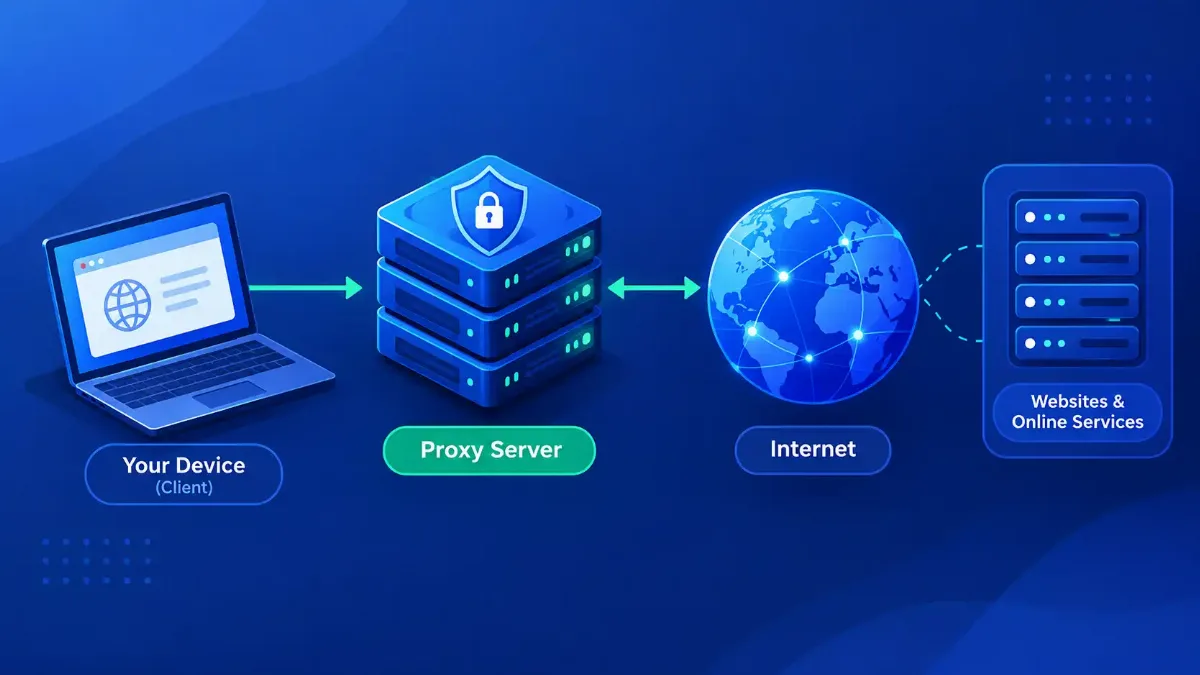
A proxy server is a machine that makes requests on your behalf, and there is a fair chance you are behind one right now without having configured anything. Chrome began routing some third-party Incognito traffic through a two-hop proxy at version 140, which reached the stable channel on September 2, 2025. Safari does the same for anyone with iCloud Private Relay switched on.
That is the part most explanations skip. They describe a proxy as an optional privacy gadget you go and buy, when the accurate description is a piece of network plumbing that sits in front of a large share of the sites you visit and, more and more, inside the browser you already use.
So this guide covers the mechanism rather than the marketing: the request a proxy receives, the headers it adds, the ports it listens on, the five axes worth classifying any proxy on, and the things it cannot hide. Where a claim rests on a standard or a vendor document, the source is named, and dated wherever the date changes the meaning.

Quick Answer: What a Proxy Server Is
What Is a Proxy Server, in One Request?
A proxy server is an intermediary that accepts a network request from a client, opens its own connection to the destination, and relays the response back. Nothing about the destination changes. What changes is who appears to be asking: the destination logs the proxy's address, not yours, because the proxy is the machine that actually opened the socket.
Everything else people associate with proxies — caching, filtering, load balancing, geo-switching — is built on that one structural fact. A machine positioned in the middle of a conversation can inspect what passes, store copies, refuse things, rewrite headers or pick a different destination. What you are buying, or being subjected to, is that position.
Mozilla's own documentation on how proxies forward and tunnel HTTP traffic splits them by who they work for: a forward proxy serves a client or a group of clients, a reverse proxy serves the origin server. Hold on to that split, because it decides almost everything else about how a given proxy behaves.
| Who sees what | Direct request | Through a proxy |
|---|---|---|
| The destination site | Your IP address | The proxy's IP address |
| Your ISP | The destination name, unless DNS is encrypted | The proxy's address, plus the destination name in the CONNECT line or the TLS SNI |
| The proxy operator | Nothing — there is no proxy | Your IP address and every destination you asked for |
| You | The origin server's certificate | The origin's certificate, unless the proxy is intercepting TLS with its own |
The third row is the one people skip. A proxy does not remove an observer from the path; it moves the observer, and the new one sees more than the old one did. What follows is what that actually looks like on the wire.
How Does a Proxy Server Work? The Handshake in Full
For plain HTTP, your client sends the proxy a normal request with the full URL in the request line, and the proxy fetches it. For HTTPS that fails, because the proxy cannot read an encrypted request it has no key for, so the client first asks it to open a raw tunnel with the CONNECT method. MDN describes CONNECT as starting two-way communication with the requested resource so a tunnel can be opened, and notes that not all proxies support the method, while some limit it to port 443 only.
If the proxy wants credentials, it answers 407 Proxy Authentication Required and includes a Proxy-Authenticate header naming the scheme. The client then has to supply a Proxy-Authorization header — a browser by repeating the request, most command-line tools by sending the credentials up front and never seeing the 407 at all. Either way, missing proxy credentials are a common reason an otherwise correct configuration refuses to pass traffic.
# the request line and Host header your client sends first
CONNECT example.com:443 HTTP/1.1
Host: example.com:443
# what a proxy that wants credentials sends back
HTTP/1.1 407 Proxy Authentication Required
Proxy-Authenticate: Basic realm="corp-proxy"
# the same request with credentials. note: with Basic auth curl
# puts Proxy-Authorization on the first CONNECT rather than
# waiting for the 407. a browser is the one that waits.
curl -x http://alice:secret@192.0.2.10:3128 https://example.com
Once the tunnel is open the proxy shuttles bytes without reading them, so an HTTPS site behind a plain forward proxy still gets end-to-end encryption. The exception is a proxy doing TLS interception, which terminates your connection, opens its own to the origin, and issues its own certificate for that hostname, signed by a CA your machine has been made to trust. Corporate gateways do this deliberately. You can spot it by looking at who issued the certificate.
On the way out, proxies annotate the request. Via identifies the proxy itself and, per MDN, is added by both forward and reverse proxies in requests and responses. X-Forwarded-For carries the original client address, and its standardized replacement is the Forwarded header from RFC 7239, published in June 2014. That RFC is blunt about the catch: the header "cannot be relied upon to be correct, as it may be modified, whether mistakenly or for malicious reasons, by every node on the way to the server, including the client making the request." Any access rule you build on those headers inherits that warning. Our HTTP header inspector will show you which of them a request is carrying.
| Port | What you will find there | Standard or convention? |
|---|---|---|
| 3128 | Squid, the most widely packaged HTTP proxy on Linux | Vendor default only. Red Hat's networking guide states Squid listens on 3128 unless changed, but IANA has 3128 registered to an unrelated service, ndl-aas |
| 8080 | Appliances, secure web gateways, local development proxies | Registered with IANA as http-alt, but not reserved for proxies — which is why it collides with application servers so often |
| 1080 | SOCKS | Both. RFC 1928, March 1996: "The SOCKS service is conventionally located on TCP port 1080", and IANA registers 1080 as socks |
| 443 | Not a port proxies listen on — it is the destination port some proxies restrict CONNECT tunnels to | Policy — a restriction the proxy chooses, not a property of CONNECT |
Those four cover most of what you will meet, and the right-hand column holds a detail worth keeping: 3128, the number every admin associates with Squid, is registered at IANA to something else entirely, while 1080 is the only one of the three that is both written into a protocol spec and registered under its own name. Treat 3128 and 8080 as habits, not guarantees. Direction is the next thing to establish.
Forward Proxy vs Reverse Proxy: Which Side Are You On?
A forward proxy is configured on your side and works for you; a reverse proxy is configured by the site and works for the site. Same mechanism, opposite employer, and mostly different software in practice. You choose a forward proxy and can usually see it in your settings. You usually cannot tell a reverse proxy is there, because it presents itself as the website.
Knowing which one you are looking at is diagnostic. Forward proxies fail with authentication and connection errors that name the proxy. Gateway errors — 502 or 504 — say the front end is alive and the thing behind it did not answer, which is the reverse-proxy signature, though a forward proxy returns them too when its own upstream fails. Confusing the two sends people troubleshooting the wrong machine.
| Question | Forward proxy | Reverse proxy |
|---|---|---|
| Who configures it | You, or your IT department | The website's operator |
| What it stands in front of | The client | The origin server |
| Whose address it conceals | Yours, from the site | The origin's, from you |
| Typical software | Squid, corporate secure web gateways | nginx, HAProxy, CDN edge networks |
| How it fails | 407, connection refused, tunnel denied | 502 Bad Gateway, 504 Gateway Timeout |
Behavior is a fast guess; the headers are the proof, because how forward and reverse proxies differ at the header level shows up plainly in what arrives at the origin. Direction is only the first of five axes, though.
The Types of Proxy Server That Actually Differ
Lists of proxy types often run to a dozen entries and mix incompatible categories, so "residential proxy" sits next to "reverse proxy" as though they were alternatives. They are not. A proxy carries a value on five independent axes at once: a datacenter forward proxy speaking SOCKS5 and a residential forward proxy speaking HTTP differ on two axes, not on "type".
Sorting the axes first makes the vocabulary usable. A vendor advertising a "residential SOCKS5 proxy" has named two axes and left three blank, and you cannot tell from the listing whether it is explicit or intercepting, which direction it faces, or what it discloses about you. Once you know which boxes an offer leaves empty, comparing two offers stops being guesswork, and the full breakdown of proxy categories works through each axis with examples.
| Axis | The question it answers | The values you will see |
|---|---|---|
| Direction | Who is it working for? | Forward, reverse |
| Visibility | Did anyone configure it on this machine? | Explicit, or intercepting (often called transparent, which collides with the disclosure row below) |
| Protocol | What can it carry? | HTTP, HTTPS via CONNECT, SOCKS5, and now UDP and raw IP inside HTTP |
| Exit address source | Whose network owns the address the site sees? | Datacenter, residential, static ISP, mobile carrier |
| Disclosure | What does it tell the destination about you? | Transparent (forwards your IP in a header), anonymous, elite |
Two of those axes deserve a note. On protocol, SOCKS5 is the one people reach for when HTTP proxying is too narrow, because RFC 1928 gives it three commands — CONNECT, BIND and UDP ASSOCIATE — and support for IPv4, IPv6 and bare domain names. If you need something other than web traffic to cross the boundary, a SOCKS5 endpoint is usually the answer rather than an HTTP proxy.
On exit address source, the distinction is not technical quality but ownership. A datacenter address belongs to a hosting network; a residential address belongs to a consumer ISP. Of the five, this is the axis that drives the most blocking decisions, and no amount of protocol sophistication changes it. What networks actually deploy proxies to do is a separate question, and a more interesting one.
What Are Proxy Servers Used For in a Network?
Strip away the privacy marketing and the role of proxy servers in networking comes down to control and economics: putting a policy point where traffic must pass, and reusing responses instead of fetching them again. Six jobs come up again and again.
- → Access control. One machine every request must cross is the cheapest place to enforce a rule, which is why category filtering, malware blocking and data-loss policy all live on forward proxies.
- → Caching. Serving a stored copy costs a fraction of fetching the original. This is a large part of the economic basis of content delivery networks.
- → Load balancing. A reverse proxy can spread requests across a pool of origins and stop sending traffic to one that stops answering.
- → TLS termination. Decrypting once at the edge frees the application servers from certificate handling and CPU cost.
- → Logging and monitoring. A proxy log is a complete record of what a network asked for — the reason compliance teams like them, and the reason to be careful who operates yours.
- → Address selection. Choosing which address the request leaves from is what geo-testing, ad verification and large-scale data collection depend on.
The load-balancing role is where proxies meet the rest of network engineering, because the address clients connect to is usually not the address of any real server — it is a virtual IP that fronts a pool of machines. A reverse proxy and a load balancer are frequently the same appliance wearing two labels.
The one that surprises people
Not one of those six is really about hiding you, which is what most people arrive at this topic wanting. That deserves an honest section of its own.
Does a Proxy Server Hide Your IP Address? Partly
A proxy replaces the address the destination sees, and that is all it promises. A plain HTTP proxy does not encrypt traffic that was not already encrypted, no proxy touches your cookies or sessions, and none of them changes how your browser presents itself. Anyone selling a proxy as anonymity is describing one field in one log line.
Identification on the modern web runs on several signals at once, and a proxy moves one of the central ones. Sites can compare what your browser says about itself with what the network says, and a mismatch is itself a signal — which is the short explanation for why a fresh proxy address sometimes gets blocked faster than your own.
| Signal | Does a proxy hide it? | Why |
|---|---|---|
| Your IP, as the destination logs it | Yes — this is the job | The proxy opened the connection, so its address is the one recorded — unless it is a transparent proxy that forwards your real address in a header |
| Your IP, as the proxy logs it | No | The operator has to know where to send the response |
| DNS lookups | Usually yes with an HTTP proxy, not always with SOCKS | The hostname goes in the CONNECT line, so an HTTP proxy resolves it. With SOCKS it depends on the client: socks5h hands the name over, plain socks5 resolves locally first |
| Cookies and active logins | No | They travel inside the request the proxy is forwarding untouched |
| Browser and TLS fingerprint | No | Fonts, canvas, screen metrics and handshake ordering are properties of your client |
| That the exit address is a datacenter range | No | Address ownership is public registry data and resolves in a single ASN query |
If your goal is to reduce what a site can work out about you, the address is one item on a longer list — there is a full accounting of what a website can actually read from your connection, and a proxy addresses roughly one line of it.
A VPN covers more of that list because it moves your whole machine's traffic rather than one application's, at the cost of speed and configuration, and how a VPN and a proxy compare for hiding your address works through that trade-off in detail. Either way, the first useful step is finding out whether something is already proxying you.
Where Proxy Settings Live on Your Machine
Proxy configuration is scattered across three layers, and a setting at one layer does not necessarily govern the others. The operating system holds a system-wide setting, individual applications can override it, and a network can push a configuration at you automatically without touching either.
That last mechanism is the one people miss. A PAC file — proxy auto-config — is a small JavaScript file containing a FindProxyForURL function that returns a different proxy depending on the URL requested. WPAD, web proxy auto-discovery, is how a machine goes looking for that file without being told where it is. Between them they explain why a laptop can be proxied at the office and direct at home with nothing in its settings changing.
1 Check the operating system first
2 Then check the browser separately
3 Look for an automatic configuration
4 Find out who owns your public address
5 Check how that address is classified
The first three tell you which layer owns your configuration, which is the prerequisite for changing it. The last two tell you what the outside world makes of the address you end up with. And step five hints at something larger: proxies you never set up are now the normal case, not the exception.
The Shift Most Guides Missed: Proxies Nobody Configured
Two things happened to proxying that most explanations have not caught up with. The standards moved past TCP, and the largest browser and phone vendors began proxying consumer traffic without anyone configuring a proxy. Both change what a reasonable answer to "am I using a proxy" looks like.
On standards: RFC 9298, published in August 2022, defines how to proxy UDP inside HTTP, described in its own abstract as being "similar to how the HTTP CONNECT method allows proxying TCP in HTTP." RFC 9484, published in October 2023, went further and defined proxying arbitrary IP packets the same way. Together they are the basis of MASQUE, and they retire the old shorthand that a proxy only carries web traffic while a VPN carries everything.
Why the protocol change matters to you
On consumer defaults: Apple's documentation for how iCloud Private Relay splits Safari traffic across two relays describes a design where the first relay, operated by Apple, sees your IP address but not the site you requested, and a second relay run by a third-party content provider generates a temporary address, decrypts the site name and makes the connection. Neither one holds both halves.
Chrome's IP Protection uses the same two-hop shape for a different scope. Google's Privacy Sandbox documentation states that the first proxy "sees only the user's IP and a request to connect to the second proxy server" while the second "sees only the destination domain," so that neither can link a user to the sites they visit. It applies to third-party requests in Incognito against a published masked domain list, and Google's own intent-to-ship record put it in Chrome 140 on desktop and Android — the release that reached stable on September 2, 2025.
Apple never uses the word, calling them relays; Google uses it plainly in the documentation quoted above. Both are proxies by the definition this article opened with, and neither is something you switch on from a proxy menu. My honest reading is that the architecture is spreading faster than the vocabulary, which makes knowing the mechanism more useful than knowing the label — and makes the risk question larger, not smaller.
Is a Proxy Server Safe to Use?
A proxy is exactly as trustworthy as whoever runs it, because the design hands them your full request history by necessity. That is not a flaw waiting for a patch. It is the arrangement, and the real question is whether this particular operator has a reason to behave.
What a hostile or careless proxy can do
Two things follow from that. Treat a proxy as a change of observer rather than a removal of one, and pick the observer deliberately — an employer's gateway and an anonymous free endpoint are both proxies and are nothing like the same risk. Then check the certificate chain on any connection that matters; an unexpected issuer is the clearest evidence that something in the middle is reading the traffic.
On legality, the distinction that matters is between the tool and the conduct. Running a proxy is ordinary network administration. Using one to get around a site's terms, a licensing restriction or an access control you were not granted is a separate matter, governed by contract and local law rather than by whether the traffic worked. Rules vary by country, and this is general information rather than legal advice.
Correction to an earlier version of this guide
That covers the mechanism, the classification, the honest limits and the risk. What remains is knowing which part of it applies to the problem that brought you here.
The Short Version
A proxy server makes requests for you, so the destination sees its address instead of yours. Caching, filtering, load balancing, TLS termination and address selection are all consequences of that position rather than separate products. For HTTPS the mechanism is a CONNECT tunnel, gated by a 407 challenge when the proxy wants credentials, usually on port 3128 or 8080. SOCKS5 on 1080 does the same job with its own binary handshake and neither of those.
Classify any proxy on five axes rather than picking a type off a list: direction, visibility, protocol, exit address source and disclosure. Direction decides who it works for and how it fails. Exit address source decides whether sites will let it through.
Be realistic about what changes. Your address does; cookies, fingerprints and logins do not, and the proxy operator sees everything the destination stopped seeing. Pick operators the way you would pick anyone holding your browsing history.
The next step depends on why you are here. If a setting is what you need, start with what that configure-proxy screen is asking for on whichever device is giving you trouble. If you want to know what your traffic currently looks like from the outside, run the address you are on through our IP trust score checker and read what it reports before changing anything.