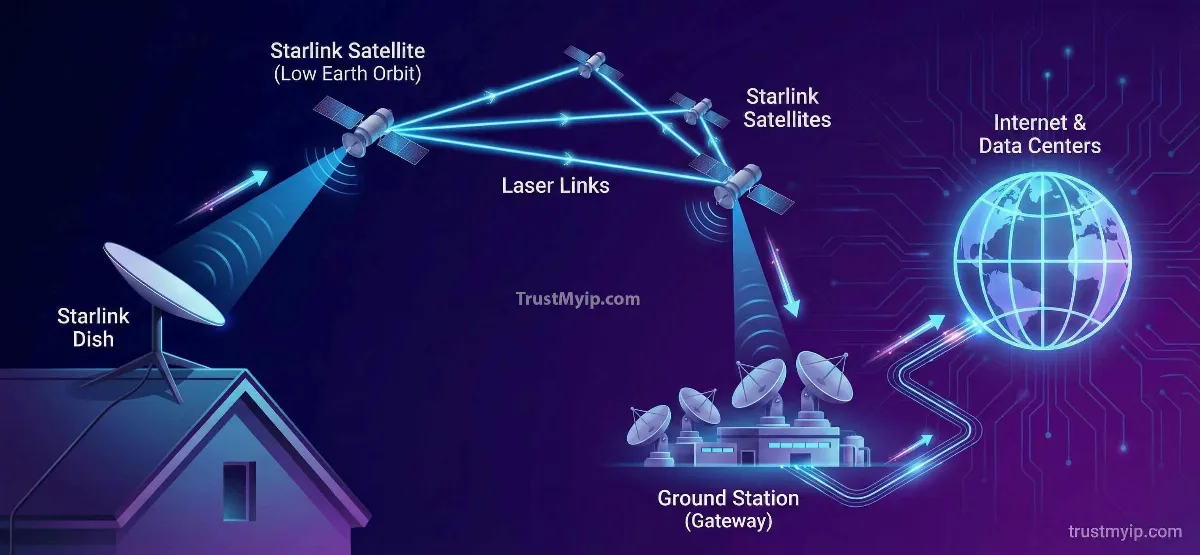
How does Starlink internet work? In three hops: your dish beams data up to a satellite passing overhead, that satellite typically relays it straight down to the nearest ground station rather than routing it through space, and the ground station hands off to the same fiber backbone your neighbor's cable connection uses. The full round trip usually takes 25 to 40 milliseconds in 2026 — down from the 600-plus milliseconds older satellite internet still carries.
That single design choice — flying satellites at roughly 550 kilometers instead of the 35,786 kilometers geostationary satellites use — is the reason Starlink handles video calls, gaming, and streaming when older satellite internet couldn't. Everything else people associate with Starlink, the laser links, the CGNAT addressing, the constant satellite handoffs, exists to support that one low-altitude decision.
Most explanations stop at "satellites talk to each other with lasers," which is true for some traffic and not the default for most of it. An independent academic measurement study tracking real Starlink connections found the network usually takes a single hop to your nearest ground station rather than routing through a mesh of satellites in space — a detail almost every explainer, including an earlier version of this one, gets backwards.
This guide walks through the actual path your data takes, corrects the version of events that's technically wrong but widely repeated anyway, and covers what changed in 2026: a new terminal generation, an expanding Direct to Cell network, and real speed numbers instead of marketing ranges.

I get pulled into Starlink questions on this site more than almost any other topic, and most people start in the wrong place — they ask about IP addresses before they understand the actual network path their data takes. I rewrote this guide from scratch after finding a genuinely inaccurate technical claim in our own earlier version, which is exactly the kind of mistake I try to catch before it costs a reader real understanding.
What surprised me most while updating this: Starlink's actual routing is simpler than the marketing implies. Most of your traffic never bounces satellite-to-satellite through space at all — it takes one hop to the nearest ground station, confirmed by independent network measurement research, not just company claims. I'll flag every place where the popular explanation and the measured reality genuinely differ.
Quick Answer: How Does Starlink Internet Work
Your dish sends data to a low-orbit satellite roughly 550 km up, which usually relays it straight down to your nearest ground station rather than through other satellites, then onto the normal internet backbone. Round trip latency runs 25 to 40 ms in 2026. Check your own numbers with TrustMyIP's ping test.
The Short Answer: How Your Data Actually Gets Online
Starlink internet works by routing your connection through a three-part chain: a user terminal at your home, a constellation of satellites in low Earth orbit, and a network of ground stations that connect back to the terrestrial internet. When you request a webpage, your dish — officially the user terminal, nicknamed Dishy — beams the request to whichever satellite is currently overhead, using a phased-array antenna that steers its signal electronically with no moving parts.
That satellite almost always hands the request straight down to the nearest ground station, which is physically wired into the same fiber-optic backbone that carries traffic for every other ISP. The ground station fetches your data from the open internet and sends it back up through the same path in reverse. Your dish switches to a new satellite every 15 to 30 seconds as the one it's using moves out of range — SpaceX's software handles this automatically, and most users never notice it happening.
How the Dish Tracks a Moving Target Without Moving
The user terminal has no motor and doesn't physically rotate to follow satellites across the sky. It's a phased-array antenna — built from thousands of small antenna elements that adjust their signal timing electronically to steer the beam in different directions, the same underlying principle radar systems use. That's why the dish can retarget from one satellite to the next in a fraction of a second, with zero moving parts to wear out, jam, or fail in bad weather.
All of this talks to your home network as a single connected system. If you're setting up hardware for the first time rather than trying to understand what's happening underneath it, our step-by-step installation walkthrough covers the physical side — mounting, cabling, and activation — while this guide stays focused on what actually happens once you're online.
Why Low Earth Orbit Changes Everything
Starlink satellites orbit at roughly 340 to 570 kilometers above Earth, compared to the 35,786 kilometers traditional satellite internet providers like HughesNet and Viasat use. That altitude difference is the entire reason Starlink feels like normal broadband instead of old-school satellite internet — light itself takes measurably longer to travel the extra 35,000-plus kilometers, and no amount of software optimization can shrink a speed-of-light delay.
| Factor | Starlink (LEO) | Traditional Satellite (GEO) |
|---|---|---|
| Orbital altitude | 340–570 km | 35,786 km |
| Typical latency | 25–60 ms | 600–700 ms |
| Satellites needed for coverage | Thousands (constellation) | One per coverage region |
| Satellite visible time | Minutes, then handoff | Fixed, permanent |
| Good for gaming/video calls | Yes | Generally no |
The trade-off for that low altitude is coverage area — a single geostationary satellite can blanket a third of the planet from one fixed spot, while a single Starlink satellite only covers a small patch of ground for a few minutes before disappearing over the horizon. SpaceX solves this by running a constellation of thousands of satellites arranged so there's always at least one passing overhead anywhere on Earth, handing your connection off automatically as each one moves out of range.
The Journey of Your Data: Dish to Satellite to Internet
Your data's actual path is shorter than most explanations suggest: an uplink from your dish to the nearest overhead satellite, a downlink from that same satellite to your nearest ground station, and a handoff into the normal terrestrial internet — a single "bent-pipe" hop rather than a chain of satellite-to-satellite relays. Researchers running traceroute measurements against live Starlink connections confirmed this directly, finding the network consistently connects to whichever ground station sits closest to the dish, regardless of where the destination server actually is.
This single-hop pattern also shows up in Starlink's published network identity. The service operates its own autonomous system, AS14593, and advertises its IP address blocks directly through Border Gateway Protocol (BGP) rather than routing through a third-party ISP's infrastructure underneath a rebranded label. Starlink runs its own backbone network end to end, not a wireless access layer bolted onto someone else's internet — part of why its routing behavior is consistent enough for researchers to measure and trace in the first place.
That finding matters because it contradicts the popular image of Starlink as a network that bounces your traffic across space to wherever it's headed. In a peer-reviewed measurement study of real end-user Starlink connections, researchers found no evidence of multi-hop satellite routing for the great majority of traffic — instead, one uplink and one ground-station link, then terrestrial fiber the rest of the way, no matter how far the actual destination is.
This single-hop design has a side effect worth knowing about: because your traffic always exits at your nearest ground station rather than one near your destination, geolocation tools sometimes show a city you don't live in, especially if the closest ground station happens to be a few hundred kilometers away in a different metro area. That's a routing quirk, not a sign anything is broken, and it's a normal part of how satellite ISPs work.
None of this means laser links are irrelevant — they're essential for a specific set of situations, and understanding when Starlink actually uses them clears up most of the remaining confusion about how the network really operates.
Laser Links: When Starlink Actually Routes Through Space
Starlink satellites use laser inter-satellite links — infrared beams operating near 1,550 nanometers, the same wavelength used in undersea fiber cables — mainly when there's no ground station within range of the connection, such as over open ocean, polar regions, or other remote areas. Each satellite carries three optical terminals capable of up to 200 Gbps per link, letting satellites relay data to each other without ever touching the ground.
This matters most for maritime users, polar research stations, and remote areas outside the reach of any nearby gateway — situations where a bent-pipe hop to a ground station simply isn't available. SpaceX has also started extending this laser capability outward: engineering leadership demonstrated a compact "mini laser" in 2026 capable of 25 Gbps at distances up to 4,000 kilometers, designed to link third-party satellites into the Starlink mesh rather than just Starlink's own fleet.
SpaceX has taken this even further with a proposed orbital data center concept — a system that would use high-bandwidth optical links to connect dedicated computing satellites directly into the Starlink network, letting data get processed in orbit instead of only relayed through it. The FCC accepted SpaceX's filing for this system for review in February 2026, though acceptance for filing is a procedural step, not operational approval.
For a typical home user with a ground station nearby, laser links stay mostly in the background — present, occasionally used for load balancing, but not the primary reason your Netflix stream loads quickly. That distinction between what's architecturally possible and what actually carries your traffic day to day is the single most misunderstood part of how Starlink works.
How Your Dish Gets an IP Address — and Why It's Rarely a Real One
When your Starlink dish connects, the ground station assigns it an address from a shared address pool rather than a dedicated public IP — a system called Carrier-Grade NAT, or CGNAT. Most residential customers land in the 100.64.0.0/10 shared address range defined for exactly this purpose, meaning the network routes thousands of Starlink users through the same small set of public-facing addresses at once.
CGNAT exists because SpaceX doesn't have enough IPv4 addresses to give every subscriber a unique public one — nobody does anymore, which is the same reason most home ISPs use some form of address sharing today. The practical effect is that port forwarding doesn't work by default, hosting a server from home isn't straightforward, and your visible public IP can shift without warning as the network reassigns addresses across its shared pool. For the full breakdown of getting a dedicated address instead, see our guide to bypassing CGNAT on a Starlink connection.
IPv6 is the partial workaround. Starlink assigns a publicly routable IPv6 prefix to most connections, which technically sidesteps CGNAT entirely — though the stock router's firewall still blocks unsolicited inbound connections by default. For readers who want the fundamentals of how IP assignment normally works on a conventional connection before comparing it to this satellite-specific model, our guide to how IP addresses get assigned is a useful place to start.
A Correction From Our Earlier Coverage
An earlier version of this guide described Starlink's routing as "Anycast." That's inaccurate — Anycast is a specific, well-defined method where multiple separate servers advertise the same IP address so traffic reaches whichever one is nearest, commonly used for DNS and CDN infrastructure. Starlink's satellite handoff system doesn't work that way, and conflating the two terms understates how the network actually operates. Check exactly what address Starlink has assigned you with TrustMyIP's IP lookup tool.
Address assignment explains what your connection looks like from the outside. What actually matters for day-to-day use is how fast and how consistent that connection feels — and the 2026 numbers tell a genuinely different story than they did even a year ago.
Real-World Speed and Latency in 2026
Independent speed-test data from 2026 puts Starlink's US median download speed roughly between 100 and 200 Mbps at typical hours, with a spread from around 110 Mbps at the 25th percentile up to 240 Mbps for well-served users, and median latency generally landing between 25 and 40 milliseconds. Those numbers move around by time of day and local congestion, but they represent a real, measured range rather than a marketing ceiling.
| Period | Median Download | Median Latency |
|---|---|---|
| Q3 2022 | ~54 Mbps | ~40 ms |
| Q1 2025 | ~105 Mbps | ~30 ms |
| Mid-2026 (typical) | 100–200 Mbps | 25–40 ms |
| Mid-2026 (peak hour) | 50–60 Mbps | 50–70 ms |
Speeds climbed as SpaceX launched more satellites with roughly four times the per-satellite capacity of earlier models, expanded ground station count past 100 gateway sites in the US, and pushed software updates that improved beam-forming efficiency. Congestion is still the main variable — speeds commonly drop 20 to 40% during evening peak hours in densely subscribed areas, since everyone on a given satellite shares its available capacity.
Latency and bandwidth measure different things, and mixing them up is a common source of confusion when comparing internet options. Our guide to latency, bandwidth, and throughput breaks down exactly what each term means and why a connection can be "fast" on paper but still feel laggy. Run your own ping test at different times of day to see how much your specific connection varies.
Starlink vs Traditional Satellite vs Cable and Fiber
Starlink beats traditional geostationary satellite internet on every meaningful metric except raw coverage simplicity — speed, latency, and real-time application support all favor the low-orbit design by a wide margin. Cable and fiber still win on raw speed and consistency wherever they're physically buried in the ground, since a wired connection doesn't share bandwidth with an entire orbital cell of other users. The honest comparison depends entirely on what's actually installed at your specific address, not which technology sounds more advanced on paper.
| Connection Type | Typical Speed | Typical Latency | Best For |
|---|---|---|---|
| Starlink (LEO) | 100–220 Mbps | 25–60 ms | Rural, remote, no fiber access |
| HughesNet / Viasat (GEO) | 12–100 Mbps | 600–700 ms | Basic browsing only |
| Cable | 200–1,000+ Mbps | 10–20 ms | Urban and suburban areas |
| Fiber | 500 Mbps–10 Gbps | 5–15 ms | Wherever it's actually installed |
If fiber or cable is genuinely available at your address, it will almost always outperform Starlink on price-to-speed ratio and consistency. Starlink's real advantage shows up specifically where those options don't reach — rural properties, boats, disaster-recovery scenarios, and the millions of addresses terrestrial providers have never built out to.
Beyond Home Internet: Direct to Cell and What's Next
Starlink's Direct to Cell network lets ordinary LTE smartphones connect straight to satellites with no special hardware, no new SIM card, and no app to install — the satellites broadcast standard LTE signals and function as cell towers in orbit, so a phone connects to one the same way it connects to a terrestrial tower on the ground. The switch happens automatically the moment a phone loses ground signal, handling texting, and increasingly voice and data, wherever normal coverage doesn't reach.
As of 2026, SpaceX has more than 650 Direct to Cell satellites in orbit, live with carrier partners including T-Mobile in the US, Rogers in Canada, Optus in Australia, and carriers in Japan, Chile, and Peru, with more countries added through the year.
Voice calling moved out of beta in late 2025, and January 2026 brought FCC authorization for 7,500 additional next-generation satellites, pushing the total approved constellation size to 15,000. Not every one of those will carry Direct to Cell hardware, but the authorization gives SpaceX substantial room to keep scaling both the home-internet and cellular sides of the network simultaneously.
This growth isn't happening without friction. Regulators and independent researchers have raised real concerns about the sheer number of satellites involved — light pollution affecting astronomical research, orbital debris risk, and questions about how existing rural-broadband subsidy programs should adapt now that satellite service covers areas they were originally designed to reach. Independent broadband policy research published in 2026 documents these trade-offs in detail, and the FCC rejected at least one SpaceX spectrum expansion request in April 2026, showing the growth isn't unconditional.
None of this changes how the network works for a home user today, but it's a reasonable preview of where the "how does Starlink work" question is heading next — less a home-internet story alone, and more a single satellite platform quietly absorbing home broadband, cellular backup, and orbital computing under one constellation.
Why Your Connection Slows Down or Drops
Most Starlink slowdowns trace back to one of three causes: a partially obstructed sky view, evening congestion in your local satellite cell, or a routine satellite handoff that briefly interrupts an active connection. None of these mean the hardware is faulty, and all three show up in predictable, checkable patterns. Knowing which of the three you're dealing with is usually obvious once you know what to check — the Starlink app surfaces most of the relevant signal directly on its status screen.
Obstructions
Even a single tree branch blocking part of the sky can trigger repeated micro-dropouts as your dish loses and reacquires satellites. The Starlink app's built-in scanner will flag this directly.
Evening Congestion
Speeds commonly drop 20 to 40% between roughly 7 and 11 PM local time in densely subscribed areas, as everyone sharing your satellite's capacity comes online at once.
Satellite Handoffs
Every 15 to 30 seconds, your dish switches to a new satellite. This is normally invisible to you, but a brief stutter during the switch is occasionally noticeable on latency-sensitive tasks.
Most of these three causes are preventable at installation time rather than something to troubleshoot after the fact. A dish mounted with a genuinely clear sky view, checked against the app's obstruction scanner before it's bolted down permanently, avoids the majority of dropout complaints people post about online. Congestion and handoffs are largely out of your control, but obstruction is the one variable you fully own.
Conclusion: A Simpler System Than It Gets Credit For
How does Starlink internet work, in the end? Closer to normal broadband than science fiction: a low-orbit satellite relay standing in for the cable or fiber line other providers bury underground, doing one hop to the nearest ground station for most traffic rather than a dramatic space-based routing mesh. The low altitude is what makes the whole system usable for real-time applications; almost everything else is engineering built to support that one decision reliably.
Understanding the actual path your data takes also explains the parts that confuse people most — why port forwarding doesn't work by default, why your IP can shift, why a nearby tree causes more trouble than distance ever will. None of that is a flaw unique to Starlink; it's what any CGNAT-based, shared-infrastructure network looks like from the inside.
Whatever you're troubleshooting or planning, start by checking what your connection is actually doing right now — your real latency, your real download speed, your real assigned IP — rather than what a marketing page promises it should do. The gap between the two is usually smaller than people expect once you're looking at your own numbers instead of someone else's average.
See What Your Connection Is Really Doing
Check your real latency, confirm your assigned IP address, and see exactly how your Starlink connection is routing right now.