Ever wondered what actually happens to your data the moment you click "Connect" on your VPN? Understanding how VPN tunnels encrypt data reveals the invisible cryptographic process protecting every byte you send online—transforming readable emails, passwords, and browsing activity into unbreakable ciphertext that hackers, ISPs, and government surveillance systems cannot decode even with supercomputers.
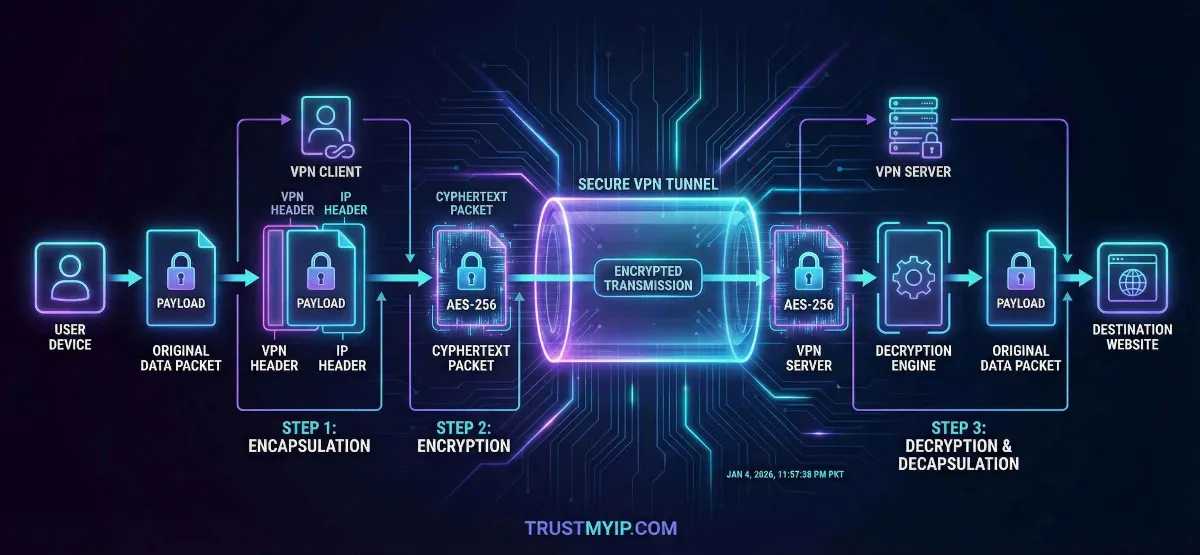
A VPN tunnel creates a secure, encrypted pathway between your device and a remote server using military-grade encryption algorithms like AES-256 and ChaCha20. Your original data gets wrapped inside encrypted packets through a process called encapsulation, making it invisible to anyone monitoring your network—including your own ISP. This encrypted tunnel operates at the network layer, protecting everything from browser traffic to background app communications simultaneously.
This comprehensive 2026 guide breaks down each encryption phase step by step: from the initial cryptographic handshake establishing secure keys, through the symmetric encryption process protecting your actual data, to the integrity verification ensuring packets arrive unmodified. You will learn how different VPN protocols like WireGuard, OpenVPN, and IKEv2 implement these processes differently, why Perfect Forward Secrecy matters for long-term protection, and how to verify your VPN tunnel actually works without leaking your real identity.

"After twenty years auditing corporate VPN infrastructures and testing encryption implementations across hundreds of providers, I have witnessed a dangerous gap between what users believe VPN encryption does and what actually happens inside the tunnel. Most people assume clicking 'Connect' magically protects everything—but the reality involves complex cryptographic negotiations happening in milliseconds that determine whether your data gets truly protected or merely obscured.
The difference between a properly encrypted VPN tunnel and a weak one comes down to three critical factors: the handshake protocol establishing session keys, the cipher algorithm transforming your data, and whether Perfect Forward Secrecy ensures past sessions remain unbreakable even if current keys get compromised. I have personally audited VPN services where the marketing promised AES-256 encryption but the actual implementation used deprecated ciphers vulnerable to known attacks. Understanding these mechanisms empowers you to verify rather than blindly trust—because in cybersecurity, assumptions create vulnerabilities."
Quick Answer: How VPN Tunnels Encrypt Data
VPN tunnels encrypt data through a three-phase process: (1) Cryptographic handshake where your device and VPN server exchange encryption keys using asymmetric algorithms like RSA or Diffie-Hellman, (2) Symmetric encryption where your actual data gets transformed into unreadable ciphertext using fast algorithms like AES-256 or ChaCha20, and (3) Integrity verification using HMAC hashing to confirm packets arrive unmodified. Your data travels inside encrypted packets wrapped through encapsulation—your original packet gets placed inside a new outer packet with a different IP header, making it invisible to ISPs, hackers, and surveillance systems monitoring your network traffic. Different VPN protocols (WireGuard, OpenVPN, IKEv2) implement these phases using different algorithms, affecting both security strength and connection speed.
1. What is a VPN Tunnel? The Architecture Explained
A VPN tunnel is not a physical cable or dedicated connection—it is a logical encrypted pathway created over your existing internet infrastructure. Whether you connect through Comcast, Verizon, Starlink satellite, or coffee shop WiFi, the tunnel wraps your data inside encrypted packets that travel across the same public internet infrastructure everyone else uses, but remain completely unreadable to outside observers.
The tunnel works through a process called encapsulation. Your original data packet (containing your real IP address, destination website, and actual content) gets placed inside a completely new packet. This outer packet carries the VPN server's IP address instead of yours, and the inner payload stays encrypted—meaning anyone intercepting the outer packet sees only the VPN server address and scrambled data they cannot decode.
Unlike a standard proxy that works at the application level (only protecting browser traffic), a VPN tunnel operates at OSI Layer 3 (Network Layer). This critical distinction means it encrypts everything leaving your device—browser requests, email clients, background app communications, system updates, DNS queries, and every other network process. Nothing escapes the tunnel unless you specifically configure split tunneling exceptions.
| Connection Type | Encryption Level | What ISP Sees | Protection Scope |
|---|---|---|---|
| No Protection | None | Everything: sites visited, data sent, real IP | Zero protection |
| HTTPS Only | TLS (site-level) | Which domains you visit, connection times, data volume | Content encrypted, metadata exposed |
| Proxy Server | Varies (often none) | Connection to proxy server, some DNS queries | Browser only, app-level |
| VPN Tunnel | AES-256 / ChaCha20 (full) | Only that you connected to a VPN server—nothing else | Entire device, all traffic |
Before examining encryption mechanics: First check what your connection currently exposes without VPN protection. Use our IP identity checker to see your raw public IP address, ISP details, and geographic location visible to every website you visit—this baseline helps you understand exactly what the VPN tunnel needs to hide.
2. Phase 1: The Cryptographic Handshake (Key Exchange)
Before your VPN encrypts a single byte of data, your device and the VPN server must agree on HOW to communicate securely. This negotiation process—called the cryptographic handshake—establishes shared encryption keys without ever transmitting them across the open internet where attackers could intercept them.
The handshake uses asymmetric encryption (public/private key pairs) to solve a fundamental problem: how do two parties who have never communicated before create a shared secret key over a public network? The answer lies in mathematical algorithms like Diffie-Hellman (DH), Elliptic Curve Diffie-Hellman (ECDH), or RSA key exchange that allow both sides to independently compute the same session key without directly sharing it.
The VPN Handshake Process Step by Step
1 Client Hello: Your Device Initiates Contact
Your VPN app sends a "Client Hello" message to the VPN server containing supported cipher suites (encryption algorithms), protocol version, and a random number used for key generation. This message travels unencrypted but contains no sensitive data—only capabilities negotiation.
2 Server Response: Certificate and Parameters
The VPN server responds with its digital certificate (proving identity), selected cipher suite, its own random number, and Diffie-Hellman parameters. Your device verifies the certificate against trusted Certificate Authorities ensuring you connected to the legitimate server—not an impersonator.
3 Key Exchange: Generating the Shared Secret
Both sides exchange Diffie-Hellman public values and independently compute the identical Pre-Master Secret using their private keys. Neither side transmits the actual secret—they each calculate it independently using exchanged parameters. An attacker intercepting the exchange cannot compute this secret without solving computationally impossible mathematical problems.
4 Session Keys Derived: Encryption Ready
From the Pre-Master Secret plus both random numbers, both sides derive identical session keys for symmetric encryption, MAC keys for integrity checking, and initialization vectors for cipher operations. The handshake completes—encrypted communication begins using these shared keys.
Why Perfect Forward Secrecy (PFS) Matters
Perfect Forward Secrecy ensures each VPN session uses completely unique encryption keys that get destroyed after disconnection. Without PFS, an attacker who compromises the server's long-term private key could retroactively decrypt ALL previously recorded encrypted sessions—a devastating scenario for anyone whose encrypted traffic was stored by surveillance agencies.
With PFS enabled (using ephemeral Diffie-Hellman keys), each session generates fresh keys independently. Even if an attacker obtains current session keys, they cannot decrypt past or future sessions. Modern protocols like WireGuard and properly configured OpenVPN implement PFS by default—always verify your VPN provider enables this critical protection.
3. Phase 2: Symmetric Encryption (Protecting Your Data)
Once the handshake establishes shared session keys, the VPN switches to symmetric encryption for actual data protection. Symmetric algorithms use the SAME key for both encrypting and decrypting—making them dramatically faster than asymmetric methods while maintaining strong security when key length exceeds 128 bits.
Every packet leaving your device passes through the encryption engine before entering the tunnel. Your original data (plaintext) gets mathematically transformed into unreadable ciphertext using the session key. On the VPN server end, the same key reverses the process—restoring your original data before forwarding it to its destination on the internet.
| Cipher Algorithm | Key Size | Speed | Used By |
|---|---|---|---|
| AES-256-GCM | 256-bit | Fast (hardware accelerated) | OpenVPN, IKEv2, most VPNs |
| ChaCha20-Poly1305 | 256-bit | Very fast (software optimized) | WireGuard default cipher |
| AES-128-CBC | 128-bit | Fastest AES variant | Older VPN configurations |
| Camellia-256 | 256-bit | Comparable to AES | Alternative in OpenVPN configs |
AES-256 vs ChaCha20: Which Cipher Wins in 2026?
AES-256-GCM remains the industry standard for VPN encryption, adopted by governments and military organizations worldwide. Modern processors include dedicated AES-NI hardware instructions making encryption nearly free in terms of CPU overhead—perfect for desktop and server environments where hardware acceleration exists.
ChaCha20-Poly1305 excels on mobile devices and older hardware lacking AES hardware acceleration. WireGuard chose ChaCha20 as its default cipher because it performs 3-4 times faster than AES in pure software implementations—delivering better battery life on smartphones while maintaining equivalent 256-bit security strength.
Both ciphers provide effectively unbreakable encryption in 2026. Breaking AES-256 through brute force requires testing 2^256 possible keys—a number exceeding atoms in the observable universe. ChaCha20 offers identical mathematical security with different performance characteristics. Your choice depends on device hardware rather than security concerns.
4. Phase 3: Integrity Verification and Authentication
Encryption alone does not guarantee security. An attacker cannot read your encrypted data, but they could potentially modify encrypted packets in transit—injecting malicious content or altering destination addresses. Integrity verification through HMAC (Hash-based Message Authentication Code) prevents this by attaching a cryptographic fingerprint to every packet.
When your VPN encrypts a packet, it simultaneously generates a hash value computed from the packet contents plus a secret key. The receiving server independently computes the same hash and compares results. If even a single bit changed during transit—whether from network corruption or deliberate tampering—the hashes mismatch and the packet gets dropped immediately, triggering retransmission of the original data.
Integrity Hashing (HMAC)
HMAC-SHA256 generates a 256-bit digital fingerprint for every encrypted packet. This fingerprint depends on both the packet content AND a secret authentication key—meaning attackers cannot forge valid hashes without knowing the key, even if they understand the hashing algorithm completely.
Server Authentication
Digital certificates verify the VPN server's identity during every connection, preventing man-in-the-middle attacks where hackers impersonate legitimate servers. Certificate pinning ensures your VPN app only trusts specific certificates—rejecting forged ones even if signed by compromised Certificate Authorities.
The combination of encryption (confidentiality), HMAC (integrity), and certificate verification (authentication) creates the three pillars of VPN tunnel security. Modern cipher modes like AES-GCM and ChaCha20-Poly1305 combine encryption and authentication into a single operation called AEAD (Authenticated Encryption with Associated Data)—improving both security and performance compared to older separate implementations.
5. VPN Protocols Compared: The Engines Behind the Tunnel
The VPN protocol determines how your tunnel gets built, which encryption algorithms protect your data, and how fast the connection performs. In 2026, three protocols dominate the landscape—each implementing the handshake, encryption, and verification phases differently with distinct strengths for different use cases.
Choosing the right protocol affects your daily experience significantly. The wrong choice means slower speeds, dropped connections on mobile networks, or weaker encryption that sophisticated attackers could potentially exploit. Understanding protocol differences empowers you to configure your VPN optimally rather than accepting default settings that may not match your threat model. For a deeper comparison of privacy tool approaches, see our VPN versus proxy comparison guide.
| Protocol | Encryption | Speed | Best Use Case |
|---|---|---|---|
| WireGuard | ChaCha20-Poly1305 | Fastest (4,000 lines of code) | Gaming, streaming, mobile, daily browsing |
| OpenVPN | AES-256-GCM / AES-256-CBC | Moderate (600,000+ lines of code) | Corporate security, strict firewall bypass |
| IKEv2/IPSec | AES-256-GCM | Fast (native OS integration) | Mobile roaming, WiFi-to-cellular switching |
| SSTP | AES-256 over SSL/TLS | Moderate | Windows environments, HTTPS firewall bypass |
WireGuard represents the future of VPN tunneling in 2026 with dramatically simplified code (4,000 lines versus OpenVPN's 600,000+), faster connection times (100ms versus several seconds), and built-in modern cryptography. Its smaller codebase means fewer potential vulnerabilities and easier security auditing. However, OpenVPN remains preferred in corporate environments where its maturity, extensive configuration options, and proven track record matter more than raw speed.
6. Why VPN Tunnels Fail: Common Encryption Leaks
Even the strongest AES-256 encryption becomes worthless if your data escapes the tunnel through side channels. VPN leaks occur when certain types of traffic bypass the encrypted tunnel—exposing your real IP address, DNS queries, or browsing activity despite an active VPN connection. Understanding these failure modes helps you verify your tunnel actually protects everything it claims to.
Leaks happen at multiple layers: DNS resolution requests may bypass the tunnel reaching your ISP's servers, WebRTC browser APIs can reveal your real IP through peer-to-peer connections, IPv6 traffic may route outside an IPv4-only tunnel, and VPN connection drops leave you temporarily unprotected. Each leak type requires specific detection and mitigation strategies beyond simply connecting to a VPN. For comprehensive leak detection, learn how to check if your VPN is leaking through systematic testing procedures.
Critical VPN Tunnel Leak Vectors
- DNS Leaks: Your browser bypasses the VPN tunnel to resolve domain names through your ISP's DNS servers—revealing every website you visit despite encrypted traffic. Use our DNS leak auditor to verify your DNS queries route through the VPN tunnel exclusively.
- WebRTC Leaks: Modern browsers can expose your real private and public IP addresses through WebRTC peer connection APIs—completely bypassing VPN encryption at the application layer. Run a dedicated WebRTC leak test and implement browser-level fixes preventing this exposure.
- IPv6 Leaks: Many VPN tunnels only encrypt IPv4 traffic while your device simultaneously sends unencrypted IPv6 packets—exposing your real IPv6 address to monitoring systems. Verify your VPN handles both protocols or disable IPv6 at the OS level.
- Kill Switch Failures: When VPN connections drop, your device reverts to unprotected internet—exposing everything until the tunnel reconnects. A properly configured VPN kill switch prevents this by blocking all traffic during disconnection.
- IP Address Conflicts: When your VPN tunnel subnet matches your local LAN network (both using 192.168.1.x), routing conflicts crash the tunnel or leak traffic. Read our IP conflict resolution guide for solutions.
Comprehensive leak testing should happen every time you change VPN servers, update VPN software, or switch networks. Use our browser leak detection tool to run complete privacy audits checking DNS, WebRTC, IPv6, and fingerprinting exposure simultaneously—revealing exactly which leak vectors your current configuration leaves open.
7. VPN Encryption vs Other Privacy Tools
VPN tunnel encryption represents one approach to online privacy, but understanding how it compares to alternatives helps you build comprehensive protection strategies. Different tools encrypt data differently, protect different traffic types, and address different threat models—making layered combinations more effective than any single solution.
A VPN tunnel protects data in transit between your device and the VPN server, but privacy requires more than just encryption. Your browser fingerprint, login patterns, and behavioral data can identify you regardless of IP masking. Combining VPN encryption with additional privacy techniques creates stronger overall protection than relying on any single tool.
| Privacy Tool | Encryption Type | Hides IP? | Limitation |
|---|---|---|---|
| VPN Tunnel | AES-256 / ChaCha20 (full device) | Yes (replaces with VPN server IP) | Trust required in VPN provider |
| Tor Network | Multi-layer (3 relays) | Yes (through onion routing) | Very slow, exit node risk |
| Proxy Server | Usually none (SOCKS5 optional) | Partially (app-level only) | No encryption, browser-only |
| Incognito Mode | None (local privacy only) | No—IP fully exposed | Only deletes local browsing data |
Many users mistakenly believe incognito mode hides their IP address—it does not. Incognito mode only prevents your browser from saving local history, cookies, and cache. Websites, ISPs, and network administrators still see your real IP address and complete browsing activity. Only VPN tunnel encryption or Tor routing actually hides your network identity from external observers.
For maximum anonymity, some users combine VPN encryption with Tor routing—connecting to VPN first, then launching Tor Browser through the encrypted tunnel. This approach hides VPN usage from your ISP while adding Tor's multi-relay anonymity. Compare the tradeoffs in our Tor browser versus VPN privacy guide to determine which approach matches your specific threat model and performance requirements.
8. Beyond Encryption: What VPN Tunnels Cannot Protect
Understanding VPN tunnel limitations prevents dangerous false confidence. While encryption effectively protects data in transit, several identity layers exist beyond what any VPN tunnel can mask—and confusing encryption with complete anonymity creates security gaps attackers exploit.
A VPN tunnel operates at OSI Layer 3 (Network Layer), hiding your public IP address and encrypting traffic content. However, your MAC address remains visible to your local router at Layer 2, browser fingerprinting identifies you through unique device characteristics at the application layer, and login-based tracking follows your identity regardless of IP changes. Understanding the difference between MAC addresses and IP addresses clarifies exactly which identity layer the VPN tunnel protects.
What VPN Encryption Does and Does Not Protect
- • Protected: Public IP address hidden behind VPN server IP—websites see VPN location, not yours
- • Protected: All network traffic encrypted—ISP sees only encrypted packets to VPN server
- • Protected: DNS queries (when properly configured)—prevents ISP from logging visited websites
- • NOT Protected: MAC address visible to local network devices and router administrators
- • NOT Protected: Browser fingerprint (screen resolution, fonts, extensions, WebGL) uniquely identifies your device
- • NOT Protected: Logged-in accounts (Google, Facebook, Amazon) track activity regardless of IP
- • NOT Protected: Files downloaded through the tunnel—malware in downloads survives decryption
- • NOT Protected: Physical location if GPS/location services remain enabled on mobile devices
For comprehensive privacy beyond VPN encryption, explore multiple methods to hide your IP address that complement tunnel encryption with additional privacy layers. Combining VPN encryption with privacy-focused browsers, cookie management, and careful account separation creates significantly stronger anonymity than encryption alone.
Conclusion: Mastering VPN Tunnel Encryption in 2026
Understanding how VPN tunnels encrypt data transforms you from a passive user clicking "Connect" into an informed practitioner who verifies, configures, and maintains genuine encryption protection. The three-phase process—cryptographic handshake establishing secure keys, symmetric encryption protecting your actual data with AES-256 or ChaCha20, and integrity verification through HMAC preventing tampering—creates the foundation of every secure VPN connection.
Protocol selection matters significantly for your security and performance. WireGuard delivers the fastest connections with modern ChaCha20 encryption ideal for daily browsing, gaming, and mobile use. OpenVPN provides maximum configurability with AES-256-GCM for corporate environments requiring strict compliance. IKEv2/IPSec excels at maintaining connections during network transitions on mobile devices.
Perfect Forward Secrecy ensures each session uses unique keys that get destroyed after disconnection—protecting past communications even if current keys become compromised. Always verify your VPN provider implements PFS through ephemeral key exchange rather than static keys that could retroactively expose historical sessions if compromised.
Remember that encryption only protects data inside the tunnel. DNS leaks, WebRTC exposure, IPv6 bypasses, and kill switch failures can expose your real identity despite active encryption. Regular leak testing, proper browser configuration, and layered privacy practices ensure your VPN tunnel delivers the protection you expect rather than creating false confidence in incomplete security.
Audit your current VPN tunnel configuration today by checking for DNS leaks through our diagnostic tools, running WebRTC leak tests in your browser, verifying kill switch functionality through controlled disconnection testing, and confirming your VPN protocol uses modern encryption with Perfect Forward Secrecy enabled. Proactive verification transforms VPN encryption from assumed protection into verified security.
Is Your VPN Tunnel Truly Secure?
Encryption means nothing if your IP is leaking. Audit your DNS health, check for WebRTC leaks, and verify your complete privacy posture with our professional diagnostic tools.