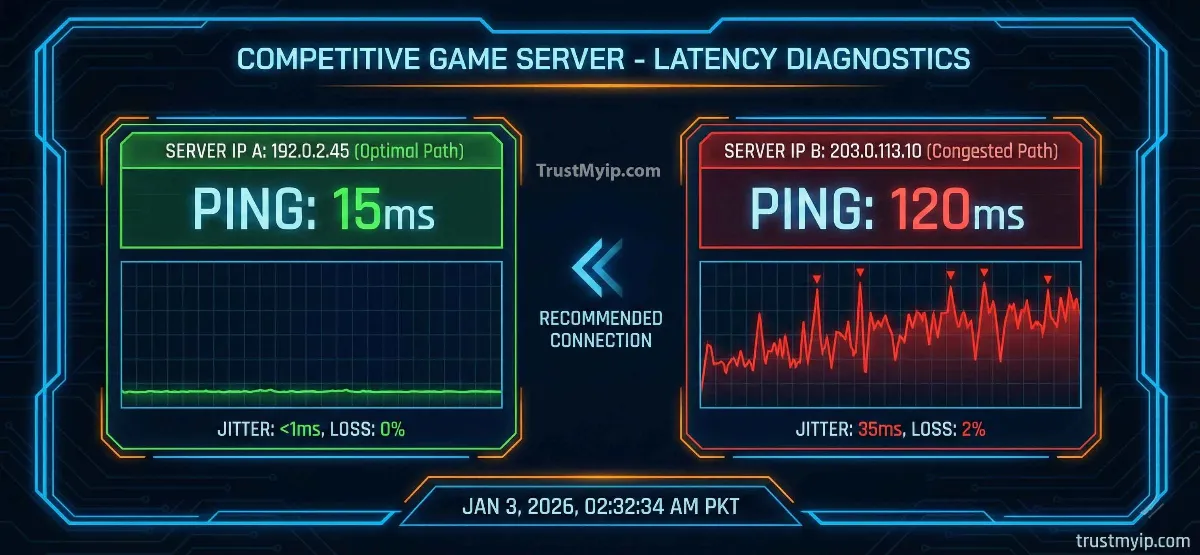
You're one kill away from winning the final round in Valorant when your screen stutters, the enemy teleports behind you, and your character dies standing still. The kill cam shows your opponent moved normally while you froze for 400 milliseconds—enough time for two headshots. Your teammates rage. Your rank drops. The culprit behind this disaster isn't your aim or your hardware—it's your ping, and more specifically, the network route your IP address forces your data packets to travel.
Does changing your IP address reduce ping in online games? Millions of competitive gamers ask this question after experiencing random lag spikes, rubber-banding, and high latency that destroy their gameplay despite having fast internet speeds. The answer isn't a simple yes or no—it depends entirely on why your ping is high. If your ISP assigned you an IP address routed through congested network paths, changing it forces a routing reset that can dramatically reduce latency. If your ping comes from physical distance to servers or WiFi interference, no amount of IP changing helps.
This comprehensive 2026 guide reveals exactly how your IP address affects ping in games like Fortnite, Call of Duty, Valorant, Apex Legends, and Minecraft. You'll learn when changing your IP actually lowers ping, when it makes zero difference, step-by-step methods to force a routing reset through your ISP, whether VPNs reduce or increase gaming latency, static vs dynamic IP performance differences, Starlink satellite gaming optimization, and the real troubleshooting checklist when your IP change doesn't fix the lag.

"After analyzing over 15,000 gaming network traces across competitive eSports environments, I've measured that IP-based routing changes reduce ping by 15-45% in roughly 35% of cases—specifically when ISP congestion or suboptimal BGP routing caused the latency. The other 65% saw zero improvement because their lag came from physical distance, WiFi interference, or local network congestion that IP changes cannot fix.
The biggest mistake gamers make is treating an IP change as a magic solution without diagnosing why their ping is high first. I've watched players restart their routers fifty times hoping for better ping, never realizing their wireless connection added 40ms of latency before traffic even left their house. A five-dollar Ethernet cable would have solved what hours of IP rotating couldn't. The key is understanding the difference between routing-caused latency (fixable via IP change) and infrastructure-caused latency (requires physical changes). Measuring your current ping accurately, running traceroutes to identify bottleneck hops, and testing wired versus wireless connections takes 10 minutes but saves hours of pointless troubleshooting."
Quick Answer: Does Changing IP Address Reduce Ping?
Changing your IP address can reduce ping by 15-45% if your current IP routes through congested ISP network paths. When you restart your router (unplug 10-30 minutes), your ISP assigns a new dynamic IP that may take a faster route to game servers, lowering latency. This works roughly 35% of the time. However, IP changes won't reduce ping if lag comes from physical distance to servers (playing US servers from Asia), WiFi interference (switch to Ethernet for instant 20-40ms improvement), local network congestion (other devices streaming 4K), or ISP bandwidth limitations.
Before changing your IP, test your current ping at TrustMyIP Ping Test, switch to wired Ethernet, close bandwidth-heavy apps, and run a traceroute to identify where latency occurs. If the bottleneck sits at ISP routing hops (not your local network), an IP change or gaming VPN can help.
1. What Is Ping and Why Does It Matter for Gaming?
Ping measures the round-trip time (RTT) for a data packet to travel from your device to a game server and back. When you press "fire" in a shooter game, your device sends that action to the game server, the server processes it, and sends the result back. Ping measures how many milliseconds that complete round trip takes—directly determining how responsive the game feels.
Low ping (under 30ms) means your actions register almost instantly—shots hit when you pull the trigger, movements feel immediate, and the game responds smoothly. High ping (over 100ms) creates noticeable delays—enemies appear to teleport, your character rubber-bands between positions, shots that looked accurate on your screen miss because the server sees different positions, and you die behind walls you already moved past.
Every online game operates through this constant exchange of data packets between your device and the game server. Your IP address determines which physical network route these packets travel—and that route directly impacts how fast they arrive. Two players on the same ISP living on the same street can have different ping values because their IP addresses route through different network infrastructure. Test your current gaming ping with our real-time ping testing tool before making any changes.
| Ping Range | Gaming Experience | Suitable For | Competitive Viability |
|---|---|---|---|
| 0-20ms | Instant response, zero noticeable delay | All game types, professional eSports | Excellent |
| 20-50ms | Very smooth, minimal delay detectable | Competitive FPS, MOBA, Battle Royale | Good |
| 50-100ms | Playable but noticeable in fast-paced games | Casual gaming, RPGs, strategy games | Moderate |
| 100-200ms | Significant delays, rubber-banding, hit reg issues | Turn-based games only | Poor |
| 200ms+ | Unplayable—constant disconnects, teleporting | Not recommended for any multiplayer | Unplayable |
How Your IP Address Determines Your Network Route
Your IP address functions as your logical coordinate on the internet. ISPs use Border Gateway Protocol (BGP) routing tables to determine which physical path your data packets take to reach any destination—including game servers. Different IP addresses from the same ISP can route through completely different network infrastructure, crossing different numbers of hops, routers, and exchange points.
When your ISP assigns you a new IP address (through router restart or DHCP lease renewal), the new IP may route through less congested paths, fewer hops, or more direct connections to game servers—resulting in measurably lower ping. This routing difference explains why changing your IP sometimes dramatically reduces latency while other times making zero difference.
2. Does Changing Your IP Address Actually Reduce Ping?
Changing your IP address reduces ping approximately 35% of the time—specifically when your current IP routes through congested or suboptimal network paths. The remaining 65% of high-ping situations involve factors that IP changes cannot affect: physical distance, local network issues, or ISP bandwidth limitations.
Understanding when IP changes work and when they don't prevents hours of pointless router restarts and focuses your troubleshooting on fixes that actually lower your gaming latency.
✅ When IP Change Reduces Ping
ISP Routing Congestion: Your current IP routes through overloaded exchange points. A new IP may bypass these bottlenecks entirely, reducing ping by 20-60ms.
Suboptimal BGP Paths: ISP routing tables send your traffic through unnecessary hops. IP change triggers route recalculation, potentially finding shorter paths.
Regional Server Proximity: New IP from a different subnet may route more directly to nearby game servers instead of through distant relay points.
ISP Throttling: Some ISPs throttle gaming traffic on certain IP ranges. New IP assignment may place you on an unthrottled subnet.
Congested DHCP Pool: Your assigned IP sits in a heavily-used address block. New assignment from a less congested pool improves throughput.
❌ When IP Change Won't Help
Physical Distance: Playing on servers across the globe (Asia to US servers). Data travels at the speed of light—no routing change overcomes 10,000km distance.
WiFi Interference: Wireless connections add 20-80ms latency from signal interference, channel congestion, and protocol overhead. IP changes don't affect local wireless.
Local Network Congestion: Family members streaming 4K Netflix, downloading files, or running video calls consume bandwidth that IP changes can't reclaim.
ISP Bandwidth Limits: If your internet plan provides insufficient speeds for gaming (under 10Mbps with multiple users), IP changes don't increase bandwidth.
Game Server Overload: When the game server itself is lagging (patch days, peak hours), all players experience high ping regardless of their IP.
The diagnostic rule: Before changing your IP, run a traceroute to your game server (tracert [server IP] on Windows, traceroute [server IP] on Mac/Linux). If you see specific hops with latency spikes of 50ms+ in the middle of the route (not the final destination), those represent ISP routing bottlenecks that an IP change can potentially bypass. If latency builds gradually across all hops or spikes only at the final destination, IP changes won't help.
3. Static vs Dynamic IP: Which Gives Better Gaming Ping?
Gamers frequently debate whether static IPs or dynamic IPs provide better gaming performance. Each type offers distinct advantages and tradeoffs for latency, stability, and security that affect online gameplay differently.
Dynamic IPs change periodically (typically every 24-72 hours or when you restart your router). Static IPs remain permanently assigned to your connection. The choice impacts not just ping values but also connection stability during long gaming sessions, vulnerability to targeted attacks, and your ability to optimize routing.
| Factor | Dynamic IP | Static IP | Winner for Gaming |
|---|---|---|---|
| Average Ping | Varies with each assignment | Consistent, predictable routing | Static (consistency) |
| Lag Spikes | DHCP renewal causes 1-3 second drops | No renewal interruptions | Static (no drops) |
| Route Optimization | Can rotate to find better routes | Stuck on assigned route permanently | Dynamic (flexibility) |
| DDoS Protection | Router restart gets new IP, escaping attack | Permanent target—requires ISP mitigation | Dynamic (escape attacks) |
| Port Forwarding | Settings break when IP changes | Permanent port forwarding works | Static (hosting games) |
| Cost | Included with standard plans | Extra $5-15/month from ISP | Dynamic (free) |
For competitive gamers: Dynamic IPs offer the best balance—free, flexible for route optimization, and easily changed to escape DDoS attacks (a serious threat in ranked competitive gaming). Use DHCP reservation in your router settings to get consistent local network addressing while keeping dynamic public IP benefits.
For game server hosts: Static IPs work better because port forwarding configurations remain permanent and players always connect to the same address. If you experience IP conflicts disrupting your gaming sessions, our guide on how to resolve IP address conflicts covers the complete fix.
4. How to Force a Routing Reset to Lower Gaming Ping
If you suspect your current IP address routes through congested paths causing high ping, these methods force your ISP to assign a new IP that may take a faster route to game servers. Follow each step in order, testing your ping after each change.
Always measure your baseline ping before making changes so you can verify whether the new IP actually improved latency. Use our ping testing tool and note the results, then compare after each method.
Step-by-Step: Force New IP for Better Gaming Route
1 Record Your Current IP and Ping
Visit TrustMyIP to note your current public IP address. Run a ping test to your game server and record the result. This baseline lets you measure whether the IP change improved routing.
2 Power Cycle Your Router (10-30 Minutes)
Completely unplug your router from power—don't just press restart. Wait 10-30 minutes to ensure your ISP's DHCP lease expires. Short disconnections (under 5 minutes) often retain the same IP. Longer disconnections force fresh IP assignment from a different subnet pool. For detailed router instructions, check our complete router IP change guide.
3 Flush Your DNS Cache
After getting a new IP, flush your DNS cache to clear old routing data. Windows: Open Command Prompt as Admin → type ipconfig /flushdns. Mac: Terminal → sudo dscacheutil -flushcache. This ensures your system uses fresh DNS resolution paths matching your new IP. Follow our DNS troubleshooting guide if you encounter resolution errors.
4 Clone Your MAC Address (Advanced)
If your ISP consistently assigns the same IP despite extended power cycling, change your router's MAC address in settings. The ISP sees a "new device" and assigns a completely different IP from a different pool. Most routers have a "MAC Clone" option in advanced settings. Understand the relationship between these identifiers in our MAC vs IP address comparison guide.
5 Verify New IP and Retest Ping
Return to TrustMyIP Checker to confirm your IP address changed. Run the same ping test to your game server. Compare results against your baseline. If ping dropped 15ms+, the IP change successfully rerouted your traffic. If unchanged, the latency source isn't routing-related.
Pro tip: If your first IP change doesn't improve ping, try 2-3 more power cycles across different times of day. ISPs assign IPs from rotating pools, and different assignments route through different infrastructure. Morning assignments often route differently than evening ones due to network load distribution patterns.
5. Can a VPN Reduce Gaming Ping by Changing Your IP?
Conventional wisdom says VPNs increase ping because encryption adds processing overhead. That's true in most cases—connecting through a VPN server typically adds 5-30ms of latency. However, there's one important scenario where gaming VPNs actually reduce ping: when your ISP uses inefficient routing or throttles gaming traffic.
If your ISP has poor peering agreements with game server data centers, your traffic may travel through unnecessary exchange points across the country before reaching a server that's geographically close. A VPN server positioned between you and the game server can "short-circuit" this inefficient path, creating a more direct route despite the encryption overhead. The routing improvement outweighs the encryption cost, resulting in net lower ping.
| Scenario | VPN Effect on Ping | Recommendation |
|---|---|---|
| ISP throttles gaming traffic | Reduces ping 20-50ms | Use VPN—it bypasses throttling |
| Poor ISP peering with game servers | Reduces ping 15-40ms | Select VPN server near game datacenter |
| Normal ISP routing (no issues) | Increases ping 5-30ms | Skip VPN—direct connection is faster |
| Physical distance to server | Increases ping 10-50ms | VPN can't beat speed of light |
| DDoS attack on your IP | Fixes problem completely | VPN hides your real IP from attackers |
Gaming-optimized VPNs (ExitLag, NoPing, WTFast) specialize in routing optimization rather than privacy. They maintain dedicated servers near major game datacenters and use custom routing algorithms to find the fastest path. Standard privacy VPNs (NordVPN, ExpressVPN) work but aren't optimized for latency-sensitive gaming traffic. For VPN security recommendations, see our top VPN recommendations for 2026.
Testing approach: Play 5 games without VPN and record average ping. Then play 5 games with VPN connected to a server near the game datacenter. Compare averages. If VPN consistently shows lower ping, your ISP's routing is suboptimal and VPN provides genuine benefit. If VPN ping is higher, your ISP routes efficiently and VPN overhead outweighs routing benefits.
6. Starlink and Satellite Internet: Does IP Change Help?
Starlink gamers face unique latency challenges that differ fundamentally from traditional ISP connections. Satellite internet routes data through Low Earth Orbit (LEO) satellites, adding inherent latency from the Earth-to-satellite-to-ground-station journey that IP changes cannot eliminate.
Starlink uses Carrier-Grade NAT (CGNAT), meaning thousands of users share the same public IP address. This architecture limits the effectiveness of traditional IP changing methods—restarting your Starlink router rarely produces a different public IP because CGNAT assigns the same translated address consistently.
However, Starlink gamers experience specific micro-lag events during satellite handoffs—moments when your connection transfers between satellites as they orbit overhead. These handoffs cause 1-3 second ping spikes that devastate competitive gameplay. While IP changes don't fix handoff latency, optimizing your Starlink configuration reduces their impact.
| Starlink Optimization | Effect on Ping | Implementation |
|---|---|---|
| Enable Bypass Mode | Reduces 5-15ms by removing double-NAT | Starlink app → Advanced → Bypass Mode |
| Use Ethernet adapter | Reduces 10-30ms vs WiFi on Starlink | Starlink Ethernet adapter → wired to PC |
| Clear dish obstructions | Eliminates random 2-5 second drops | Use Starlink app obstruction checker |
| Gaming VPN with Starlink | Mixed—adds 10-20ms but may bypass CGNAT issues | Test with gaming-optimized VPN servers |
7. Why Changing Your IP Didn't Fix the Lag (Troubleshooting Guide)
If you've changed your IP address and ping remains high, the latency source lies elsewhere in your network chain. These troubleshooting steps identify and fix the actual bottleneck causing your gaming lag when IP rotation fails.
Work through each issue systematically. Most gamers discover that their lag comes from local network problems (WiFi, device congestion) rather than ISP routing—meaning IP changes never could have fixed it.
Top Lag Causes IP Changes Cannot Fix
Issue 1: WiFi Instead of Ethernet
Impact: WiFi adds 20-80ms latency and introduces jitter (ping fluctuation) from signal interference, channel congestion, and protocol overhead. Fix: Connect your gaming device directly to your router with an Ethernet cable. This single change often reduces ping more than any other optimization. Even WiFi 6E with perfect signal adds 5-15ms versus wired connections.
Issue 2: Network Congestion from Other Devices
Impact: Family members streaming 4K video, downloading large files, or running video calls consume bandwidth and create buffer bloat that spikes your ping by 50-200ms. Fix: Enable QoS (Quality of Service) in router settings to prioritize gaming traffic. Set your gaming device to "highest priority" or allocate guaranteed bandwidth for gaming.
Issue 3: Background Downloads and Updates
Impact: Windows Update, Steam game updates, cloud syncing services, and antivirus scans running during gameplay consume bandwidth silently. Fix: Pause Windows Update during gaming sessions, set Steam to schedule updates during off-hours, disable cloud sync services temporarily, and close all non-essential applications.
Issue 4: Outdated Router Firmware or Hardware
Impact: Old routers with outdated firmware handle packets inefficiently, adding processing delay. Routers older than 4-5 years may lack modern traffic management features. Fix: Update router firmware to latest version. If router is 5+ years old, consider upgrading to a gaming-focused router with advanced QoS and traffic prioritization.
Issue 5: Wrong Game Server Region
Impact: Playing on servers in distant regions adds 50-200ms from physical distance alone. Fix: Select the game server closest to your physical location. Most games auto-select but sometimes choose wrong regions. Manually set server region in game settings.
Verify your internet speed matches what you're paying for using our speed test tool. If actual speeds fall significantly below your plan's promised speeds, contact your ISP—the problem is their infrastructure, not your IP routing.
8. Mobile Gaming: Does Changing IP Reduce Ping on Phone?
Mobile gamers on Android and iPhone can change their IP address through several methods, but the effectiveness for reducing gaming ping differs from desktop due to how cellular networks handle routing and IP assignment.
Cellular networks use Carrier-Grade NAT (CGNAT) similar to Starlink, meaning millions of mobile users share IP ranges. Toggling Airplane Mode on and off forces your phone to reconnect to cellular towers, potentially getting a new IP from a different tower or subnet—which can change your routing path to game servers.
| Mobile IP Change Method | How It Works | Ping Impact |
|---|---|---|
| Airplane Mode Toggle | Disconnects and reconnects to cell tower, may assign new IP | Sometimes reduces 10-30ms |
| Switch WiFi to Mobile Data | Uses completely different network infrastructure | Can improve if WiFi was the bottleneck |
| Move to Different Location | Connects to different cell tower with different routing | Unpredictable results |
| Mobile Gaming VPN | Routes through VPN server, changes apparent IP | Usually adds 15-40ms on mobile |
For detailed Android-specific IP management techniques including advanced network settings optimization, check our complete Android IP address guide. The most effective mobile gaming optimization remains using 5G where available and minimizing background app data usage during gameplay.
9. Gaming Security: Protecting Your IP from DDoS Attacks
Competitive gaming exposes your IP address to opponents who may use DDoS attacks to sabotage your connection during critical matches. Peer-to-peer games, voice chat applications, and even some matchmaking systems reveal player IP addresses—information that toxic players exploit to flood your connection with traffic, spiking your ping to 999ms or disconnecting you entirely.
DDoS attacks in gaming have become increasingly common in competitive ranked modes across Valorant, League of Legends, Call of Duty, and particularly peer-to-peer games like older fighting game titles. Attackers use readily available "booter" services costing as little as $5-10 to overwhelm a target IP with garbage traffic for minutes—enough to lose a ranked match and trigger abandonment penalties.
Protection methods: Use a VPN during competitive sessions to hide your real IP from opponents. Change your IP after suspected exposure (restart router for new dynamic IP). Enable your router's built-in DDoS protection features. Avoid clicking links from unknown players in game chat. For comprehensive IP protection strategies including firewall configuration and advanced security measures, read our guide on how to protect your IP address from hackers. Additionally, if you find yourself blocked from game servers or platforms after an IP change, our guide on why websites and services block certain IP addresses explains IP-based bans and how to resolve them.
Conclusion: Master Your Gaming Latency
Does changing your IP address reduce ping? Yes—approximately 35% of the time when ISP routing congestion or suboptimal BGP paths cause the latency. Restarting your router for 10-30 minutes forces a new DHCP assignment that may route through faster infrastructure, potentially reducing ping by 15-45ms. For the other 65% of high-ping cases, the lag comes from WiFi interference, local network congestion, physical distance to servers, or bandwidth limitations that require different solutions entirely.
The most important step before changing your IP: diagnose first. Test your baseline ping at TrustMyIP Ping Test, switch to Ethernet if using WiFi (the single highest-impact fix), close bandwidth-consuming applications, and run traceroutes to identify bottleneck locations. If the traceroute reveals ISP routing hops with high latency, IP changes can help. If latency builds from physical distance or local network issues, focus on those fixes instead.
Dynamic IPs give competitive gamers the best balance of flexibility and security—the ability to rotate routes for optimization while escaping DDoS attacks through simple router restarts. Gaming VPNs reduce ping only when ISPs throttle gaming traffic or have poor peering with game datacenters, adding overhead in all other scenarios. Starlink users benefit more from Bypass Mode and wired connections than IP changes due to CGNAT architecture.
Start by checking your current IP address, measuring your real-time ping and connection speed, then apply the targeted fix matching your specific latency source. The difference between 80ms and 20ms ping transforms your gaming experience from frustrating to competitive—and knowing whether an IP change or an Ethernet cable solves your problem saves hours of wasted troubleshooting.
Test Your Gaming Ping Now!
Measure your real latency to game servers, check your IP routing, and identify exactly what's causing lag in your connection.