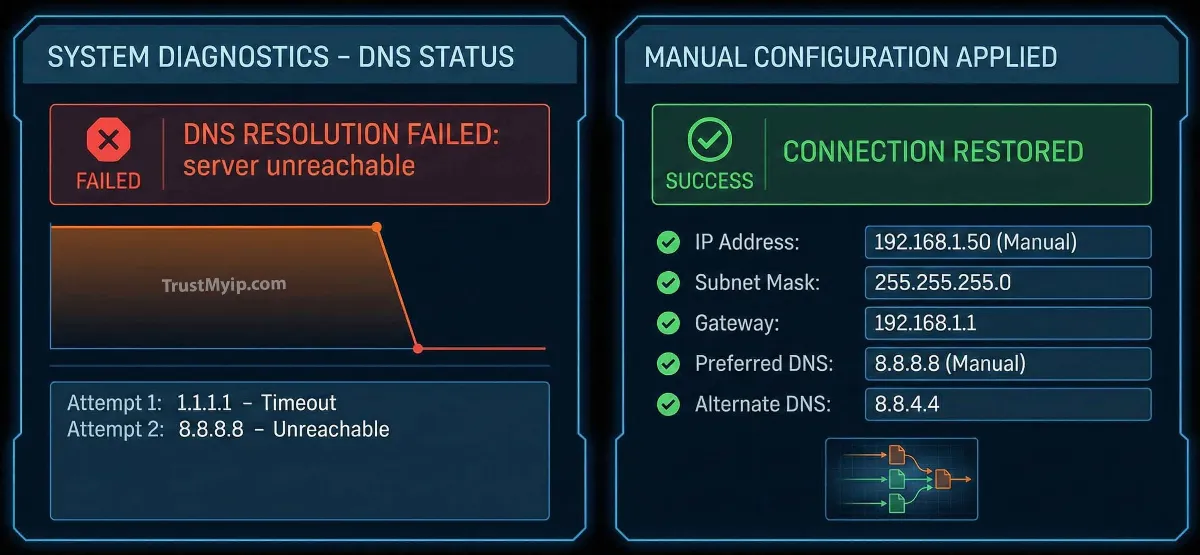
You’re in the middle of a critical task, a high-stakes Hypixel game, or a 4K stream, and suddenly, the browser hangs. The screen turns white, and the dreaded message appears: "IP Address Not Found." In the digital age of 2026, this is more than a minor glitch—it is a total communication breakdown between your device and the World Wide Web. Fixing this requires more than a simple refresh; you need to perform a forensic audit of your DNS Resolution and network identity.
"In my 15 years of resolving enterprise connectivity outages, the 'IP Not Found' error is rarely about the website itself. It is usually a failure in the DHCP allocation process or a corrupted local DNS lookup cache. To resolve this, you must treat your network identity as a living system that needs a periodic forensic reset."
1. Why Does the 'IP Address Not Found' Error Occur?
This error, often labeled as DNS_PROBE_FINISHED_NXDOMAIN or ERR_NAME_NOT_RESOLVED, happens when your computer or smartphone cannot translate a human-readable URL (like google.com) into a numeric IP address.
Common Culprits in 2026
Stale DNS Cache
Your device remembers old directions to a website that has since moved its Anycast Routing node, leading to a dead end.
DHCP Lease Failures
Your router failed to give you a fresh Private IP, or worse, you've hit an IP conflict with another device on the network.
Step 1: Check your identity. Use our IP Identity Auditor to see if your browser is even communicating with the outside world.
2. The 60-Second "First Aid" Connectivity Kit
Before we dive into kernel-level commands, these foundational SOPs (Standard Operating Procedures) resolve 80% of residential network issues in the USA.
Method A: The Power Cycle Hack
Unplug your router for exactly 60 seconds. This stops the "heartbeat" to the ISP and forces a new DHCP allocation. If you are using Starlink, this also forces a new orbital network path selection. Read our Router IP Master Guide for more on this logic.
Method B: Forget and Reconnect
On your iPhone or Android, "Forget" the Wi-Fi network and log back in. This clears the local network access control tokens and requests a fresh identity from the gateway.
3. How to Flush DNS: The Forensic Cache Cleanse
If the error is browser-specific, your DNS Resolution cache is likely corrupted. Here is how you perform a deep-clean across all 2026 platforms.
Windows 10/11 (CMD Admin)
ipconfig /flushdns
This clears the Windows Resolver cache instantly.
macOS (Terminal)
sudo dscacheutil -flushcache; sudo killall -HUP mDNSResponder
Crucial for Mac users dealing with Unix-level network stalls.
Is your DNS still failing? Verify your propagation with our Global DNS Explorer Tool.
4. Deep Infrastructure Repair: Resetting the TCP/IP Stack
Sometimes the problem isn't the data—it's the "Pipe" itself. If your network inventory shows hardware is fine but the 'IP Not Found' error persists, you must rebuild your logical stack.
The Netsh Int IP Reset
On Windows, your network stack can become "tangled" after a failed VPN tunnel session or a malware attack. By using the Netsh utility, you reset the Layer 3 Network settings to factory defaults.
1. Open CMD as Administrator.
2. Type: netsh winsock reset
3. Type: netsh int ip reset
4. Restart your computer.
This is the same logic used in professional disaster recovery scenarios to restore server connectivity.
5. Diagnostic Table: Local IP vs. Public IP Failures
Use this forensic guide to identify if the "Not Found" error is happening inside your house or at your ISP.
| Diagnostic Test | Result: Success | Result: Failure |
|---|---|---|
| Ping 192.168.1.1 | Local Hardware OK | Router/Cable Fault |
| Ping 8.8.8.8 | Internet Access OK | ISP Connection Down |
| Ping google.com | DNS Working | DNS RESOLUTION ERROR |
Check your current routing latency using our Pro Ping Diagnostic Tool.
6. Bypassing ISP DNS: Switching to Google or Cloudflare
Often, the 'IP Address Not Found' error is caused by your ISP's slow or outdated DNS lookup servers. By switching to a global Anycast Routing DNS provider, you bypass these bottlenecks.
Cloudflare (Recommended)
1.1.1.1
Best for throughput and 2026 privacy standards.
Google Public DNS
8.8.8.8
Best for reliability and authorized users globally.
For a step-by-step on how to apply these on different devices, read our guides for Windows, Mac, and Android.
7. Resolving "IP Address Not Found" via IP Conflict Resolution
In 2026, as more IoT devices flood our homes, IP conflicts are a massive cause of the "Not Found" error. If your router tries to give your laptop an IP that your printer is already using, your laptop's stack will crash.
"A conflict creates a digital stalemate. By identifying the manufacturer of the conflicting device using our MAC Lookup Tool, you can quickly spot the 'Imposter' device and assign it a Static assignment. For more, read our forensic guide on Resolving IP Address Conflicts."
8. Troubleshooting: Error Still Persists?
If you've flushed DNS and reset your stack but still can't connect, you might be facing these technical constraints:
- Antivirus/Firewall Interference: Sometimes a security policy update blocks all outbound traffic. Temporarily disable your firewall to see if the IP is found.
- Carrier-Grade NAT (CGNAT) Outages: On Starlink or mobile data, the "Not Found" error might be an ISP-level gateway failure. Read our Starlink IP Guide to verify.
- Hardware MAC Failure: If your NIC is dying, it will fail to complete the DHCP handshake. Learn more in our MAC vs IP Breakdown.
Diagnostics FAQ
Why does this error only happen in Chrome?
Chrome has its own internal DNS lookup cache. You can clear it by typing chrome://net-internals/#dns and clicking "Clear host cache."
Does a VPN fix 'IP Not Found' errors?
Sometimes. A VPN uses its own VPN tunnel and DNS servers, bypassing your local issues. However, if your DHCP allocation is broken, the VPN won't even be able to connect. Learn more in our Top 5 VPN Guide.
Is 'IP Not Found' the same as 'No Internet'?
Not exactly. 'No Internet' means the physical connection is dead. 'IP Not Found' means the connection is there, but your device can't find the specific server's address.
Conclusion: Master Your Connectivity
Learning how to fix 'IP address not found' errors is the hallmark of a savvy internet user in 2026. From flushing your DNS Resolution cache to auditing your network documentation for conflicts, you now have the forensic tools to restore your digital life. By understanding the difference between a MAC address and an IP address and managing your DHCP leases, you ensure that your connection remains reachable, resilient, and ready for whatever the web throws your way.
Is Your IP Leaking?
Don't just fix the error—audit your privacy. Use our forensic toolkit to check DNS health, analyze Proxy headers, and verify your 2026 IP reputation in one click.