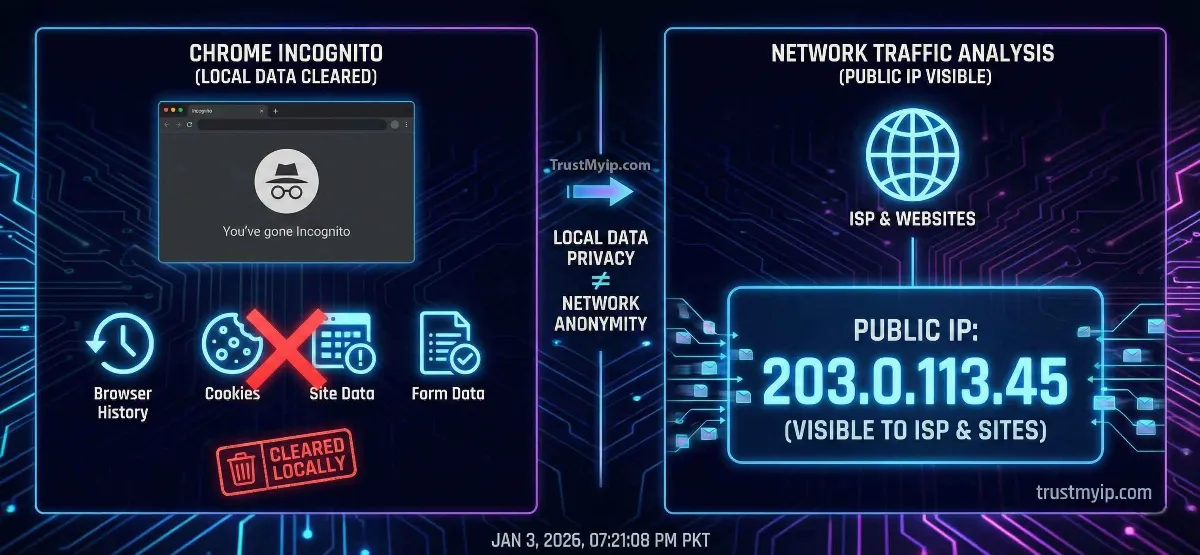
The "Secret Agent" icon and the dark-themed window suggest total invisibility. But in the world of professional networking, the question "Does Google Chrome's Incognito Mode hide your IP?" has a technical answer that surprises 90% of users. While it is excellent for hiding your late-night shopping from your family, it does absolutely nothing to mask your network identity from the World Wide Web. In 2026, understanding the boundary between local privacy and network anonymity is the only way to stay truly secure.
"In my 20 years of auditing browser security, I've seen that users confuse 'Local Privacy' with 'Network Privacy.' Incognito mode operates at the Application Layer (OSI Layer 7), whereas your IP address is a Layer 3 (Network) identifier. One clears your desk; the other is your digital GPS coordinate. If you don't use a VPN tunnel, you are still broadcasting your location to every server you touch."
1. The Local Shield: What Incognito Mode Actually Does
Chrome's Incognito mode is designed for Local Privacy. Its primary job is to ensure that after you close the window, no trace of your activity remains on the physical device you are using.
Browsing History
It does not save the URLs of the sites you visit to your local machine.
Cookies & Site Data
Cookies are deleted the moment you close all Incognito windows, preventing session tracking.
Form Information
Data entered into text boxes (usernames, passwords) is not stored in AutoFill.
Step 0: Verification. Open an Incognito window and use our IP Identity Checker. You will see that your real location is still 100% visible.
2. The Technical Wall: Why Your IP Remains Exposed
To the internet, your browser is just an "App." Your network path and public IP are managed by your operating system (Windows/Mac) and your ISP.
The Packet Header
Every request you send in Incognito still contains a "Source IP" in the packet header. Websites need this IP to know where to send the data you requested.
ISP Logging
Your ISP (Comcast, Verizon, or Starlink) sees every DNS Resolution request. Incognito does not encrypt this traffic; it only hides it from your local history.
3. The Silent Leak: WebRTC in Incognito Mode
Even if you use a proxy, Chrome’s WebRTC (Web Real-Time Communication) protocol often bypasses the browser’s internal settings to discover your real private IP and public address.
The Invisible Fingerprint
Modern websites use WebRTC to perform a "stun" request. In 2026, AI-driven tracking scripts can identify your real network identity even in private windows. To see if your browser is leaking, run our Forensic Proxy & WebRTC Audit.
4. Comparison: Privacy Tiers in 2026
Use this forensic table to understand where Incognito fits in your security policy.
| Privacy Tool | Hides IP? | Encrypts Data? | Best Use Case |
|---|---|---|---|
| Incognito Mode | NO | NO | Local History Privacy |
| Standard Proxy | YES | NO | Bypassing Geo-blocks |
| VPN Tunnel | YES | YES | Full Corporate Security |
Not sure which one to choose? Read our deep-dive on VPN vs. Proxy: The Final Verdict.
5. How to Truly Hide Your IP While Using Incognito
If you want the benefits of both local privacy and network anonymity, you must layer your defenses. Follow this authorized user protocol:
- 1 Activate a VPN: Before opening Chrome, start a secure VPN tunnel. This masks your public IP at the OS level. See our Top 5 VPN Recommendations.
- 2 Open Incognito: Now open Chrome Incognito. Any site you visit will only see the VPN's IP, and your local computer won't save the history.
- 3 Change Identity: If you are on a budget, follow our guide on How to Hide Your IP for Free.
6. Who Can Still See Your Activity in Incognito?
Many USA employees think Incognito hides their browsing from the IT department. This is a dangerous misconception that can violate corporate security policies.
"Your company router and ISP operate at Layer 3 and 4. They see the network path and the final destination IP. Even if Chrome doesn't save the history, the Intranet firewall logs every connection request. If your goal is to stay hidden from a network admin, Incognito is useless. You need a VPN or an Alternative Stealth Strategy."
7. Troubleshooting: Why is my location still showing?
If you've followed the steps above but a website like Netflix or a Hypixel server still sees your real location, you might be facing these technical constraints:
- Stale DNS Resolution: Your OS might have cached your old network identity. Follow our guide to Flush Your DNS Cache instantly.
- IP Conflicts: A virtual adapter from a previous session might be causing an IP conflict. Read our IP Conflict Resolution Manual.
- MAC Address Visibility: In 2026, some advanced tracking scripts correlate your MAC Address with your IP. Learn the Difference Between MAC and IP to secure your hardware.
Incognito Privacy FAQ
Does Incognito mode stop Google from tracking me?
Only partially. It prevents your account history from saving *if* you don't log in. But Google still sees your Public IP and can correlate your activity via browser fingerprinting.
Will Incognito prevent my ISP from seeing my history?
No. Your ISP sees every request you make at the network level. To hide from your ISP, you need an encrypted VPN tunnel.
Can a website block me in Incognito?
Yes. Websites block users based on their IP address reputation. If your IP is flagged, Incognito won't help. Read our IP Blockade Forensic Guide.
Conclusion: The Boundary of Invisibility
Mastering the answer to "Does Google Chrome's Incognito Mode hide your IP?" is the first step toward true digital hygiene. Incognito is a powerful tool for managing local privacy, but it is not a cloak of invisibility against the World Wide Web. By auditing your network documentation, identifying WebRTC leaks, and using an encrypted VPN tunnel when necessary, you ensure that your digital footprint remains exactly as private as you intend it to be in 2026.
Is Your Browser Leaking?
Don't trust the dark window. Use our forensic toolkit to audit your DNS health, check for WebRTC leaks, and verify your 2026 IP reputation in one click.