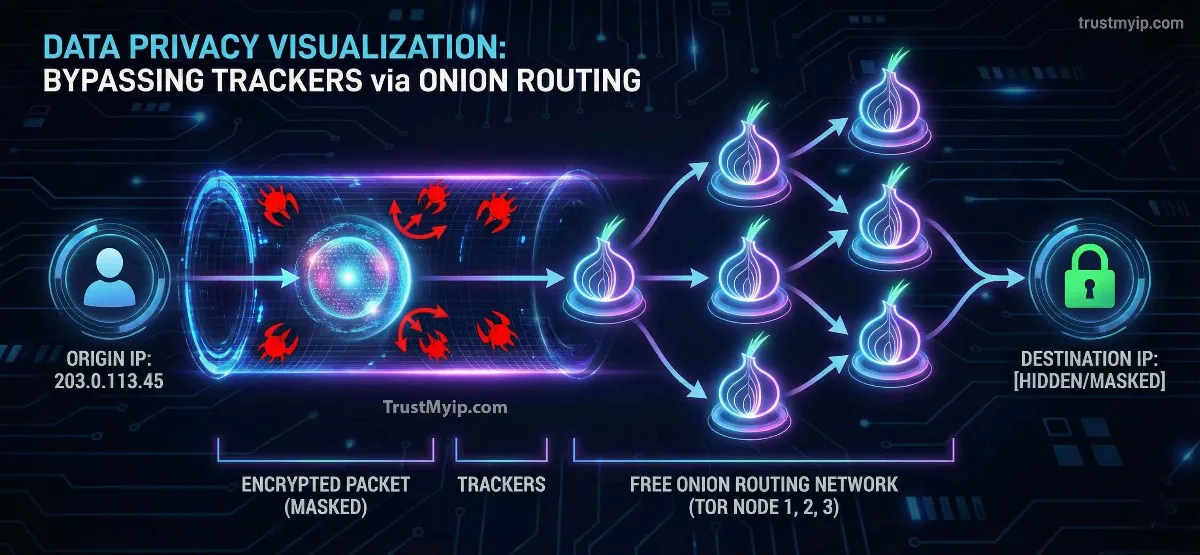
Your IP address is your internet identity. Every website you visit, every video you stream, every search you run — all of it gets logged against your IP. Advertisers build profiles from it. ISPs monitor it. Websites use it to block, restrict, and track you across sessions. And you pay nothing extra for this surveillance — it happens automatically, by default, every time you connect.
The good news: you can hide your IP address for free — and do it effectively. You do not need to spend money on a premium VPN to get meaningful protection. Several legitimate, well-tested free tools exist that genuinely mask your IP from websites, ISPs, and network monitors. But you do need to understand what each tool actually does, what it leaves exposed, and which one fits your specific situation.
This guide covers every proven free method for hiding your IP address in 2026 — how they work technically, their real limitations, the hidden risks you need to know about, and exactly how to verify your protection is actually working after you set it up.
Quick Answer: How to Hide Your IP Address for Free
The three best free methods to hide your IP address are: Tor Browser (strongest anonymity, slowest speed), Proton VPN free tier (encrypted, no data cap, limited servers), and free web proxies (fastest, no encryption, browser-only). Each works differently and protects you from different threats.
No method is perfect. Tor is slow but genuinely anonymous. Free VPNs are faster but require trusting a provider. Proxies are convenient but unencrypted. Before using any tool, check your current IP address to see exactly what information is visible right now — then verify again after setup to confirm your protection is actually working.

"The most common mistake I see from users trying to hide their IP for free is choosing a tool without understanding what it actually protects. I have reviewed hundreds of free VPN and proxy services over the years, and the reality is stark: the majority of free tools monetize your data rather than protect it. A free app that logs your browsing history and sells it to data brokers provides zero privacy — it just moves the surveillance from your ISP to the app developer. The tools that genuinely work for free are well-documented: Tor Browser, Proton VPN's free tier, and DHCP renewal for basic IP rotation. Each has specific use cases where it performs well and clear limitations where it fails. Understanding those boundaries before you rely on a tool for real privacy is the difference between genuine protection and a false sense of security that leaves you more vulnerable than before you started."
1. Why Your IP Address Needs Hiding — What It Actually Reveals
Before choosing a method, understand what your IP address exposes. Most people assume it just shows a rough location — but the reality is significantly more detailed and more permanent than that.
Your IP address reveals your city and region, your ISP name (Comcast, AT&T, Verizon, etc.), whether you are on a home, business, mobile, or datacenter connection, and in many cases your connection type (residential, VPN, proxy, or Tor). Websites use this data for geo-targeting, price discrimination, content restriction, and fraud detection.
More importantly, your IP address is the primary identifier that advertising networks use to build profiles across sites you visit. Even without cookies, your IP combined with your browser fingerprint creates a tracking ID that follows you across the web. To see the full picture of what your current IP reveals right now, use our free IP address checker — it shows your location, ISP, IP type, reputation score, and whether you appear as residential, VPN, or proxy to websites.
| What Your IP Reveals | Who Can See It | Risk Level |
|---|---|---|
| City & Region | Every website you visit | Medium — geo-blocks, price discrimination |
| ISP Name | Websites, ad networks | Medium — narrows identity significantly |
| Connection Type | Security systems, fraud filters | High — VPN/proxy detection causes blocks |
| Browsing History | Your ISP (full logs) | High — sold to advertisers, legal exposure |
| Reputation Score | Email servers, security platforms | High — bad score causes blocks site-wide |
2. Method 1: Tor Browser — The Best Free Way to Hide Your IP Address
Tor Browser is the strongest free tool available for hiding your IP address. It works by routing your traffic through three volunteer-operated relay servers — the Guard node, Middle relay, and Exit node — with each layer of encryption stripped at each hop. The destination website sees only the Exit node's IP address, not yours. No relay in the chain knows both your identity and your destination simultaneously.
Tor is operated by the nonprofit Tor Project and is completely free with no data caps, no registration, and no provider to trust. This is its core advantage over free VPNs: there is no company in the middle that could log your data, receive a court order, or sell your information to advertisers.
The significant tradeoff is speed. Three relay hops add substantial latency — typical Tor speeds run 5-15 Mbps, making it unsuitable for streaming or large downloads. It is optimized for anonymous browsing, journalism, research, and communications in high-surveillance environments. For a detailed comparison of Tor against paid VPNs across every metric, read our guide on Tor Browser vs VPN for privacy.
Tor Browser: What Each Relay Knows
Guard Node (Entry): Knows your real IP address. Does NOT know what site you are visiting. Sees only the next relay address.
Middle Relay: Knows only the Guard node and Exit node addresses. Knows nothing about your identity or destination — pure routing buffer.
Exit Node: Knows the destination website. Does NOT know your real IP. Sees only the Middle relay's address. Critical weakness: always use HTTPS sites through Tor — malicious exit nodes can read HTTP traffic in plaintext.
Bottom line: Tor provides genuine anonymity at the cost of speed. No single point in the chain can expose both your identity and your activity.
3. Method 2: Free VPN Tiers — What Is Actually Safe
Most free VPN apps in app stores are not privacy tools — they are data collection businesses. They offer "free" access in exchange for logging your browsing activity, injecting tracking scripts, or selling your bandwidth to third parties. This is not a fringe problem: multiple major free VPN services have been caught doing exactly this.
However, a small number of reputable providers offer genuine free tiers as a way to build trust with users who may eventually upgrade. These are the only free VPNs worth using for actual IP hiding. The defining characteristic is a verified no-log policy — independently audited, not just claimed.
Even legitimate free VPN tiers come with real limitations: typically restricted to 1-3 server locations, slower speeds during peak hours due to shared server capacity, and in some cases monthly data caps. For a vetted list of the best paid options when you need more performance, see our guide on the top 5 VPNs for privacy in 2026.
| Free VPN Option | Data Cap | No-Log Verified | Best For |
|---|---|---|---|
| Proton VPN Free | Unlimited | ✅ Yes — audited | Daily browsing, privacy from ISP |
| Windscribe Free | 10GB/month | ✅ Yes — verified | Light browsing, geo-unblocking |
| Random App Store VPN | Varies | ❌ Unknown — avoid | Nothing — high risk of data logging |
⚠️ Warning: Free VPN Red Flags
Avoid any free VPN that: requires no account creation (no accountability), offers unlimited data with no explanation of revenue model, shows ads during your session, requests excessive device permissions, or has no independently audited privacy policy. These are near-certain signs the product monetizes your data rather than your subscription.
4. Method 3: Free Web Proxies and SOCKS5 — Fast but Limited
A free web proxy routes your browser traffic through an intermediary server that substitutes its IP for yours. The destination website sees the proxy's IP address — not your real one. Setup requires zero installation: you paste a URL into the proxy site and browse from there.
The critical limitation: free proxies provide zero encryption. Your ISP still sees all your traffic in plaintext. Anyone monitoring your network can read everything passing through. The only thing a free proxy hides is your IP from the destination website — nothing more. It does not protect you from your ISP, your network administrator, or anyone on the same Wi-Fi network.
Use free proxies only for: bypassing simple geo-blocks on a single website, basic anonymous browsing on low-sensitivity tasks, or quick IP checks. Never use a free proxy for: login credentials, banking, personal information, or any task where the data itself is sensitive. To verify whether your current connection is routing through a proxy right now, use our proxy checker tool. For a deeper analysis of proxy risks specifically, see our guide on whether free proxies are actually safe.
| Proxy Type | Encryption | Speed | Best Use Case |
|---|---|---|---|
| HTTP Web Proxy | None | Fast | Simple geo-bypass, one browser tab |
| SOCKS5 Proxy | Optional (with SSH) | Fast | Torrents, gaming traffic routing |
| Tor Browser | 3-layer onion | Slow | Maximum anonymity, no speed needs |
| Free VPN | AES-256 (reputable) | Medium | Daily privacy, full-device protection |
5. Method 4: DHCP Renewal — Free IP Change Without Any Tool
Your ISP assigns your home router an IP address through a protocol called DHCP (Dynamic Host Configuration Protocol). Most ISPs assign dynamic IPs — meaning they can change over time. When your router disconnects and reconnects, the ISP may assign a different IP from its pool.
To force this: unplug your modem and router for at least 30 minutes, then reconnect. The extended disconnection breaks the DHCP lease, making the ISP reassign your IP from its available pool. Many ISPs use short lease times — some as short as 24 hours — meaning a simple power cycle overnight may give you a fresh IP anyway.
Important limitation: DHCP renewal gives you a new IP from the same ISP, in the same city, on the same residential subnet. It does not change your location, your ISP identity, or your connection type. It is useful for bypassing simple IP bans on gaming platforms or forums — not for privacy from your ISP or for bypassing geo-blocks. For a complete guide to changing your IP across every device type, read our guide on how to change your IP address on any device.
6. Method 5: Public Wi-Fi — Change Your IP by Switching Networks
Every network has its own public IP address. When you connect to a coffee shop, library, or public hotspot, your device uses that network's IP address — not your home IP. Websites see the venue's IP, not yours. This is a free, zero-setup way to change your visible IP address instantly.
The major risk: public Wi-Fi is inherently insecure. Anyone on the same network can potentially intercept unencrypted traffic. Malicious actors set up fake "free Wi-Fi" hotspots specifically to capture credentials and session data. Using public Wi-Fi without a VPN trades your IP privacy for network-level vulnerability — which is a bad deal for most situations.
If you use public Wi-Fi to change your IP, always combine it with a free VPN to encrypt your traffic. This gives you both the IP change benefit (you appear to be at the venue's location) and protection from local network sniffing. Enable MAC address randomization on your device — available in Windows, macOS, Android, and iOS settings — to prevent the network from tracking your device even when your IP changes. For the complete router-level IP change guide, see our router IP address change guide.
7. Verification: How to Confirm Your IP Is Actually Hidden
Setting up a privacy tool is only half the job. Many free tools fail silently — your IP appears to be hidden while DNS requests, WebRTC connections, or browser fingerprints reveal your real identity. You must verify your protection is working after every setup.
Step 1 — Check your IP: Before enabling any tool, use our IP address checker to record your current IP, location, and ISP. Enable your Tor, VPN, or proxy. Check again — the IP, location, and ISP should all be different. If any match your real connection, the tool is not working correctly.
Step 2 — Test for DNS leaks: Even with a VPN or Tor active, your browser can send DNS requests through your real ISP connection — exposing your identity despite the IP change. Run our DNS lookup tool to check whether your DNS is leaking your real ISP. If the DNS server shown matches your real ISP, you have a DNS leak that bypasses your IP hiding tool entirely.
Step 3 — Test for WebRTC leaks: Your browser's WebRTC API can reveal your real local and public IP even when a VPN or proxy is active — this is one of the most common ways IP hiding fails silently. Run our WebRTC leak test to check whether your browser is exposing your real IP through this channel. If your real IP appears in the WebRTC test, disable WebRTC in your browser settings before trusting your anonymity setup. For a complete guide to diagnosing and fixing VPN leaks specifically, read our VPN IP leak detection guide.
| Leak Type | What It Exposes | Affects Which Tools | How to Fix |
|---|---|---|---|
| DNS Leak | Your real ISP via DNS requests | VPNs, proxies | Use VPN's built-in DNS or encrypted DNS |
| WebRTC Leak | Real public + local IP via browser | VPNs, proxies, Tor (if misconfigured) | Disable WebRTC in browser settings |
| Browser Fingerprint | Device identity even without IP | All tools except Tor Browser | Use Tor Browser or privacy-hardened Firefox |
| IPv6 Leak | Real IPv6 address bypasses VPN | VPNs without IPv6 support | Disable IPv6 in OS network settings |
Conclusion: Which Free Method Should You Use?
The best free method for hiding your IP address depends entirely on what you need to protect against. For maximum anonymity with no trust requirements — use Tor Browser. It is genuinely free, genuinely anonymous, and requires no account or provider. Accept the speed limitation and only use it for tasks where anonymity matters more than performance.
For everyday privacy that is faster and easier than Tor — use Proton VPN's free tier. It provides real encryption, hides your IP from your ISP, and has an independently audited no-log policy. The free tier is limited to a few server locations but provides solid protection for daily browsing.
For quick, low-stakes geo-unblocking — use a free web proxy, but only for sites where the data itself is not sensitive. Never use a free proxy for logins, banking, or personal data. Combine any method with our verification tools to confirm your protection is actually working before you rely on it.
If your IP reputation is already damaged from using shared VPN or proxy pools — common when switching between free services — read our guide on how to improve a bad IP reputation score to restore clean access before your new privacy setup inherits the same blocks.
Whatever method you choose, verify it works. Check your IP before and after. Run the DNS leak test. Run the WebRTC test. Only when all three tests show your real identity is hidden should you trust that your IP address is actually protected.
Is Your IP Actually Hidden?
Check your real IP exposure, test for DNS leaks, and verify WebRTC is not revealing your identity — all free, all in one click.