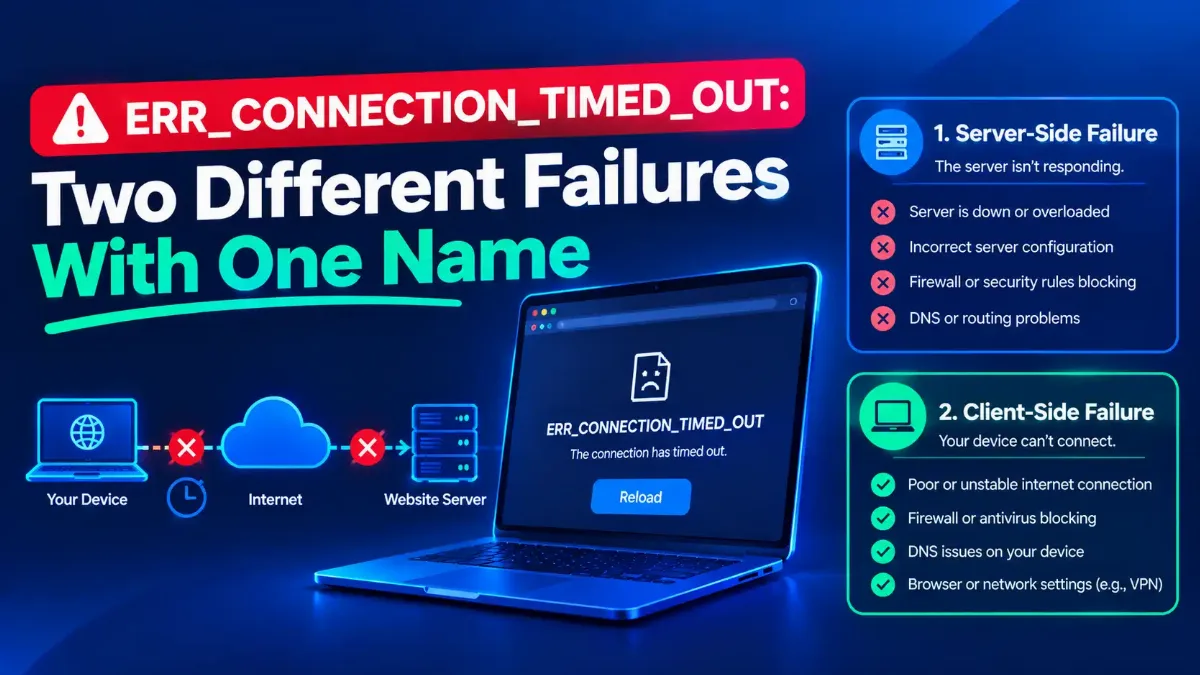
ERR_CONNECTION_TIMED_OUT is one error name covering two failures that have almost nothing in common. In the first, your browser never finished connecting. In the second, it connected perfectly well and then the transfer died halfway, which looks identical from the outside and needs an entirely different fix.
Every guide checked for this article treats those as one problem and offers one checklist for both. Flushing your DNS, clearing the cache and disabling extensions cannot tell the two apart, and for the second failure they cannot help at all. That is why people arrive at those pages having already done all twelve steps.
So this guide starts by separating them, using a test that takes fifteen seconds and no commands. Then it covers the failure the first page of results leaves out entirely, the diagnostic ladder published in the standard that named it, and how to rule that cause out rather than assume it.

Quick Answer: What Does This Error Mean?
What the ERR_CONNECTION_TIMED_OUT Name Hides
Google's Chrome help page gives one sentence for this code: "The page took too long to connect. Your internet connection might be too slow, or the page might be too busy." It is accurate about the first failure and silent about the second.
Failure one is a connect that never completed. Your machine sent a TCP SYN packet, nothing came back, it tried again, and eventually the stack gave up. Nothing was ever established, so nothing was ever transferred, and a connection timed out message is a fair description of what happened.
Failure two is stranger and far less documented. The connection opened normally, data started moving, then it stopped dead while both ends waited. The browser eventually surfaces a timeout, because from its point of view the page never arrived.
Those need opposite responses, and one of them is invisible to every fix on the popular checklists. Worth knowing before you start is that what to check when a name resolves but nothing loads covers the address-level failures that sit underneath both cases.
One claim to discard first. Three of those pages state that the wait is about thirty seconds, phrased three different ways, with no source on any of them. RFC 9293, the current TCP specification, requires at section 3.8.3 that "R2 for a SYN segment MUST be set large enough to provide retransmission of the segment for at least 3 minutes (MUST-23)".
Read precisely, that binds the network stack rather than the browser. The very next sentence in the same section says so: "The application can close the connection (i.e., give up on the open attempt) sooner, of course." So the stack must be capable of retrying for three minutes, while Chrome is free to stop earlier. What none of those three pages can support is a fixed thirty-second budget, and they do not agree with each other about what the thirty seconds is even measuring.
Which One Do You Have
This costs nothing and rules out most of the checklist immediately. Watch what the browser does before it gives up, then repeat the request on a phone with Wi-Fi off, using mobile data.
If the page fails instantly or sits completely blank with no progress at all, you are probably looking at failure one. If something started, a partial layout appeared, a download began and stalled, or the tab spun for a long time before giving up, that is failure two.
The phone test then tells you where the problem lives. Loading on mobile data means the site is fine and the fault is yours. Failing there too, on a different network and carrier, points at the site or the path to it.
| What you actually see | Which failure | What is worth testing |
|---|---|---|
| Every site fails, nothing loads at all | Connect never completed | The usual checklist is reasonable here. Start with the adapter and the resolver |
| One site fails, everything else is fine | Either, and the distinction matters | Whether that host answers on its port, and whether large packets survive the path |
| Small pages load, big pages or uploads hang | Connected, then the transfer died | Packet size along the path. Section four |
| Loads on the phone, fails on the computer | Either, but it is local to that machine | That machine's own firewall, security software and adapter settings |
| Fails on every device on your network | Either, but it is the router or the line | The router's own settings, including its packet size |
Two rows of that table send you somewhere no popular guide goes, and the next three sections are about that route. For the first row the standard advice is genuinely sensible, and when the adapter never gets a working address in the first place is the better starting point.
The standard list is not useless. It is aimed at one failure and silent about the other, and reading it against the two columns below tells you in advance whether working through it is time well spent.
| The fix every guide lists | Reaches a failed connect? | Reaches a stalled transfer? |
|---|---|---|
| Flush the DNS cache | Sometimes, if a stale record sends you to a dead address | No. The address was correct and the connection opened |
| Clear the browser cache | Rarely | No. The problem is below the browser entirely |
| Change to a public resolver | Yes, if your resolver was the problem | No. It changes who answers the name, not what the path carries |
| Disable extensions, try a private window | Occasionally | No |
| Turn the firewall or antivirus off briefly | Yes, and it is a reasonable test | Partly, since security software can also discard oversized packets |
| Reset the TCP/IP stack and adapter | Yes, for local configuration damage | No. Nothing on your machine is misconfigured in this case |
| Lower the packet size on the router | No | Yes, and no popular guide lists it at all |
Read the last row against the six above it. Every item the guides agree on lands in the left column, and the one thing that reaches the right column appears on none of them. That is not a criticism of the individual steps, it is an observation about which half of the problem the genre has decided to answer.
In fairness, not every page is identical. At least one guide on this error does separate the protocols properly, noting that a ping travels over ICMP while your actual request is TCP on a specific port, and gives commands to test a port directly. That is the right instinct, and it is still a long way from the packet-size question, which no page checked here raises at all.
Why Ping Succeeds While the Browser Does Not
This is the most reported and least explained pattern on the subject. The site answers a ping, a traceroute reaches it, and the browser still times out, so people reasonably conclude their browser is broken.
It is not. A ping and a web request differ in both size and protocol, and they can take the same route with different outcomes. A ping is tiny, and so is the SYN packet that opens a connection. A page full of images is neither.
There are two distinct reasons this happens, and separating them saves time. The first is size, covered in section four. The second is protocol: a ping is ICMP, a web request is TCP, and a firewall can permit one and drop the other without telling you.
That second case has a signature worth knowing. A refused connection comes back fast, because something actively said no. A dropped connection hangs, because nothing said anything and your machine simply waits. Which is why whether that port is filtered rather than simply closed is a different question from whether the host is alive, and the answer points at different culprits.
If you want to check both from a command line rather than a browser, reading an address from the command line instead of the browser has the syntax for Windows and macOS.
The Failure the First Page Leaves Out
Across the ten pages checked for this article, not one mentions MTU, MSS, packet fragmentation or path MTU discovery. Between them they run to tens of thousands of words. The failure they are all missing has been documented in an RFC since 2000.
The mechanism is short. Your machine sends packets as large as it thinks the path allows, with a flag set that forbids routers from splitting them. RFC 1191 requires a router that cannot forward such a packet "to return an ICMP Destination Unreachable message to the source of the datagram, with the Code indicating 'fragmentation needed and DF set'". IANA's registry lists that message as type 3, code 4.
Now remove that message. RFC 2923, which named this problem, states the consequence: "PMTUD, as documented in [RFC1191], fails when the appropriate ICMP messages are not received by the originating host." And on why the message goes missing: "Firewalls are often misconfigured to suppress all ICMP messages."
Microsoft's own documentation supplies the name. "Routers that ignore these datagrams and send no message are called PMTU black hole routers." Your packets are dropped and nothing tells you.
Here is the part that matters for this error, and the part I had wrong before checking it. The handshake is not what breaks. RFC 2923 is explicit: "The short SYN packet has no trouble traversing the network, due to its small size. Similarly, ICMP echo packets used to diagnose connectivity problems will succeed."
What breaks is everything after it. "Large data packets fail to traverse the network. Eventually the connection times out. This can be especially confusing when the application starts out with a very small write, which succeeds, following up with many large writes, which then fail."
And the symptom it produces, in the RFC's own words, is exactly what people describe: "This shows up as a TCP connection which hangs (fails to make progress) until closed by timeout". Cloudflare put the same thing more plainly in 2015, writing that when that happens "the whole connection gets stuck. The sending side constantly tries to resend lost packets, while the receiving side acknowledges only the small packets that get delivered."
One difference between the two address families is worth carrying forward. The same RFC notes that under IPv6 "there is no DF bit -- it is implicitly on at all times", and that "Fragmentation is not allowed in routers, only at the originating host". So on IPv6 there is no permissive fallback to drop back to, which is part of why its minimum supported size was set far higher than IPv4's.
The Diagnostic Ladder, From the Standard That Named It
RFC 2923 does not only describe the failure. It publishes the test, in one sentence, and that sentence is worth more than any checklist on this subject.
"A series of ICMP echo packets will show that the two end hosts are still capable of passing packets, a series of MTU-sized ICMP echo packets will show some fragmentation, and a series of MTU-sized ICMP echo packets with DF set will fail."
Three rungs, each answering a different question. Does the host respond at all, does it respond to something large, and does it respond to something large that routers are forbidden to split.
A path MTU problem passes the first rung and fails the third. That combination is the signature, and it is why running only the first test tells you almost nothing.
Microsoft's guidance on black hole routers turns that into two commands you can run now. It gives the pair as ping with a forced size, one either side of the boundary, and the one that fails tells you where the limit is. Substitute the host you cannot reach.
| Payload you send | Total packet size | What the result tells you |
|---|---|---|
| 1472 bytes | 1500 with headers | A reply means the whole path carries a standard 1500-byte packet |
| 1473 bytes | 1501 with headers | This one should fail. Microsoft's example is the boundary case |
| 1464 bytes | 1492 with headers | Succeeding only here suggests PPPoE overhead on the line |
| 1422 bytes or lower | 1450 or lower | Something is adding substantial overhead. A tunnel or VPN is the usual answer |
| 1472 fails but 56 works | Large versus tiny | The clearest signature of the failure in section four |
One Windows detail is worth knowing, with a caveat attached. Microsoft documents a feature that works around black hole routers automatically, and it is not switched on: "The Path MTUBH Detect feature is disabled by default". When enabled it "recognizes repeated unacknowledged transmissions and responds by turning off the Don't Fragment bit".
The caveat matters. That page is archived Windows 2000 Server documentation, last touched in July 2012, and I could find no current Microsoft page documenting the same registry entry for Windows 10 or 11. So treat it as a description of how the problem behaves, which has not changed, rather than as a setting to go and edit today. The two ping commands on that same page are the part worth keeping, because they still work exactly as printed.
If you would rather have the boundary found for you than walk the sizes by hand, the largest packet your connection will actually carry does the stepping and reports the matching segment size.
Where the Extra Bytes Come From
Nothing on a normal connection reduces your usable packet size on its own. Something has to be added, and there are only a few common candidates.
Cisco's troubleshooting guide for PPPoE connections, updated in February 2008 and still accurate about the mechanism, describes the line's own overhead and then the reason it turns into a broken website: "The problem occurs because many web servers block ICMP messages, which causes the server to continuously send 1500-byte packets." Its recommended values are 1492 for the MTU and 1452 for the segment size. It treats 1400 and 1360 not as alternatives but as the floor of a process, telling you to keep lowering until you reach them.
Tunnels add more, and they add it to every packet. On a Cisco community thread in February 2015 a contributor set out the whole chain in one paragraph: "PPPoE will add 8 bytes and IPsec VPN will add as much as 80 bytes to the original packet. So the packet will be larger than MTU down the path between client and server."
He then named the exact message and what happens when it goes missing: "those packets maybe set df-bit, so ICMP type 3 code 4 (packet need fragment but df-bit set)will send back to the originator, but sometimes it can not reach the originator due to FW block or ACL or packet drop. so the connection will be timeout." The typing is his; the mechanism is the one the RFCs describe. That is worth remembering whenever the failure appears only while connected to something, and what tunneling adds to every packet you send covers the same arithmetic for IPv6 tunneling.
One real case is worth citing because the person with the problem confirmed the outcome, which most forum threads never do. On a Cisco community thread in January 2012, a user reported that the internet worked but some web pages would not open. Two people answered within six minutes of each other, and both named the same command.
A Cisco employee wrote: "The LAN interface (FastEthernet or VLAN SVI) should be configured with ip tcp adjust-mss 1452 command. The WAN interface (Dialer, in this case) should be configured with ip mtu 1492 command."
Sixty-six minutes later the same user wrote back: "Guys thanks a lot it is solved i will have an extra money for that in my boss thank you very much ip tcp adjust-mss help thanks a lot". That is one confirmed case, on one router, from 2012. It is evidence that this cause is real, not evidence that it is yours.
When It Is Not Packet Size
A guide that hands you one overlooked cause and stops has written a better-dressed version of the checklist it criticized. So here is the case that rules it out, and it is a good one.
On a Cisco community thread in August 2011, a user described travel sites where the page "just sits there" after clicking Search. The pattern fits section four exactly: small pages fine, the large response never arriving. He worked the packet size hard, and wrote: "I've tried setting the MSS to every recommended size, such as 1300, 536, and many, many, many others."
None of it helped, because the cause was somewhere else. A packet capture showed connections stalling, and the engineer who solved it found aggressive address translation timeouts on the router set to two seconds, ageing out the connection's entry before the reply came back. The user's response was "THAT DID IT!!!"
So the rule is simple. If the size test in section five shows large packets passing cleanly with the fragmentation flag set, packet size is not your problem and no amount of lowering it will help. Look instead at anything holding per-connection state: the router's translation table, local security software, or the tunnel itself.
That case is instructive for a second reason. The symptom matched the packet-size failure closely enough to send an experienced person down that road for a day, which is why the test matters more than the theory. A cause that fits the story is not a cause the evidence supports.
Two more causes belong in that list. Security software can accept ICMP while blocking the browser's actual connection, which produces exactly the ping-works pattern from section three. And a kill switch is worth checking before you follow the common advice to turn the VPN off, since why switching the VPN off can stop all traffic instead of restoring it explains how that setting behaves when the tunnel drops.
What to Do, By Situation
My position, stated plainly
If it fails on one device only, the device is the suspect and its security software is the first place to look. If it fails on every device on your network, the router or the line is the suspect, and its packet size is a setting you can read rather than guess at.
If it started recently and nothing on your side changed, ask what changed on the path instead. A new router, a firmware update, a switch to a different line technology or a newly enabled tunnel all alter the usable packet size, and none of them announces it. The users whose threads informed this article mostly described intervals of weeks, not a single overnight break.
And if a port answers from inside your network but not from outside, that is a mapping question rather than a size question, and it belongs to a different investigation entirely.
The Short Version
ERR_CONNECTION_TIMED_OUT names two failures. One never connected. The other connected, started, and stalled. Watch whether anything begins to load before the browser gives up, then repeat the request on a phone using mobile data, and you have separated them in about fifteen seconds without typing a command.
For the second failure there is a cause none of those pages mentions: packets too large for some link on the path, and the message that would have said so being discarded. The standard that documented it also published the test, three pings of increasing size with fragmentation forbidden, and a path MTU problem passes the first and fails the last.
Then believe your own result. If large packets pass, the size is fine and the answer is elsewhere, because one confirmed case in a forum thread is not a diagnosis of your network. It is only a reason to run the test that nobody thought to give you.
Two neighbouring questions finish the picture. Why a port can answer from inside and not from outside covers the mapping case rather than the size case, and how much of every packet the header itself consumes explains why the two address families leave you different room to work with.