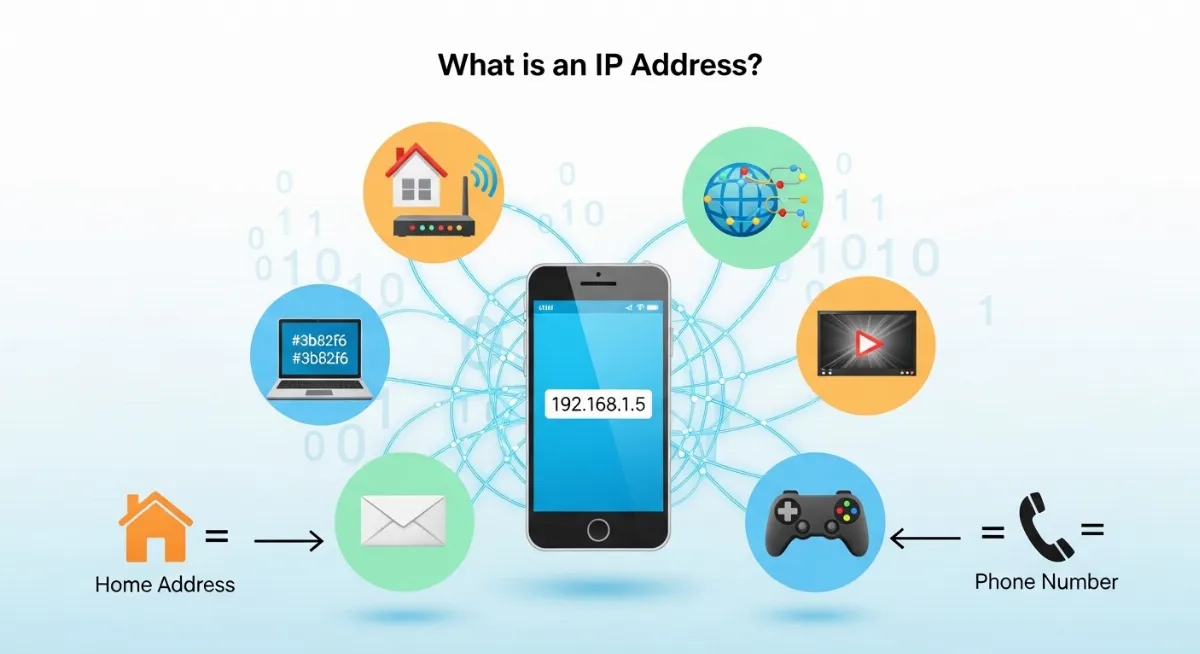
Every time you send a text, stream a video, or check your email, there's an invisible number working behind the scenes. This number tells the internet exactly where to send information—like your home address tells the postal service where to deliver mail.
Understanding what is an IP address and how does it work simple explanation transforms confusing tech jargon into something anyone can grasp. This IP address simple explanation uses everyday examples you already understand. Think of your IP address as your device's phone number on the internet. Without it, websites couldn't find your computer, your messages wouldn't reach friends, and streaming would be impossible.
This complete IP address for beginners guide explains what is an IP address using everyday examples, shows you how does IP address work step-by-step, reveals the different types of IP addresses, and teaches you how to find IP address on any device—all in simple language a 12-year-old can understand. No technical background needed.

"After explaining IP addresses to over 50,000 beginners, I've learned that simple analogies work better than technical definitions. Most people understand IP addresses instantly when I compare them to phone numbers or home addresses. The confusion usually comes from overthinking it—an IP address is just a unique identifier that helps devices find each other on networks, nothing more complicated than that."
Quick Answer: What is an IP Address?
An IP address (Internet Protocol address) is a unique identifier assigned to every device connected to a network. Think of it like a phone number or home address for your computer, phone, or tablet. When you visit a website, your IP address tells the internet where to send the information back to you. Without an IP address, devices couldn't communicate online—websites wouldn't know where to deliver content, and you couldn't send or receive any data.
1. What is an IP Address? The Simple Answer
What is an IP address? Understanding the IP address meaning starts simple: it's a numerical label that identifies your device on a network.
Imagine every house on your street needs a unique address so mail carriers know exactly where to deliver packages. An IP address works the same way for the internet.
When you type "youtube.com" into your browser, your device needs to know YouTube's IP address to send the request. YouTube's servers then use your IP address to send videos back to your exact device.
Think of an IP address like a phone number. When you call a friend, you dial their specific number. The phone network uses that number to connect your call to the right person. The internet works identically—your IP address ensures data reaches your device, not someone else's. Check your current IP address instantly with our IP address checker tool.
Why Every Device Needs an IP Address
Every device that connects to the internet needs its own IP address. This unique identifier ensures data reaches the correct device. Your laptop has one. Your phone has one. Your smart TV, gaming console, and even your smart fridge have IP addresses serving as their unique identifiers.
Without an IP address, your device would be invisible to the internet. Websites wouldn't know where you are. Email servers couldn't send messages to you. Online games couldn't connect you with other players.
It's like trying to receive mail without a home address—impossible. The Internet Protocol requires every device to have this unique identifier for network communication to function properly.
2. How Does an IP Address Look?
IP addresses look like a series of numbers separated by dots. The most common type you'll see is called IPv4.
A typical IPv4 address looks like this: 192.168.1.1
This IP address format has four groups of numbers separated by periods (called dotted decimal notation). Each group is called an octet and can range from 0 to 255. That's because IPv4 addresses are 32-bit addresses written in a way humans can read easily. For a deeper look at reading and breaking down each part of an address, see our guide to reading IP address formats. Learn more about IP numbering systems with our IP to binary converter.
IPv4 vs IPv6: The Two Types
| Type | Format Example | Total Addresses |
|---|---|---|
| IPv4 | 192.168.1.1 | 4.3 billion addresses |
| IPv6 | 2001:0db8:85a3::8a2e:0370:7334 | 340 undecillion addresses |
IPv4 was created in the 1980s. It provides about 4.3 billion possible addresses. That sounds like a lot, but with billions of devices online today, we're running out.
That's why IPv6 was invented. IPv6 addresses are 128-bit addresses that look much longer: 2001:0db8:85a3:0000:0000:8a2e:0370:7334
IPv6 provides enough addresses for every grain of sand on Earth to have its own IP address—literally. Both types work on the internet today, though IPv4 remains more common. These addresses are further organized into five classes (A through E) that define network size and purpose—learn how in our IP address classes explained guide. Explore the full technical header differences in our IPv4 vs IPv6 comparison guide.
3. How Does an IP Address Work? Step-by-Step
Let's walk through exactly how does IP address work when you browse the internet. Understanding how does IP address work step-by-step removes all the mystery. We'll use visiting a website as our example.
This process happens in milliseconds every time you click a link or load a page. Understanding it demystifies network communication completely.
The 5-Step Journey of Data
How Network Communication Actually Happens
Step 1 - You Type a Website Name: You enter "google.com" in your browser. Computers don't understand names like "google.com"—they only understand IP addresses (numbers).
Step 2 - DNS Translates the Name: Your computer contacts a DNS (Domain Name System) server—think of it like a phone book for the internet. DNS looks up "google.com" and returns Google's IP address: 142.250.185.46. Test DNS lookups with our DNS lookup tool. For a complete walkthrough of this translation process, read our guide on how DNS resolves domain names to IPs.
Step 3 - Your Device Sends a Request: Now your computer knows where Google lives on the internet. It sends a request to 142.250.185.46 saying "I want to see google.com." This request includes YOUR IP address so Google knows where to send the response.
Step 4 - The Request Travels Through Routers: Your request travels through multiple routers—like highway interchanges for internet traffic. Each router reads the destination IP address and forwards the data packets closer to Google's servers. Your Internet Service Provider (ISP) handles the first leg of this journey.
Step 5 - Data Returns to Your IP: Google's servers process your request and send back the website data. The response uses YOUR IP address as the destination. Routers deliver data packets back through the internet highway until they reach your exact device.
Think of this like sending and receiving mail. You write a letter (your request), put the recipient's address on it (destination IP), and include your return address (your IP). The postal service (routers and ISP) delivers it. The recipient sends a reply using your return address.
Every website visit, every email, every video stream follows this exact process. The Internet Protocol ensures data packets always find their way to the correct destination using IP addresses as navigation coordinates. Analyze your network path with our ping test tool.
4. Types of IP Addresses Made Simple
Not all IP addresses work the same way. Understanding the different types of IP addresses helps you troubleshoot connection problems and understand network privacy. The main distinction is between public vs private IP addresses and static vs dynamic IP addresses.
There are three main categories that affect how your devices communicate. The biggest choice today is IPv4 vs IPv6—two different systems for numbering devices. Let's break them down using simple comparisons.
Public vs Private IP Addresses
Your public IP address is like your street address—visible to the world, used for mail delivery. Your private IP address is like apartment numbers inside your building—only used internally.
Public IP addresses are assigned by your ISP and identify your home network to the internet. Every device in your house shares the same public IP address when viewed from outside. This public IP address is what websites see when you visit them.
Private IP addresses distinguish devices INSIDE your network. Your laptop might be 192.168.1.5 while your phone is 192.168.1.6. These private IP addresses work only on your local network—they're invisible to the internet.
A router acts like a building manager, using NAT (Network Address Translation) to convert between your private IPs and your single public IP. This allows multiple devices to share one internet connection. Learn more in our public vs private IP guide.
Static vs Dynamic IP Addresses
Static IP addresses never change—like a permanent home address. Dynamic IP addresses change periodically—like staying at different hotel rooms. Understanding static IP address vs dynamic IP address helps with network troubleshooting.
Most homes use dynamic IP addresses. Every time your router reconnects to your ISP, you might get a different IP address. This dynamic IP address assignment happens automatically through DHCP (Dynamic Host Configuration Protocol).
Businesses often pay extra for static IP addresses because they need the same address for servers, remote access, or security systems. A static IP address never changes, making it easier to access devices remotely. Gamers sometimes request static IPs for better connection stability. Not sure which type you have? Our static vs dynamic IP checker guide walks you through finding out in seconds.
You can check if your IP address changes by visiting our IP checker today, then checking again in a few days. If the number changed, you have a dynamic IP.
5. How to Find Your IP Address on Any Device
Wondering "what is my IP address"? Need to know how to find IP address on your device? Learning how to find IP address takes just minutes. The process varies by operating system, but it's always straightforward.
Here's how to check your IP address on Windows, Mac, iPhone, and Android with step-by-step instructions. Learning how to check your IP address helps with network troubleshooting.
Finding IP Address on Windows
Method 1 - Quick Check (Windows 10/11):
1. Click the Start menu and type "cmd"
2. Open Command Prompt
3. Type: ipconfig and press Enter
4. Look for "IPv4 Address" under your active network interface
Method 2 - Settings (Windows 10/11):
1. Open Settings > Network & Internet
2. Click on your connection (Wi-Fi or Ethernet)
3. Scroll down to see your IP address
Finding IP Address on Mac
Method 1 - System Preferences:
1. Click Apple menu > System Preferences
2. Click Network
3. Select your active connection (Wi-Fi or Ethernet)
4. Your IP address appears right there
Method 2 - Terminal:
1. Open Terminal (Applications > Utilities)
2. Type: ifconfig | grep "inet "
3. Your IP address appears in the results
Finding IP Address on iPhone
1. Open Settings
2. Tap Wi-Fi
3. Tap the (i) icon next to your connected network
4. Your IP address is listed under "IPV4 ADDRESS"
Finding IP Address on Android
Here's how to find IP address on Android devices step-by-step:
1. Open Settings
2. Tap Network & Internet (or Connections on Samsung)
3. Tap Wi-Fi
4. Tap your connected network name
5. Tap Advanced to expand details
6. Your IP address is listed under "IP address"
The Easiest Method (Any Device)
Simply visit TrustMyIP.com on any device. Your IP address displays instantly on the screen.
This method shows your public IP address—the one visible to websites you visit. It works on computers, phones, tablets, and even gaming consoles with web browsers. If you also need to change your address after finding it, our complete guide to changing your IP on any device covers every platform step-by-step. For detailed device information, use our browser info tool.
6. Why IP Addresses Matter in Daily Life
Why do we need IP addresses? Understanding what is IP address used for shows why they're essential. The internet literally cannot function without them. Understanding why do we need IP addresses shows how fundamental they are. Every online activity depends on IP addresses working correctly.
Here's how IP addresses impact your daily digital life in ways you probably never noticed.
Real-World Applications
Streaming Services: Netflix uses your IP address to determine your geographic location. That's why content libraries differ by country. Your IP tells Netflix which shows you're legally allowed to watch.
Online Gaming: Multiplayer games match you with nearby players using your IP address to estimate your location. This reduces lag and improves game performance. Console manufacturers use IP addresses for ban systems too. Curious whether changing your IP address actually improves ping in games? Read our guide on does changing IP address reduce ping in games.
Website Security: Websites block suspicious IP addresses to prevent hacking attempts. If too many login failures come from one IP address, security systems automatically block it to protect accounts. Understanding exactly why this happens is explained in our guide on why your IP address gets blocked by websites.
Email Delivery: Email providers check sender IP addresses against spam blacklists. If your IP appears on a blacklist, your emails might never reach recipients. Verify your email IP reputation with our blacklist checker.
Smart Home Devices: Your smart lights, thermostats, and security cameras all have IP addresses on your home network. You control them by connecting to their specific IP addresses through apps. Without IP addresses, your smart home would be dumb.
5G and Mobile Networks: The rollout of 5G has completely transformed how mobile devices receive IP addresses—using faster, smarter assignment systems that support millions of devices per cell tower. Learn how this revolution works in our guide to how 5G changes IP address assignment.
7. Common Questions About IP Addresses
Let's answer the most common questions beginners ask about IP addresses using simple, honest explanations.
Can IP Addresses Change?
Yes. Most home users have dynamic IP addresses that change when you restart your router or periodically based on your ISP's policies.
Your IP might stay the same for days, weeks, or months, then suddenly change. This is completely normal. Only users who pay for static IPs keep the same address permanently.
Is My IP Address Safe to Share?
Generally yes. Websites see your IP address every time you visit—that's how the internet works. However, you shouldn't broadcast your IP publicly on social media or forums.
What can someone do with my IP address? They can see your approximate location (city/region), your ISP, and potentially target you with DDoS attacks if you're a streamer or gamer. Learn protection methods in our IP security guide.
What Information Does IP Address Reveal?
Your IP address reveals:
• Your city or region (not exact address)
• Your Internet Service Provider
• Your time zone
• Whether you're using a proxy or VPN
What information does IP address reveal that it DOESN'T show: your name, physical street address, phone number, or personal details. Those require additional data that ISPs keep private unless law enforcement requests it. For the complete forensic breakdown of exactly what websites can extract from your connection, see our guide on what information websites can see from your IP. Your IP also carries a hidden reputation score that affects how websites treat you—learn what that means in our guide on what is an IP reputation score. See exactly what your IP reveals with our IP lookup tool.
How to Hide IP Address
How to hide IP address? Use a VPN (Virtual Private Network). A VPN routes your traffic through its servers, replacing your real IP address with the VPN server's IP.
Other methods include using Tor Browser for anonymous browsing or proxy servers for basic masking. VPNs offer the best combination of speed, security, and ease of use. For free options that don't require a paid subscription, see our guide on how to hide your IP address for free. Compare paid tools in our VPN vs Proxy comparison.
IP Address vs MAC Address: What's the Difference?
An IP address is assigned by your network and can change. A MAC address is burned into your device's hardware and never changes.
Think of IP addresses like hotel room numbers (change when you check into different hotels). MAC addresses are like your fingerprints (permanently unique to you).
IP addresses work across the internet for global communication. MAC addresses work only on local networks for device identification. Read the complete technical breakdown in our MAC vs IP address guide.
Conclusion: IP Addresses Made Simple
Understanding what is an IP address and how does it work simple explanation demystifies one of the internet's most fundamental technologies. An IP address is simply a unique identifier—like a phone number or home address—that allows devices to find and communicate with each other online.
What is an IP address in practical terms? It's the reason you can send emails, stream videos, play online games, and browse websites. Without IP addresses, the internet would be like a telephone system with no phone numbers—completely useless.
How does IP address work? When you visit a website, your device uses the site's IP address to send requests. The website uses YOUR IP address to send data back. Routers act like postal workers, using these addresses to deliver data packets to the right destinations. The DNS system translates website names into IP addresses so you can type words instead of numbers.
The different types of IP addresses—public vs private, static vs dynamic, IPv4 vs IPv6—each serve specific purposes. Most homes use dynamic private IP addresses internally and share one dynamic public IP externally through their router's NAT system.
How to find IP address on your devices? Windows users can run ipconfig in Command Prompt. Mac users check System Preferences > Network. Mobile users find it in Wi-Fi settings. The easiest method for anyone? Visit TrustMyIP.com to see your public IP address instantly.
IP addresses impact your daily life more than you realize—from Netflix detecting your country to online games matching you with nearby players. They're not particularly sensitive information (websites see them automatically), but you shouldn't broadcast yours publicly. For complete transparency about your network identity, check your IP address details, verify your DNS settings with our DNS lookup tool, examine HTTP headers with our headers analyzer, and understand subnet configurations using our subnet calculator. The internet runs on IP addresses—now you understand exactly how and why.
Check Your IP Address Now!
See your IP address instantly, check your location data, analyze network details, and verify your internet identity with our professional IP tools.